
Using Google Fonts in a Tailwind project

Many websites leverage Google Fonts to introduce cool and unique fonts to a website. And fonts can make or break you're website. Let's take a look at how we can introduce a Google Font into the plain HTML Tailwind starter we made yesterday.
If you're looking for any project, check out my article on how to use Google Fonts
For Tailwind, the process is similar, but we'll use some handy features of the Tailwind config.
The end result will look like this:

Loading a Google font
First of all, head over to Google Fonts and find a cool font you want to use.
Open up the font and click the "Select this style" button for each style you like.
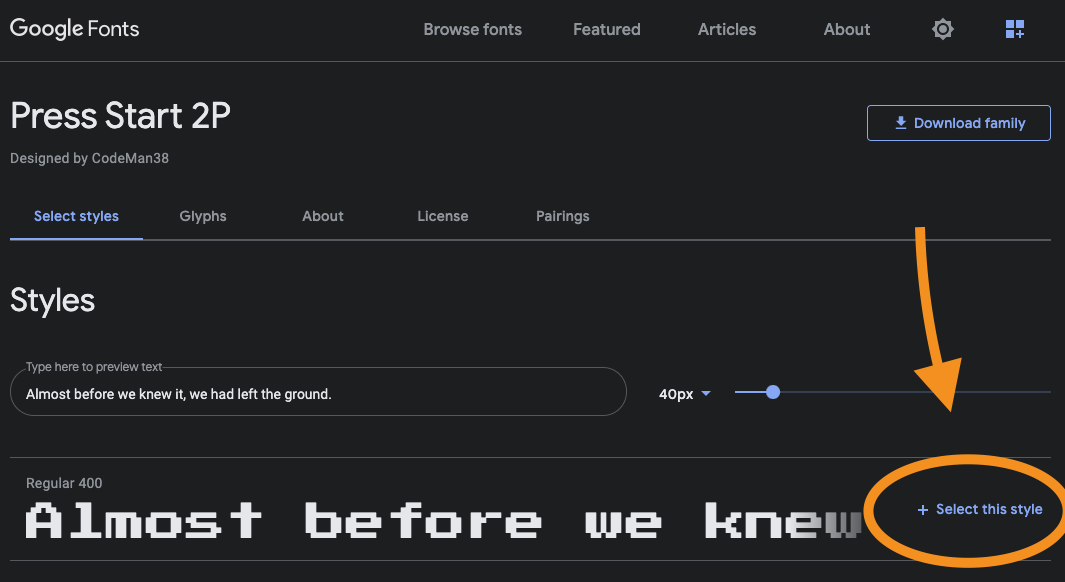
With it selected, you'll get a sidebar on the right showing the <link> attribute for it.
Copy this link method.
Now head back to your project and open the index.html file. We'll place this import above our styles.css file.
<!DOCTYPE html>
<html lang="en">
  <head>
    <!-- other stuff -->
    <link rel="preconnect" href="https://fonts.gstatic.com" />
    <link
      href="https://fonts.googleapis.com/css2?family=Press+Start+2P&display=swap"
      rel="stylesheet"
    />
    <link rel="stylesheet" href="styles.css" />
  </head>
</html>
Note: The second link is specific to the font you picked.
Making the Google font available in Tailwind
Now let's extend our Tailwind theme to have it know about this font.
Open the tailwind.config.js file and extend the theme's fontFamily option.
module.exports = {
  theme: {
    extend: {
      fontFamily: {
        'press-start': ['"Press Start 2P"', 'cursive']
      }
    }
  }
};
If your font like this example uses spaces, it's best to use the double escape '" it will make sure it's used in the right way.
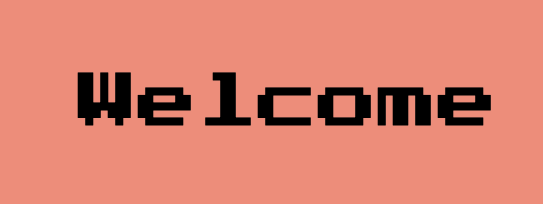
Our font will now be available as font-press-start we can add this to our heading on the homepage like this:
<h1 class="text-6xl font-press-start">Welcome</h1>
And that will render the following:
You can find this full code on the following GitHub repo.
Thank you for reading, and let's connect!
Thank you for reading my blog. Feel free to subscribe to my email newsletter and connect on Facebook or Twitter
About the author
I'm a full-stack developer from South Africa 🇿🇦. I love writing about JavaScript, HTML and CSS.
Comments
Join the discussionHello! Google fonts are important for websites. I have my website and try different ideas to develop it, as Google fonts and SEO that helps to improve my site to increase its visibility. When I created this website, my friend recommended me Crowd Marketing technique. I was excited with this SEO technique. So that, I develop my website.
Awesome, glad you found it useful!



