# Using Google Fonts in a Tailwind project
Many websites leverage Google Fonts to introduce cool and unique fonts to a website.
And fonts can make or break you're website. Let's take a look at how we can introduce a Google Font into the [plain HTML Tailwind starter](https://daily-dev-tips.com/posts/plain-html-starter-with-tailwind-css/)
we made yesterday.
> If you're looking for any project, check out my article on [how to use Google Fonts](https://daily-dev-tips.com/posts/how-to-use-google-fonts/)
For Tailwind, the process is similar, but we'll use some handy features of the Tailwind config.
The end result will look like this:

## Loading a Google font
First of all, head over to [Google Fonts](https://fonts.google.com/) and find a cool font you want to use.
Open up the font and click the "Select this style" button for each style you like.
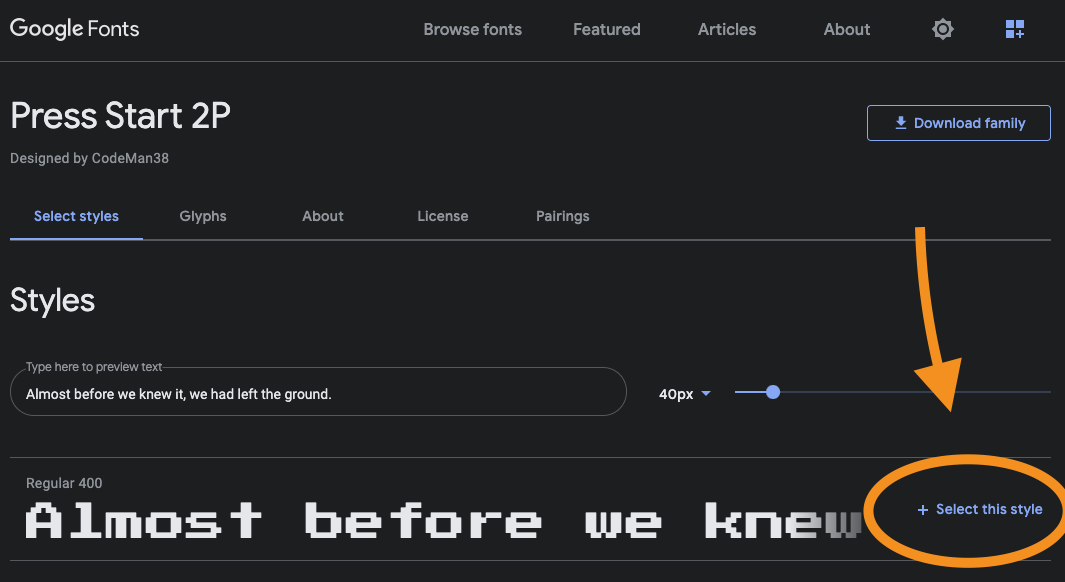
With it selected, you'll get a sidebar on the right showing the `` attribute for it.
Copy this link method.
Now head back to your project and open the `index.html` file. We'll place this import above our styles.css file.
```html
```
> Note: The second link is specific to the font you picked.
## Making the Google font available in Tailwind
Now let's extend our Tailwind theme to have it know about this font.
Open the `tailwind.config.js` file and extend the theme's fontFamily option.
```js
module.exports = {
theme: {
extend: {
fontFamily: {
'press-start': ['"Press Start 2P"', 'cursive']
}
}
}
};
```
If your font like this example uses spaces, it's best to use the double escape `'"` it will make sure it's used in the right way.
Our font will now be available as `font-press-start` we can add this to our heading on the homepage like this:
```html
Welcome
```
And that will render the following:

You can find this full code on the following [GitHub repo](https://github.com/rebelchris/HTML-Tailwind-Starter/tree/google-fonts).
### Thank you for reading, and let's connect!
Thank you for reading my blog. Feel free to subscribe to my email newsletter and connect on [Facebook](https://www.facebook.com/DailyDevTipsBlog) or [Twitter](https://twitter.com/DailyDevTips1)