
SVG Blur Filter

Some time ago, we played around with SVG animteTransform, and I got feedback from people saying they didn't even know it exists.
Today we are going to look into SVG Filters, something you might also never seen before.
A filter element can be added to an SVG object, there are many filters, but today we are looking into the Blur filter since I recently needed one.
HTML Setup
As for our HTML we are using the following code:
<svg
  aria-hidden="true"
  style="position: absolute; width: 0; height: 0; overflow: hidden;"
  version="1.1"
  xmlns="http://www.w3.org/2000/svg"
  xmlns:xlink="http://www.w3.org/1999/xlink"
>
  <defs>
    <symbol id="check" viewBox="1 1 15.6 11.9">
      <path
        d="M16.3 4l-8.6 8.6c-.2.2-.4.3-.7.3-.3 0-.5-.1-.7-.3l-5-5C1.1 7.5 1 7.2 1 7c0-.3.1-.5.3-.7l1.4-1.4c.2-.2.4-.3.7-.3.3 0 .5.1.7.3l3 3 6.6-6.6c0-.2.3-.3.5-.3.3 0 .5.1.7.3l1.4 1.4c.2.2.3.4.3.7 0 .2-.1.4-.3.6"
      />
    </symbol>
    <filter id="blur">
      <feGaussianBlur in="SourceGraphic" stdDeviation="5" />
    </filter>
  </defs>
</svg>
As you see we added our filter in our defs part.
It will apply a gaussian blur of 5, the id is blur which is going to be used to apply it to SVG.
Using the SVG Filter
To use the SVG Filter we can use the following code.
<svg aria-hidden="true" focusable="false" class="icon icon-check">
  <use xlink:href="#check" />
</svg>
<svg aria-hidden="true" focusable="false" class="icon icon-check">
  <use filter="url(#blur)" xlink:href="#check" />
</svg>
The first icon won't have any blur, and the second will have the blur filter applied.
Applying the Filter Directly
We can however also omit the sprite and use the filters as such:
<svg
  width="230"
  height="120"
  xmlns="http://www.w3.org/2000/svg"
  xmlns:xlink="http://www.w3.org/1999/xlink"
>
  <filter id="blur">
    <feGaussianBlur in="SourceGraphic" stdDeviation="5" />
  </filter>
  <rect width="60" height="60" x="20" y="20" fill="#534B62" />
  <rect width="60" height="60" x="120" y="20" fill="#534B62" filter="url(#blur)" />
</svg>
Awesome right? There are many more awesome filters in SVG, I'm sure we'll touch base on them someday.
See the Blur Filter in action on this Codepen.
Browser Support
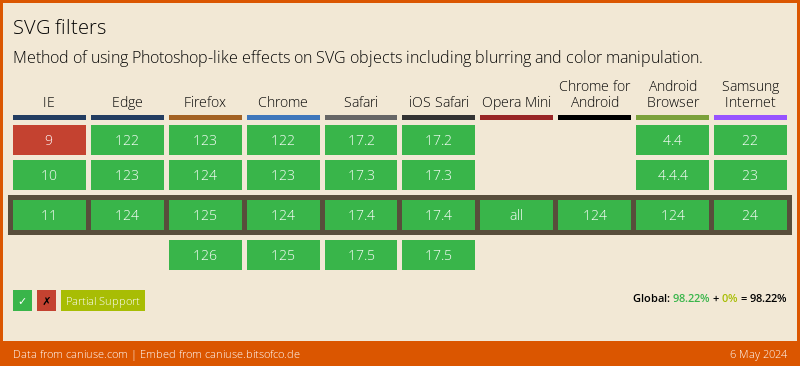
You won't believe this, but SVG Filters have really good browser support!
Thank you for reading, and let's connect!
Thank you for reading my blog. Feel free to subscribe to my email newsletter and connect on Facebook or Twitter
About the author
I'm a full-stack developer from South Africa 🇿🇦. I love writing about JavaScript, HTML and CSS.
Comments
Join the discussionGreat tip. Thanks. 😄
Glad you like it!



