
JavaScript get HTML elements from a string

I recently had a string with some content from a WYSIWYG editor (What you see is what you get). In there, I needed to find all the href elements.
But this specific approach can work for many things.
My approach consists of using the DOMParser, one could also use a regex approach to finding all the links in a text, but I needed an HTML output back again, so for me, this worked best.
Using JavaScript to get HTML elements from a string
To get started, let's first define our HTML.
We will be using a variable, which you can consider came from our CMS.
const text = `<p>Some text</p><br /><a href="https://daily-dev-tips.com/">My website</a><hr /><a href="https://google.com">Another link</a>`;
As you can see, we have two links in there. Let's say we want to parse each link to add a target="_blank".
We can leverage the DOMParser to convert this string into a dom element.
let parser = new DOMParser();
const doc = parser.parseFromString(text, 'text/html');
console.log(doc);
This console.log will return the following object.
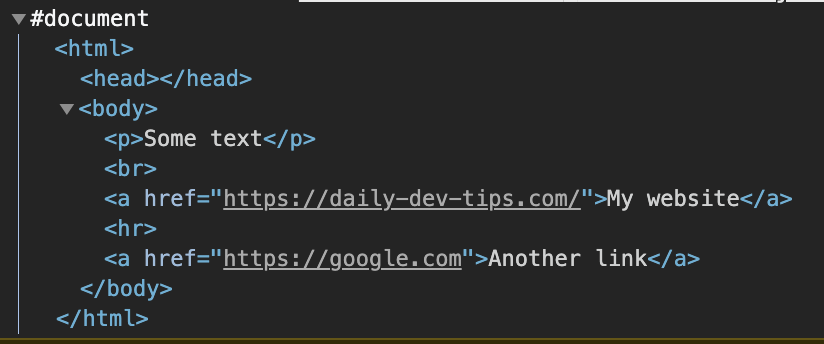
As you can see, this is a full document.
To get all the links, we can use regular queries on this doc const.
links = doc.getElementsByTagName('a');
console.log(links);

// HTMLCollection(2) [a, a]
Nice, we got our two links. We can loop over these two links and manipulate them. This will be adjusted in our doc variable.
[...links].forEach(link => {
  link.setAttribute('target', '_blank');
});
Here we loop over the getElementsByTagName results, and set the target to a blank page.
Now, if we would log the current status:
console.log(doc);
We get the following result. You can see the links now have a target blank.
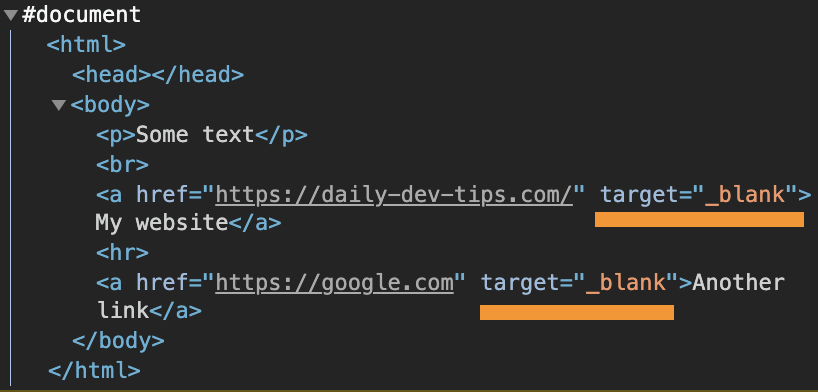
Using the output of a JavaScript DOMParser
Let's also take some time to output the changes to see them in the HTML action.
Let's add two divs to our HTML.
<div id="original"></div>
<div id="output"></div>
First, we have our basic text variable.
const text = `<p>Some text</p><br /><a href="https://daily-dev-tips.com/">My website</a><hr /><a href="https://google.com">Another link</a>`;
Next, we will get the two div elements.
const original = document.getElementById('original');
const output = document.getElementById('output');
For the original one, we can immediately add the output as-is.
original.innerHTML = text;
And for the output one, we do our modifications as seen above.
let parser = new DOMParser();
const doc = parser.parseFromString(text, 'text/html');

links = doc.getElementsByTagName('a');
console.log(links);
[...links].forEach(link => {
  link.setAttribute('target', '_blank');
});

output.innerHTML = doc.documentElement.innerHTML;
That's it. We now have two divs, one with links that open in the same tab and open in a blank tab.
Try it out using the following Codepen.
Thank you for reading, and let's connect!
Thank you for reading my blog. Feel free to subscribe to my email newsletter and connect on Facebook or Twitter
About the author
I'm a full-stack developer from South Africa 🇿🇦. I love writing about JavaScript, HTML and CSS.
Comments
Join the discussionNo comments yet. Be the first to comment.



