# JavaScript get HTML elements from a string
I recently had a string with some content from a WYSIWYG editor (What you see is what you get). In there, I needed to find all the href elements.
But this specific approach can work for many things.
My approach consists of using the `DOMParser`, one could also use a regex approach to finding all the links in a text, but I needed an `HTML` output back again, so for me, this worked best.
## Using JavaScript to get HTML elements from a string
To get started, let's first define our `HTML`.
We will be using a variable, which you can consider came from our `CMS`.
```js
const text = `Some text
My website
Another link`;
```
As you can see, we have two links in there. Let's say we want to parse each link to add a `target="_blank"`.
We can leverage the `DOMParser` to convert this string into a dom element.
```js
let parser = new DOMParser();
const doc = parser.parseFromString(text, 'text/html');
console.log(doc);
```
This console.log will return the following object.
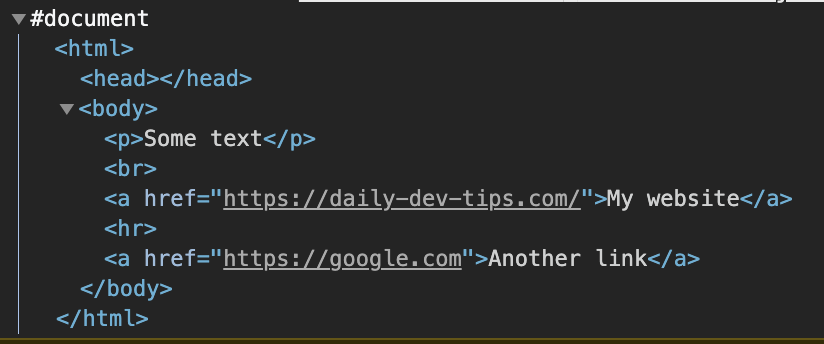
As you can see, this is a full document.
To get all the links, we can use regular queries on this doc const.
```js
links = doc.getElementsByTagName('a');
console.log(links);
// HTMLCollection(2) [a, a]
```
Nice, we got our two links. We can loop over these two links and manipulate them. This will be adjusted in our doc variable.
```js
[...links].forEach(link => {
link.setAttribute('target', '_blank');
});
```
Here we [loop over the getElementsByTagName](https://daily-dev-tips.com/posts/javascript-loop-queryselectorall-results/) results, and set the target to a blank page.
Now, if we would log the current status:
```js
console.log(doc);
```
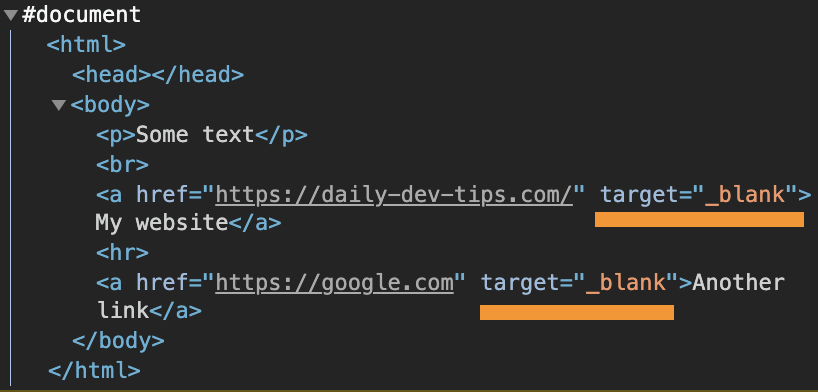
We get the following result. You can see the links now have a target blank.
## Using the output of a JavaScript DOMParser
Let's also take some time to output the changes to see them in the `HTML` action.
Let's add two divs to our `HTML`.
```html
```
First, we have our basic text variable.
```js
const text = `Some text
My website
Another link`;
```
Next, we will get the two div elements.
```js
const original = document.getElementById('original');
const output = document.getElementById('output');
```
For the original one, we can immediately add the output as-is.
```js
original.innerHTML = text;
```
And for the output one, we do our modifications as seen above.
```js
let parser = new DOMParser();
const doc = parser.parseFromString(text, 'text/html');
links = doc.getElementsByTagName('a');
console.log(links);
[...links].forEach(link => {
link.setAttribute('target', '_blank');
});
output.innerHTML = doc.documentElement.innerHTML;
```
That's it. We now have two divs, one with links that open in the same tab and open in a blank tab.
Try it out using the following Codepen.
%[https://codepen.io/rebelchris/pen/MWjmGYE]
### Thank you for reading, and let's connect!
Thank you for reading my blog. Feel free to subscribe to my email newsletter and connect on [Facebook](https://www.facebook.com/DailyDevTipsBlog) or [Twitter](https://twitter.com/DailyDevTips1)