
HTML Datalist

Confession time: I have never used the Datalist before! Therefore I thought it was about time I did some research into what it can be used for.
The Datalist specifies a list of pre-defined option which can be used for an input field.
This means it can be used as an autocomplete for input fields.
Let's see how to use it:
HTML Structure
<label for="looney"
  ><input list="looneys" name="looneys" id="looney" /> is my favorite Looney Tune!</label
>

<datalist id="looneys">
  <option value="Bugs Bunny"> </option>
  <option value="Daffy Duck"> </option>
  <option value="Elmer Fudd"> </option>
  <option value="Foghorn Leghorn"> </option>
  <option value="Marvin the Martian"> </option>
  <option value="Porky Pig"> </option>
  <option value="Road Runner"> </option>
  <option value="Speedy Gonzales"> </option>
  <option value="Sylvester"> </option>
  <option value="Tasmanian Devil"> </option>
  <option value="Tweety"> </option>
  <option value="Wile E. Coyote"> </option>
  <option value="Yosemite Sam"> </option>
</datalist>
Wow, that is all! Amazing right?
All we need to do is define list="" on our input, and then we can define a datalist with the same id as the list.
This will generate an input with autocomplete functionality. Basically a better select.
You can view it in action on this Codepen.
Datalist downsides
It can not replace a select fully, so people will be able to type whatever they want in the box, and we can't stop them unless we are doing some JavaScript magic.
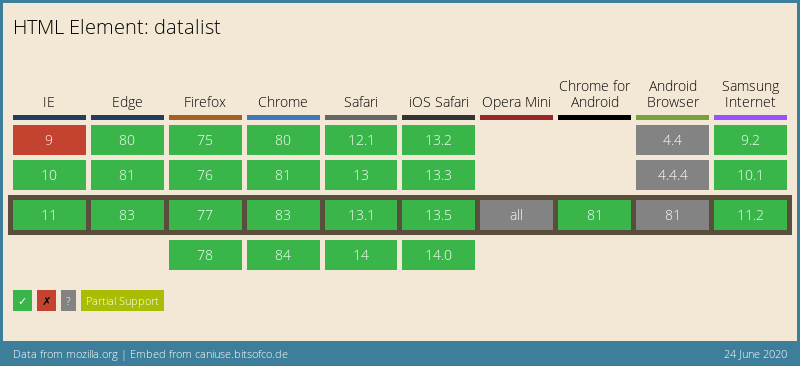
Browser Support
To be honest, I'm quite surprised how well it is supported. We can even find a polyfill for IE9<.
Thank you for reading, and let's connect!
Thank you for reading my blog. Feel free to subscribe to my email newsletter and connect on Facebook or Twitter
About the author
I'm a full-stack developer from South Africa 🇿🇦. I love writing about JavaScript, HTML and CSS.
Comments
Join the discussionThe process is simple and easy! Just fill out the order form on our webpage. If you need assistance with this, the support team is right behind you writing help . You can easily order essays online at the lowest prices from us! The most professional essay writing paper service available 24/7.



