# HTML Datalist
Confession time: I have never used the Datalist before!
Therefore I thought it was about time I did some research into what it can be used for.
The Datalist specifies a list of pre-defined option which can be used for an input field.
This means it can be used as an autocomplete for input fields.
Let's see how to use it:
## HTML Structure
```html
```
Wow, that is all! Amazing right?
All we need to do is define `list=""` on our input, and then we can define a `datalist` with the same `id` as the `list`.
This will generate an input with autocomplete functionality.
Basically a better select.
You can view it in action on this Codepen.
[View on Codepen.](https://codepen.io/rebelchris/pen/abdwzQQ)
## Datalist downsides
It can not replace a select fully, so people will be able to type whatever they want in the box, and we can't stop them unless we are doing some `JavaScript` magic.
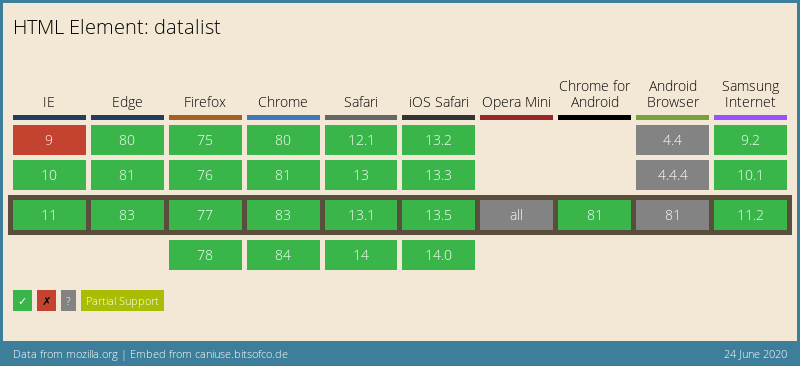
## Browser Support
To be honest, I'm quite surprised how well it is supported. We can even find a [polyfill](https://github.com/mfranzke/datalist-polyfill) for IE9<.
### Thank you for reading, and let's connect!
Thank you for reading my blog. Feel free to subscribe to my email newsletter and connect on [Facebook](https://www.facebook.com/DailyDevTipsBlog) or [Twitter](https://twitter.com/DailyDevTips1)