
Did you know HTML elements can be editable?

This is one of the HTML options you don't see often, but are actually really cool.
There is an HTML attribute called contenteditable, and it allows HTML elements to become editable 🙊.
Let me show you how it looks on this Codepen. (Click any text!)
HTML contenteditable
We can simply make an element editable by adding the contenteditable tag.
<div class="container">
  <h1 contenteditable="true">Welcome click me 🎯</h1>
  <p contenteditable="true">
    Did you know you can click me to edit my content?<br />
    Even big paragraphs 👀
  </p>
  <a contenteditable="true" href="#">View the full article</a>
</div>
It can have three values:
contenteditable="true"~ We can change the contentcontenteditable="false"~ Not able to change itcontenteditable="inherit"~ What ever the parent has
Capturing changes in JavaScript
Of course, this is cool, but it doesn't do much on its own, we can actually capture these changes with JavaScript.
Let's bind an event listener to the input event for each contenteditable tag.
var contents = document.querySelectorAll('[contenteditable]');

for (let content of contents) {
  content.addEventListener('input', function() {
    console.log('input changed to: ' + content.innerHTML);
  });
}
Browser Support
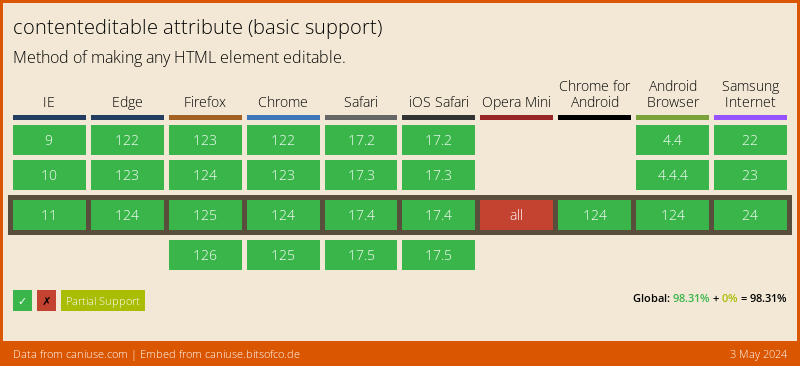
Since this is a native HTML tag, it has amazing support!
Thank you for reading, and let's connect!
Thank you for reading my blog. Feel free to subscribe to my email newsletter and connect on Facebook or Twitter
About the author
I'm a full-stack developer from South Africa 🇿🇦. I love writing about JavaScript, HTML and CSS.
Comments
Join the discussionThat’s cool that you showcased this often forgotten attribute. I’m actually quite familiar with contentenditable as I worked on a project that utilized it to create a transcript editor. When you couple it with Javascript, it’s actually pretty powerful.
Oh nice to hear someone actually using it! So you used it as actual "input" to save values?
Yea that’s the general gist. We used contenteditable to allow them to make revisions and extract the content with textContent. Behind the scenes we do a bunch of validation and all that good stuff. The final product ended up being fairly robust. But I am biased since I worked on it 😆
Alyssa Holland Sounds cool! Awesome work Alyssa, thanks for noting this, it's good that people see use-cases of this element
Hi! Interesting article.
Sorry for my lack of knowledge but could you give me some examples in which this feature can be useful?
Thanks for sharing!
I personally wouldn't recommend this option for many adventures, BUT it can be useful to make something like a visual character tester!
So imagine you have an email or website and content creators are able to write content, you tell them, keep lines at 250 chars. It would be cooler if they can just see how it would actually look right. In this case contenteditable is a good option.
If they actually need a wysywg editor not, if they need to save the data, not.
It's a thin line, but there are some good use-cases for it.
I see. It makes sense. Thanks again! Daily Dev Tips



