# Did you know HTML elements can be editable?
This is one of the `HTML` options you don't see often, but are actually really cool.
There is an `HTML` attribute called `contenteditable`, and it allows `HTML` elements to become editable 🙊.
Let me show you how it looks on this Codepen.
(Click any text!)
%[https://codepen.io/rebelchris/pen/xxVgJbB]
## HTML contenteditable
We can simply make an element editable by adding the `contenteditable` tag.
```html
Welcome click me 🎯
Did you know you can click me to edit my content?
Even big paragraphs 👀
View the full article
```
It can have three values:
- `contenteditable="true"` ~ We can change the content
- `contenteditable="false"` ~ Not able to change it
- `contenteditable="inherit"` ~ What ever the parent has
## Capturing changes in JavaScript
Of course, this is cool, but it doesn't do much on its own, we can actually capture these changes with `JavaScript`.
Let's bind an event listener to the input event for each `contenteditable` tag.
```js
var contents = document.querySelectorAll('[contenteditable]');
for (let content of contents) {
content.addEventListener('input', function() {
console.log('input changed to: ' + content.innerHTML);
});
}
```
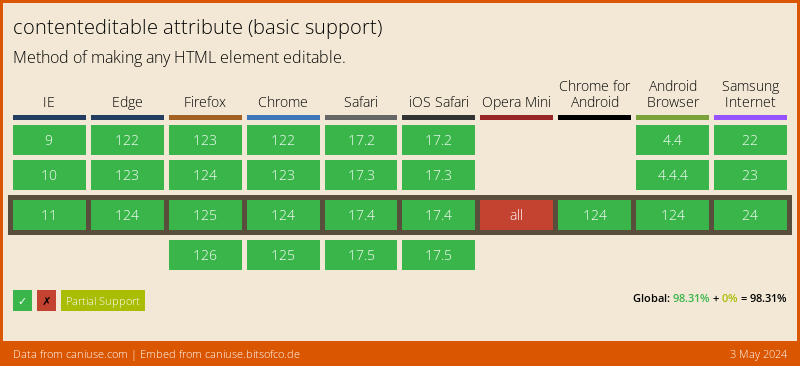
## Browser Support
Since this is a native `HTML` tag, it has amazing support!
### Thank you for reading, and let's connect!
Thank you for reading my blog. Feel free to subscribe to my email newsletter and connect on [Facebook](https://www.facebook.com/DailyDevTipsBlog) or [Twitter](https://twitter.com/DailyDevTips1)