
Vanilla JavaScript get all elements in a form

If you ever made your own validation you will understand the struggle of getting all the form elements.
I've made code that would loop over each type of input as such:
types = ['input', 'select', 'texture'];
// Manually loop and get all those
That will work, but it's very easy to miss one, and not really maintainable.
Did you know there is a simpler way to retrieve all the elements inside a form?
Vanilla JavaScript get a form's elements
So let's say we have a form with all kinds of inputs like this:
<form id="form">
  <div class="container">
    <div class="row">
      <label for="firstname">Firstname</label>
      <input type="text" name="firstname" id="firstname" />
    </div>
    <div class="row">
      <label for="email">Email</label>
      <input type="email" name="email" id="email" />
    </div>
    <div class="row">
      <label for="select">Select</label>
      <select name="select" id="select">
        <option value="1">Option 1</option>
        <option value="2">Option 2</option>
      </select>
    </div>
    <div class="row">
      <p>Do you agree?</p>
      <label>
        <input type="radio" name="agree" value="yes">
        Yes
      </label>
      <label>
        <input type="radio" name="agree" value="no">
        No
      </label>
    </div>
    <div class="row">
      <p>Your favorite animal?</p>
      <label>
        <input type="checkbox" name="agree" value="penguin">
        🐧
      </label>
      <label>
        <input type="checkbox" name="agree" value="dog">
        🐶
      </label>
    </div>
  </div>
  </div>
</form>
This is a typical form, it has some regular inputs, some select elements, checkboxes, and radio groups.
It also has random markup in between to style your form, see the divs and labels.
So how can we distinguish these elements?
First, let's define a variable that will get our form.
const form = document.getElementById('form');
Now it is literally as simple as calling .elements on this const.
console.log(form.elements);
This will give us an HTMLFormControlsCollection which looks as follows.
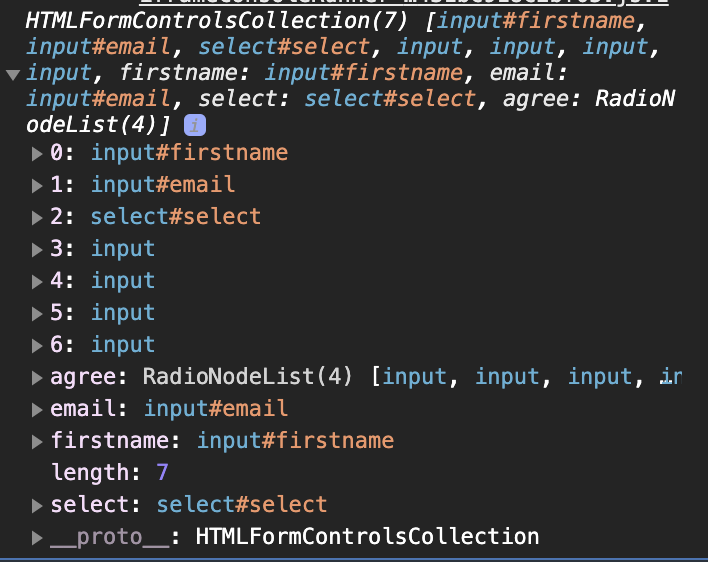
As you can see these holds are our form elements, which is already super useful.
You can then loop over them using a forEach loop for instance.
[...form.elements].forEach(item => {
  console.log(item);
});
Now it's up to you to create your own validation with this.
You can find this full demo on the following Codepen.
Thank you for reading, and let's connect!
Thank you for reading my blog. Feel free to subscribe to my email newsletter and connect on Facebook or Twitter
About the author
I'm a full-stack developer from South Africa 🇿🇦. I love writing about JavaScript, HTML and CSS.
Comments
Join the discussionNo comments yet. Be the first to comment.



