
TypeScript generic types

When working with types in TypeScript, we assume that we know what kind of type we will be working with.
For instance to define this log function:
const logAndReturn = (input: string): string => {
  console.log(input);
  return input;
};
In this simple function, we expect a string, return a string, and that's it.
But why should this be limited to just strings?
What if we try to pass a number?
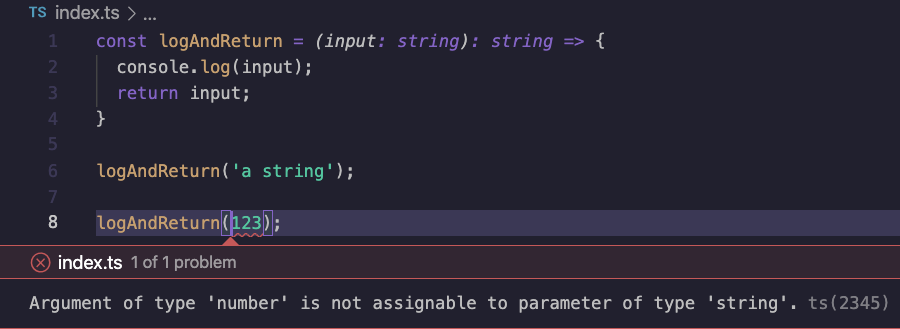
Hmm, that's a bit silly. We can't pass numbers to this function. And it makes total sense.
One possible way of solving this would be to use any as the type.
const logAndReturn = (input: any): any => {
  console.log(input);
  return input;
};
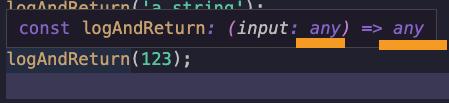
But using this makes it impossible to identify the type from outside. It's basically as if you didn't use TypeScript at this point.
By the use of outside, I mean wherever we call this function, you should see what type it is being cast to like so:
So what then?
TypeScript generic type
This is precisely where generic types come in handy. They can be used to identify that specific called function as a type.
Making the function itself unaware of which type it's working with.
To identify a generic type, you must prefix the function with <Type> where Type is the generic variable.
Note: We often use
Tfor generic types. However, it's not limited to any name.
Let's redo the above function as a generic typed function.
const logAndReturn = <T>(input: T): T => {
  console.log(input);
  return input;
};
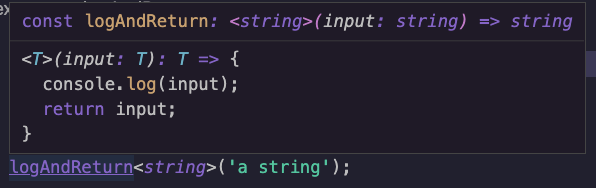
Now, if we want to use this function and pass a string, we can do the following:
logAndReturn<string>('a string');
And on inspection, it states the following:
And if we want to convert this to our number, we can change the generic type used.
logAndReturn<number>(123);
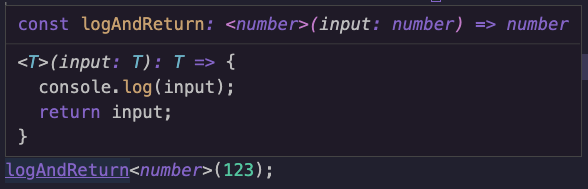
As you can see, this is super powerful as we don't need to know the type upfront, but keep the reference to the correct types.
This method is not limited to these existing types. We can even define a custom interface that we want to use.
interface User {
  firstname: string;
  lastname: string;
}

logAndReturn<User>({firstname: 'Chris', lastname: 'Bongers'});
And in that case, our function will expect the User type.
Conclusion
I hope you got an excellent first look at Generic types and how we can use them. I'll go deeper into specific use-cases that will shed a broader light on them in the following articles.
Thank you for reading, and let's connect!
Thank you for reading my blog. Feel free to subscribe to my email newsletter and connect on Facebook or Twitter
About the author
I'm a full-stack developer from South Africa 🇿🇦. I love writing about JavaScript, HTML and CSS.
Comments
Join the discussionNo comments yet. Be the first to comment.



