
This Tailwind CSS cut out effect will amaze you

A while a go we created this super cool cut out text effect in CSS, however in today's article we'll have a look at how to do this in Tailwind CSS.
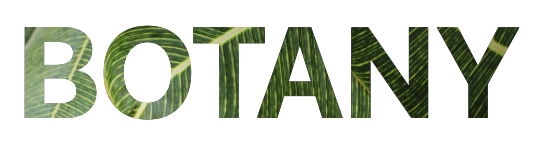
The result will be this super amazing, yet simple to achieve effect.
HTML Structure for Tailwind cut out text
As for the HTML structure, we only need two elements.
- The background container div, this will hold the background image
- A text element, this will be positioned on top of the background for the cut out effect
<div>
  <h1>BOTANY</h1>
</div>
That is all that we need, and with the help of Tailwind CSS we can easily create this amazing cut out effect.
Note: Check out this article for integrating Tailwind in your project
Tailwind CSS cut out text effect
To generate this effect, lets first focus on giving out div a background image. This will be the only custom part to the setup, however when you are using Tailwind in your project you can use the tailwind config for this.
.background {
  background-image: url('https://images.pexels.com/photos/797797/pexels-photo-797797.jpeg?auto=compress&cs=tinysrgb&dpr=2&h=650&w=940');
}
Then we can add some classes to center this background and make it cover the whole area.
<div class="background bg-cover bg-center"></div>
The second part to this tutorial is to style the h1 element.
Let's start by making it a big bigger and bold.
<h1 class="font-bold text-9xl">BOTANY</h1>
And the magic comes with the following three classes, we want our text to be the opposite of our background, and then use the blend mode to get the effect we need.
<h1 class="font-bold text-9xl mix-blend-lighten text-black bg-white">BOTANY</h1>
And that's it we now have a stunning CSS cutout text effect using Tailwind CSS.
Thank you for reading, and let's connect!
Thank you for reading my blog. Feel free to subscribe to my email newsletter and connect on Facebook or Twitter
About the author
I'm a full-stack developer from South Africa 🇿🇦. I love writing about JavaScript, HTML and CSS.
Comments
Join the discussionLovely!
Glad you like it Braydon. I really wish I could use this effect more often in my projects.



