
The types in TypeScript

When it comes to TypeScript, a big part of the game is defining types.
With this, we can define annotations, but they can appear in more places.
In this specific article, we will go through the most basic types, and eventually, we'll dive a bit deeper into extended kinds.
The pillar of types
There are the primitive types that are very commonly used in JavaScript, basically responsible for most of your variables, and these three are:
string: A string valuenumber: A integer/number value, JavaScript doesn't care if it's anintorfloat. They call it anumberboolean: The good old true or false
Besides these three pillars, you might need an array of certain elements.
Let's say an array of strings. We can use the bracket annotation for that: string[].
A tale of caution
When it comes to TypeScript, the default type will be used if you don't define something in particular.
This type is called any, and it could be anything.
You want to avoid using the any type when defining types.
You can even set the noImplicitAny flag to throw errors if any is used.
Using the types
Whenever you declare a variable or function, you can annotate the type by using a : {type} format.
Let's see how it would look for a variable and function:
let username: string = 'Chris';

const myName = (name: string) => {
  console.log(`Hello ${name}`);
};
However, note that we don't explicitly have to mention a type on the' username' variable. This is because TypeScript is smart enough to derive this as a string.
Let me show you what I mean by that:
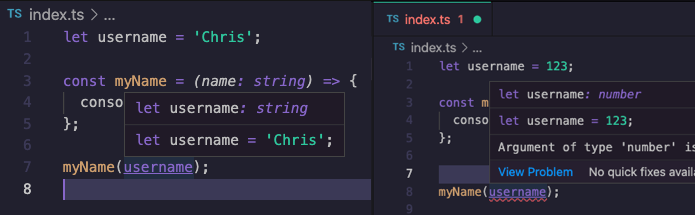
In the image above, you can see that we set the value as a string on the left and the right as a number.
Without explicitly telling a type, TypeScript knows what is going on. This is only possible with variables that have a direct value!
We can also define the return type for functions. We have a function that takes a number but returns a string.
const numberToString = (number: number): string => {
  return number.toString();
};

const output = numberToString(123);
Note the : string behind the function, which is used to define a function's return type.
We already had a brief look at the array type. Another side pillar is the object annotation, defined by curly brackets.
const getFullName = (user: {firstname: string, lastname: string}): string => {
  return `${user.firstname} ${user.lastname}`;
};

getFullName({firstname: 'Chris', lastname: 'Bongers'});
In the above example, the function accepts an object as the user variable. This object has two properties which both are strings.
Making types optional
Let's take the above example. There might be cases where we only know the first name and still want to call this function. In our current implementation, it will throw a TypeScript error.
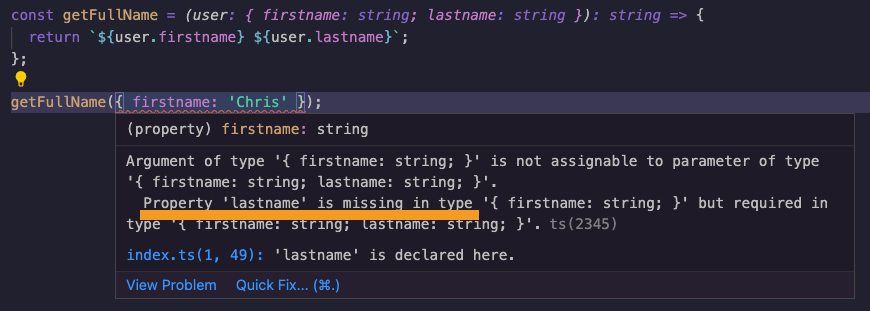
You can see that TypeScript states we are missing a required type of the last name.
We can prefix the : with a question mark to make a type optional.
const getFullName = (user: {firstname: string, lastname?: string}): string => {
  return `${user.firstname} ${user.lastname}`;
};
It's important to note that by default, variables are required. We must explicitly mention which ones are optional.
What if my variable has multiple types?
This happens more often. Let's take an ID. For example, it could be a number or a string.
To define a type that has multiple, we have to use the union type.
You can define these union types using the pipe | option.
const getUserId = (id: number | string) => {
  return `Your ID is ${id}`;
};

getUserId(123);
getUserId('Chris123');
As you can see, both use-cases are now valid.
However, what if we need to use a particular function that's not valid for one of the two?
We want to prefix the number IDs with a batch prefix, but the string versions already have this:
const getBatchString = (id: number | string): string => {
  if (typeof id === 'number') {
    id = `batch-${id}`;
  }
  return id;
};

getBatchString(123);
getBatchString('batch-123');
In the above example, you can see that we can use typeof to determine which one of the two it is.
In the case of a number, we prefix it with a string. Otherwise, we return the string.
Both these use-cases will return batch-123.
And that's it for the basic types of TypeScript and how we can use them.
Thank you for reading, and let's connect!
Thank you for reading my blog. Feel free to subscribe to my email newsletter and connect on Facebook or Twitter
About the author
I'm a full-stack developer from South Africa 🇿🇦. I love writing about JavaScript, HTML and CSS.
Comments
Join the discussionGreat article, just a question (a litle bit out of topic, sorry) What is the vscode theme you are using? thanks
The screenshots here are actually WebStorm and the default theme from there.
You might find that as a VSCode theme 💖 Think something like this: https://marketplace.visualstudio.com/items?itemName=rexebin.dracula
Seeing as my Hackathon submission is ready...
I can now properly dive into this Typescript ocean.
Thank you for this explanation
TypeScript is a great thing to learn these days 💖



