
Testing if a React component doesn’t exist with Jest

Sometimes we want to write tests to check if certain elements are not rendered.
For example, we might have a parameter to disable a section until the user has a specific level or action.
There are several ways to test this, so let's look at some examples.
Query the element
The most important thing to note when testing for non-existence is that you'll have to query items.
When looking for an element, you might have used getBy or getAllBy and then something.
This works fine if we know the element exists, but Jest will throw an error when these are not found.
To be safe with unrendered elements, we have to use the query alternatives: queryBy and queryAllBy.
Let's sketch the following component to work with.
function App({ firstTime = false }) {
  return (
    <div className='App'>
      <strong>Welcome to our app</strong>
      {firstTime && <p>I see this is your first time!</p>}
    </div>
  );
}
As you can see, this could render two lines, but we have to set the firstTime variable to true for the second sentence to show up.
Now we can write some test cases to test this.
it('should render welcome text', async () => {
  render(<App />);
  expect(screen.getByText('Welcome to our app')).toBeInTheDocument();
});
The above test will test for the same occurrence of our welcome test, which always renders.
The next thing we could test is that the second line shows when we set the variable to true.
it('should render first time text when set', async () => {
  render(<App firstTime={true} />);
  expect(
    screen.getByText('I see this is your first time!')
  ).toBeInTheDocument();
});
As you can see, I set the firstTime variable to true, which will make the line appear.
So the above will still succeed.
But now, let's see how we can test that it doesn't exist.
First, let's see what happens when we use the same syntax but with a .not call.
it(`shouldn't render first time text when set`, async () => {
  render(<App />);
  expect(
    screen.getByText('I see this is your first time!')
  ).not.toBeInTheDocument();
});
We'll get hit by the following error when running the above test.
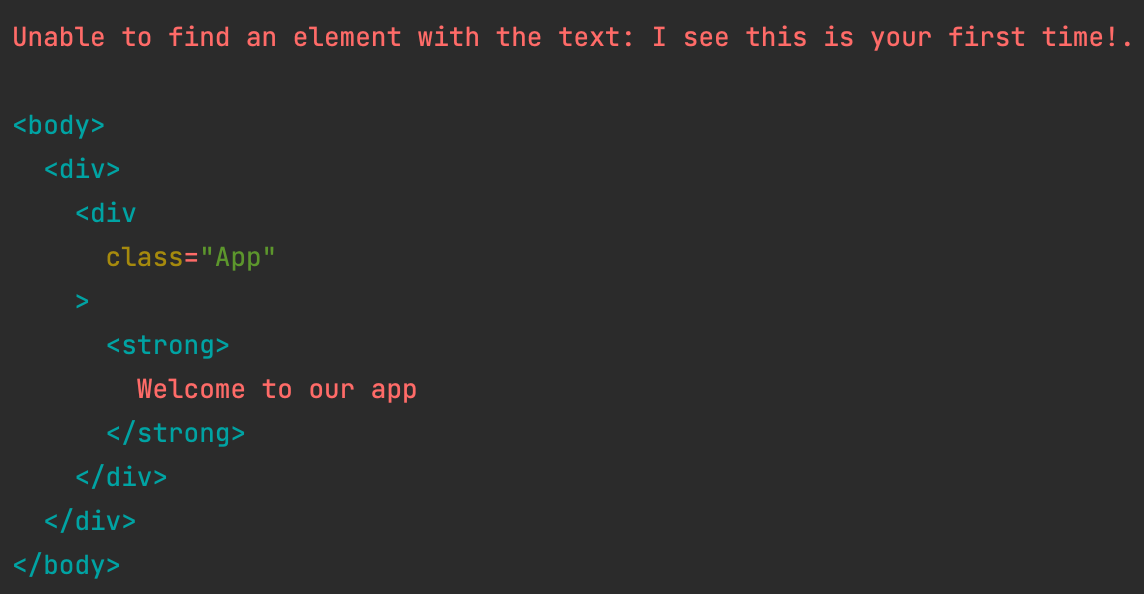
And this is actually expected since we used getBy. We can simply fix this by using queryBy.
it('should render first time text when set', async () => {
  render(<App firstTime={true} />);
  expect(
    screen.queryByText('I see this is your first time!')
  ).toBeInTheDocument();
});
And that's how we can check for non-existence of elements in a safe way.
Thank you for reading, and let's connect!
Thank you for reading my blog. Feel free to subscribe to my email newsletter and connect on Facebook or Twitter
About the author
I'm a full-stack developer from South Africa 🇿🇦. I love writing about JavaScript, HTML and CSS.
Comments
Join the discussionNo comments yet. Be the first to comment.



