
SVG Colouring Paths

Since we did our SVG Sprites yesterday, I was thinking if it was possible to colour each specific path. And it turns out you can do so.
So for my example I took an icon existing of four elements, a man and a woman and the heads are separate from the bodies.
HTML Structure
<svg
  aria-hidden="true"
  style="position: absolute; width: 0; height: 0; overflow: hidden;"
  version="1.1"
  xmlns="http://www.w3.org/2000/svg"
  xmlns:xlink="http://www.w3.org/1999/xlink"
>
  <defs>
    <symbol id="icon-man-woman" viewBox="0 0 32 32">
      <path
        d="M8 3c0 1.657-1.343 3-3 3s-3-1.343-3-3c0-1.657 1.343-3 3-3s3 1.343 3 3z"
      ></path>
      <path
        d="M26 3c0 1.657-1.343 3-3 3s-3-1.343-3-3c0-1.657 1.343-3 3-3s3 1.343 3 3z"
      ></path>
      <path
        d="M8 8h-6c-1.105 0-2 0.895-2 2v10h2v12h2.5v-12h1v12h2.5v-12h2v-10c0-1.105-0.895-2-2-2z"
      ></path>
      <path
        d="M30.469 16l1.531-1.109-4.165-6.441c-0.185-0.281-0.499-0.45-0.835-0.45h-8c-0.336 0-0.65 0.169-0.835 0.45l-4.165 6.441 1.531 1.109 3.458-4.487 1.202 2.804-4.191 7.683h3.833l0.667 10h2v-10h1v10h2l0.667-10h3.833l-4.191-7.683 1.202-2.804 3.458 4.487z"
      ></path>
    </symbol>
  </defs>
</svg>

<svg class="icon icon-man-woman">
  <use xlink:href="#icon-man-woman"></use>
</svg>
As you can see there are four paths in our definition symbol.
So how do we go about styling them all a different colour?
Styling a CSS Path
I'm going to use the nth-child selector for each specific path.
#icon-man-woman {
  path {
    &:nth-child(1) {
      fill: #83c5be;
    }
    &:nth-child(2) {
      fill: #ffddd2;
    }
    &:nth-child(3) {
      fill: #006d77;
    }
    &:nth-child(4) {
      fill: #e29578;
    }
  }
}
This will result in the following:
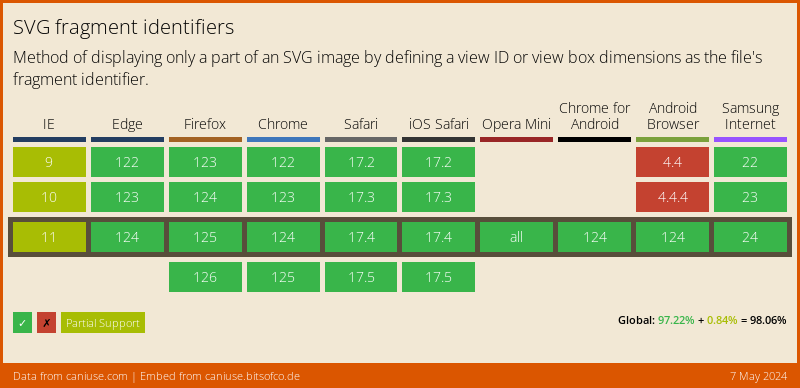
Browser Support
The support is pretty strong!
Thank you for reading, and let's connect!
Thank you for reading my blog. Feel free to subscribe to my email newsletter and connect on Facebook or Twitter
About the author
I'm a full-stack developer from South Africa 🇿🇦. I love writing about JavaScript, HTML and CSS.
Comments
Join the discussionNo comments yet. Be the first to comment.



