
Storybook - mocking API calls

Sometimes, our components might call API endpoints, which could add unnecessary load to our Storybook side of things.
In those cases, we might want to intercept those calls and mock them instead of returning them.
And luckily for us, Storybook has a mocking addon we can use for this.
Setting up the loader
I will add a super simple data loader to the demo stories/Page.jsx file.
It's simply to demo the use case, so I'll be adding a data fetching mechanism like so:
export const Page = () => {
  const [user, setUser] = React.useState();
  const [data, setData] = useState(null);
  const [loading, setLoading] = useState(true);
  const [error, setError] = useState(false);

  useEffect(() => {
    fetch(`https://jsonplaceholder.typicode.com/posts`)
      .then((response) => response.json())
      .then((formattedData) => {
        setLoading(false);
        setData(formattedData);
      })
      .catch(() => {
        setLoading(false);
        setError(true);
      });
  }, []);

  if (loading) {
    return <p>loading...</p>;
  }

  if (error) {
    return <p>Something went wrong, try again later</p>;
  }

  return (
    <article>
      <Header
        user={user}
        onLogin={() => setUser({ name: 'Jane Doe' })}
        onLogout={() => setUser(undefined)}
        onCreateAccount={() => setUser({ name: 'Jane Doe' })}
      />

      <section>
        <h2>Pages in Storybook</h2>
        <ul>
          {data.map((post) => {
            return <li key={post.id}>{post.title}</li>;
          })}
        </ul>
      </section>
    </article>
  );
};
This will call the API and render a list of post titles. When it fails, it shows an error message.
As you can see, this would call every single time we call this story.
So let's see how we can mock this instead!
Installing the MSW addon
As mentioned, we'll be using the MSW addon, which stands for: "Mock Service Worker", it adds a service worker that will intercept and mock our requests.
To install it, run the following command.
npm i msw msw-storybook-addon -D
Then we'll need to initialize the service worker:
npx msw init public/
Now you'll need to head over to the .storybook/preview.js file and add the following lines.
import { initialize, mswDecorator } from 'msw-storybook-addon';

// Initialize MSW
initialize();

// Provide the MSW addon decorator globally
export const decorators = [mswDecorator];
And now we'll be able to mock specific requests in our stories.
Mocking on component level
Let's start by mocking on a component level. This is common as we will have multiple stories that need the same mock.
As we learned before, we can use the parameters option and mock the call we have.
export default {
  title: 'Example/Page',
  component: Page,
  parameters: {
    msw: [
      rest.get(
        'https://jsonplaceholder.typicode.com/posts',
        (_req, res, ctx) => {
          return res(
            ctx.json([
              {
                userId: 1,
                id: 1,
                title:
                  'sunt aut facere repellat provident occaecati excepturi optio reprehenderit',
                body: 'quia et suscipit\nsuscipit recusandae consequuntur expedita et cum\nreprehenderit molestiae ut ut quas totam\nnostrum rerum est autem sunt rem eveniet architecto',
              },
            ])
          );
        }
      ),
    ],
  },
};
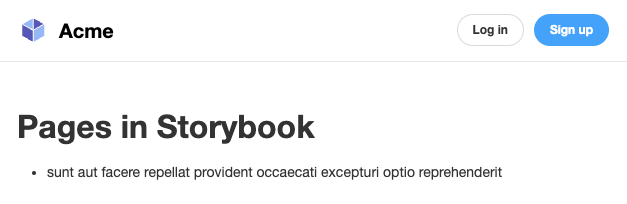
If we run our story, we can see the component will render only one item. That's always the one we describe here.
Mocking a fail
We might also want to test what happens when the API returns an error, and for this, we can use a per-story option.
Let's create a new story, so we have it separate from the existing ones.
export const FailedResponse = Template.bind({});
FailedResponse.parameters = {
  msw: [
    rest.get('https://jsonplaceholder.typicode.com/posts', (_req, res, ctx) => {
      return res(ctx.delay(800), ctx.status(403));
    }),
  ],
};
And if we open that story, we see the loading text for 800 milliseconds, after which the error is presented.
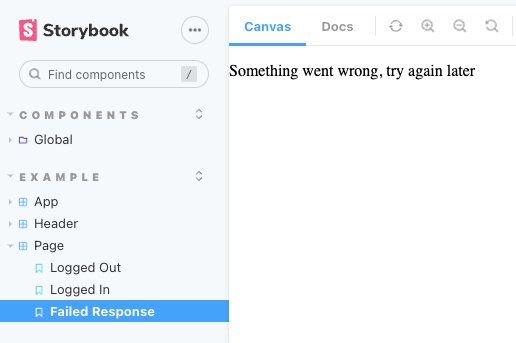
As you can see, this per-story idea overwrites our main component loading.
Thank you for reading, and let's connect!
Thank you for reading my blog. Feel free to subscribe to my email newsletter and connect on Facebook or Twitter
About the author
I'm a full-stack developer from South Africa 🇿🇦. I love writing about JavaScript, HTML and CSS.
Comments
Join the discussionNo comments yet. Be the first to comment.



