
Spice up your console logs with styling

Sometimes normal console logs just don't cut it. You might want to warn people to not paste random scripts they found online like Facebook.
Or maybe you want to hire them and shout in the console to potential devs?
Whatever your reasons might be, you can spice up your console logs with some styling!
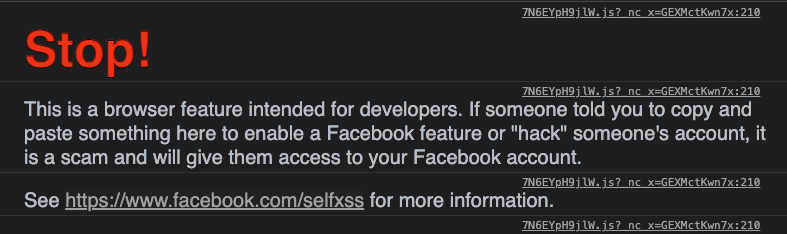
Adding some styles to our console logs
To get right in, there are several specifiers we can use in the front of our console logs to state whatever it should render.
%s: Format as a string%i/%d: Format as integer%f: Format as a float%o: Format as expendable DOM element%O: Format as an expendable JavaScript element%c: Apply CSS rules (taken from the second parameter)
Today we will be focussing on the last rule.
It looks something like this:
console.log("%cI'm blue, da ba dee da ba daa", 'color: blue;');
This will result in the following.

But that's not all. You can write as many rules of CSS as you like.
console.log(
  "%cI'm so super stylish",
  'color: #bc2e1e; font-size: 2rem; background: #edde9c; text-shadow: 0 1px 0px #378ab4, 1px 0 0px #5dabcd, 1px 2px 1px #378ab4, 2px 1px 1px #5dabcd, 2px 3px 2px #378ab4, 3px 2px 2px #5dabcd, 3px 4px 2px #378ab4, 4px 3px 3px #5dabcd, 4px 5px 3px #378ab4, 5px 4px 2px #5dabcd, 5px 6px 2px #378ab4, 6px 5px 2px #5dabcd, 6px 7px 1px #378ab4, 7px 6px 1px #5dabcd, 7px 8px 0px #378ab4, 8px 7px 0px #5dabcd;'
);
And it will give us this result:

As you can see, the possibilities are endless, maybe even over the top!
But it might help you to make your console logs just a bit more appealing.
Thank you for reading, and let's connect!
Thank you for reading my blog. Feel free to subscribe to my email newsletter and connect on Facebook or Twitter
About the author
I'm a full-stack developer from South Africa 🇿🇦. I love writing about JavaScript, HTML and CSS.
Comments
Join the discussionNo comments yet. Be the first to comment.



