
Python virtual environments

In today's article, we'll be looking at Python virtual environments. What they are, why we need them and how to create them.
In basic, a virtual environment is an isolated environment for Python projects. Basically a container for your specific project. For those familiar with node modules, I find it quite similar to that.
You can have modules globally installed, and every project can access those, or you can have them project-based installed so only that project can find them.
Why do we need virtual environments
It's because of Python's way of downloading packages that we want to differentiate between projects. In general, I find it a good choice to have project-based environments anyway since it will narrow down your error possibility.
Python can have a hard time differentiating between versions of a package to narrow it down, so let's say we want packageA but projectA needs v1.0.0 and projectB needs v2.0.0`.
As it would be installed globally, there is no way to differentiate between those two.
If we installed them in our virtual environment, each project would use its own specified version.
Python virtual environments
For my article, I'll be using venv. However, multiple options can create virtual environments for you.
Open up your project in a terminal and run the following command.
python -m venv .venv
The last argument, .venv, is the virtual environment's location and can be anything you want.
In this case, a folder called .venv is created.
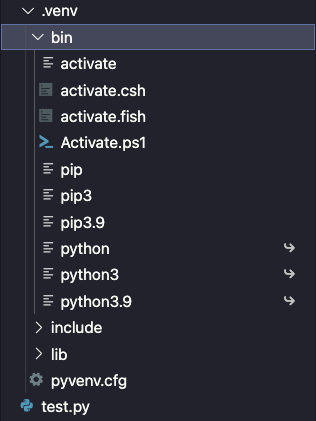
We can activate this virtual environment by running the following command.
source .venv/bin/active
You will see it's active if the terminal places the environment name in front of your arrow like this.
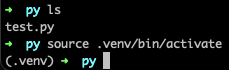
Now, if we run pip install, it will install specific packages inside our virtual environment.
Thank you for reading, and let's connect!
Thank you for reading my blog. Feel free to subscribe to my email newsletter and connect on Facebook or Twitter
About the author
I'm a full-stack developer from South Africa 🇿🇦. I love writing about JavaScript, HTML and CSS.



