
Public Solving: Elf Coffee Shop API system

Now that we solved the elf coffee shop menu, they are looking into getting an API!
You can find the original problem statement here.
Luckily for us, the hard work is already done. We just need to format the output.
We get where we ended in the previous challenge.
The menu input we get looks like this:
[
  { drink: 'Latte', flavor: undefined, price: 3 },
  { drink: 'Latte', flavor: 'Cinnamon', price: 4 },
  { drink: 'Latte', flavor: 'Mrs. Claus Special', price: 6 }
]
The desired output should look like this:
[
  {
    drink: 'Latte',
    flavor: undefined,
    price: 3,
    name: 'Latte',
    slug: 'latte'
  },
  {
    drink: 'Latte',
    flavor: 'Cinnamon',
    price: 4,
    name: 'Cinnamon Latte',
    slug: 'cinnamon-latte'
  },
  {
    drink: 'Latte',
    flavor: 'Mrs. Claus Special',
    price: 6,
    name: 'Mrs. Claus Special Latte',
    slug: 'mrs-claus-special-latte'
  }
]
Thinking about the solution
As you see in the desired output, we can simply return the drink, flavor, and price as we already have them.
The name should be a mix between the drink and flavor. However, if the flavor is undefined, we should not show it.
And the slug is the tricky part!
This should be lowercase, hyphened, non-special character version of the name.
Thinking out loop, REGEX! And yes, I suck at Regex 😂 But not letting this get to me, here is my solution
Creating the API menu
I planned to use the map method again. This is a perfect method to return a modified format of an original array.
Let's put it to the test and do the basics:
return menu.map((drink) => {
    return {
      drink: drink.drink,
      flavor: drink.flavor,
      price: drink.price,
      name: 'TODO',
      slug: slugify('TODO'),
    };
});
There we go. This should set the basic desired output. However, we need to work on the name and slug now!
Let's start with the name, as it will be the basis for the slug.
I decided to use template literals to bind the two strings.
const fullDrinkName = `${drink.flavor !== undefined ? drink.flavor : ''} ${drink.drink}`.trim();
You can see we start with the flavor, and if it's not undefined, we return it. Else we show an empty string. Then we follow with a space.
That space is why we need the trim function. It will trim the beginning and end of the strings spaces.
Now let's pass this to the slugify function as well.
return menu.map((drink) => {
    const fullDrinkName = `${drink.flavor !== undefined ? drink.flavor : ''} ${
      drink.drink
    }`.trim();
    return {
      drink: drink.drink,
      flavor: drink.flavor,
      price: drink.price,
      name: fullDrinkName,
      slug: slugify(fullDrinkName),
    };
});
We can start working on the slug function, which is quite the hard one.
Note: I'm pretty sure there is a better regex to do certain of these things at once, but this is my approach.
(Do let me know what would work better)
The slugify function takes a text. I've actually added a more challenging text to my one, just to test all the use-cases described.
My string:
-Crème. Brulée Latté
This string might not be the use case, but it's a fail-safe! We introduce a dash in the beginning and some special chars.
The rules we want to apply:
- Everything must be lowercase
- Replace all letters with accents, umlauts, etc. with a normalized letter
- Replace all other non-alphanumeric characters (incl. spaces) with a hyphen (-)
- Leading and trailing hyphens stripped
- Don't allow consecutive hyphens
Ok, quite the ruleset, but let's get cracking.
First the lowercase, this is a easy one:
return string.toLowerCase();
// '-crème. brulée latté'
Then we need to replace all the special chars like é and stuff.
This was hard, and I had to use the StackOverflow example on this.
str.toLowerCase()
  .normalize('NFD')
  .replace(/[\u0300-\u036f]/g, '');

// -creme. brulee latte
What happens here is that the normalized function will actually extract the special chars from the letter, so it becomes e´ for instance.
And then the replace says to remove all Unicode special chars and replace them with nothing.
Note: If you run normalize alone, you won't see the difference as your output will still render the particular letter.
Then we want to replace all non-alphanumeric characters with a dash. I've chosen the following Regex for this.
str.toLowerCase()
  .normalize('NFD')
  .replace(/[\u0300-\u036f]/g, '')
  .replace(/[^a-z0-9]/g, '-');

// -creme--brulee-latte
You can see the dot, and the spaces got replaced with dashes. But this brings two dashes where the dot was.
We want to find any consecutive hyphens and replace them with just one.
str.toLowerCase()
  .normalize('NFD')
  .replace(/[\u0300-\u036f]/g, '')
  .replace(/[^a-z0-9]/g, '-')
  .replace(/(\-){2,}/g, '-');

// -creme-brulee-latte
This line says to match the - character and find any consecutive occurrence that's at least two in a row.
The last part we want to address is the leading and trailing dashes.
We can again use a regex for this, to remove the leading one we can use this regex:
str.toLowerCase()
  .normalize('NFD')
  .replace(/[\u0300-\u036f]/g, '')
  .replace(/[^a-z0-9]/g, '-')
  .replace(/(\-){2,}/g, '-')
  .replace(/^-/, '');

// creme-brulee-latte
The ^ character defines the beginning of the line, followed by the character it should match.
And for the last character we can use this one:
str.toLowerCase()
  .normalize('NFD')
  .replace(/[\u0300-\u036f]/g, '')
  .replace(/[^a-z0-9]/g, '-')
  .replace(/(\-){2,}/g, '-')
  .replace(/^-/, '')
  .replace(/-$/, '');
The $ sign matches the end of the string, making sure we remove the last dash.
And that's it, we now have a fully working slugify function!
Running the test to make sure they succeed:
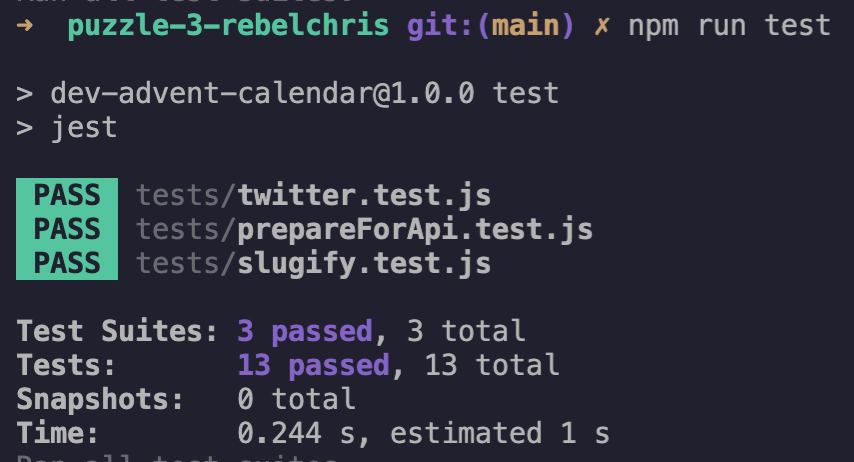
And they do! Yes, we did it 👏
Looking forward to hearing your thoughts on this approach!
Thank you for reading, and let's connect!
Thank you for reading my blog. Feel free to subscribe to my email newsletter and connect on Facebook or Twitter
About the author
I'm a full-stack developer from South Africa 🇿🇦. I love writing about JavaScript, HTML and CSS.
Comments
Join the discussionNo comments yet. Be the first to comment.



