
Optimizing Angular Universal for SEO

Today we will be continuing our journey to convert our existing Angular application into Angular Universal.
And one of the reasons we want this is SEO. That is where the title and meta service come in super handy. They can help us set the title and meta descriptions for pages, and not just at runtime but on the server-side level.
Meaning all bots can read what we want them to read.
For the result, we should open the source code of a page and see the title and meta description we provided.
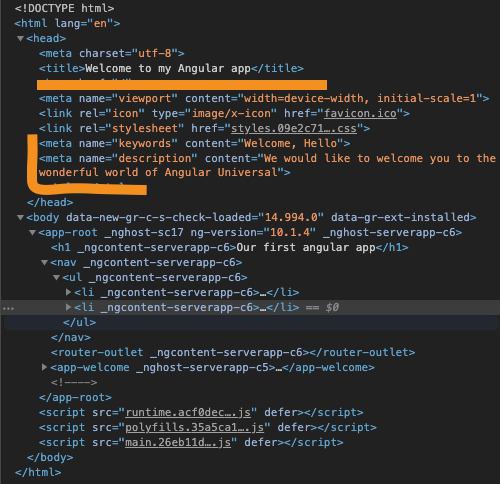
Adding a title to our Angular component
Let's start by opening up our welcome.component.ts. This will be our testing ground. Since it's not the main page, we should quickly see the results while viewing the page source.
We start by importing the Title service in our component.
import {Title} from '@angular/platform-browser';
The next part is to inject the titleService into our constructor.
constructor(private titleService: Title) { }
Now we have the option to use the titleService throughout this component.
We will use the ngOnInit function to set the title.
ngOnInit(): void {
    this.titleService.setTitle('Welcome to my Angular app');
}
Now let's test it by running our app in Universal.
npm run build:ssr && npm run serve:ssr
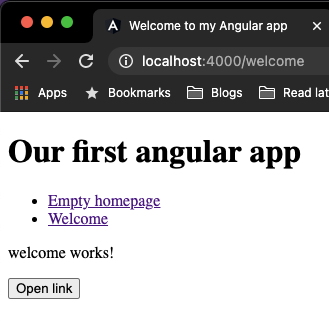
Open the browser and visit our welcome page. We should see the title come into action:
But the main goal is that it is now adjusted on the server-rendered version as well, so let's inspect the page source.
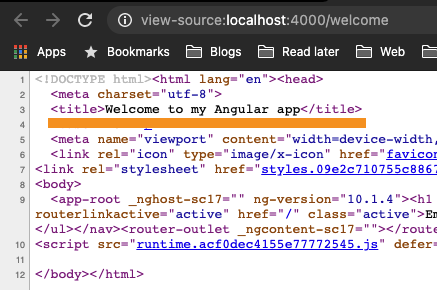
Yes, we got it, this is something crawlers and bots can read 🤩.
Adding meta tags to our Angular component
With the title working, we can look at tags. The Meta service allows us to create all kinds of cool tags. We will be focussing on the Meta tags today.
First, let's start by importing the Meta service.
import {Title, Meta} from '@angular/platform-browser';
Then let's make it available to the component in the constructor.
constructor(private titleService: Title, private metaService: Meta) {}
And like we've seen with the titleService, we can now call this in the ngOnInit.
Let's set a meta description and some tags.
this.metaService.addTags([
  {name: 'keywords', content: 'Welcome, Hello'},
  {
    name: 'description',
    content: 'We would like to welcome you to the wonderful world of Angular Universal'
  }
]);
Let's try it out by running our app once again:
npm run build:ssr && npm run serve:ssr
Now we can expect our head and see if the meta tags are injected:
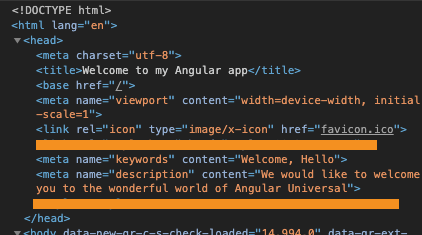
And there you go, you now have the power to inject meta descriptions and titles in the server-side rendered application. This will help crawlers and bots index your website correctly.
You can find today's source code on GitHub.
Thank you for reading, and let's connect!
Thank you for reading my blog. Feel free to subscribe to my email newsletter and connect on Facebook or Twitter
About the author
I'm a full-stack developer from South Africa 🇿🇦. I love writing about JavaScript, HTML and CSS.
Comments
Join the discussionNo comments yet. Be the first to comment.



