
NextJS and TypeScript

You may already know this, but Next.JS comes with TypeScript support out of the box for those who don't!
Which is amazing! We can leverage all the TypeScript wonders in our Next.js application.
This article will show you how you can enable it for a new project and convert existing ones to use TypeScript.
We'll also look at some types that we get out of the box.
Creating a new TypeScript Next.JS project
Starting from scratch is as simple as launching a new application and providing the typescript flag.
There is a shortcut flag: --ts or the full written version: --typescript.
Creating an app would look like this:
npx create-next-app@latest --ts
Once installed, you already have all the TypeScript powers available.
Converting an existing Next.JS project to use TypeScript
You'll often find yourself already having created a super cool app, and you don't want to start over from scratch.
So let's take a look at how we can convert an existing app to use TypeScript.
Let's take this Next Tailwind starter I've started a while ago and convert that to use TypeScript.
Download starter project from GitHub
Now add a tsconfig.json file to the root of your project. You can leave the content of this file empty.
Now when you run next or npm run dev, you should be prompted with the following message:
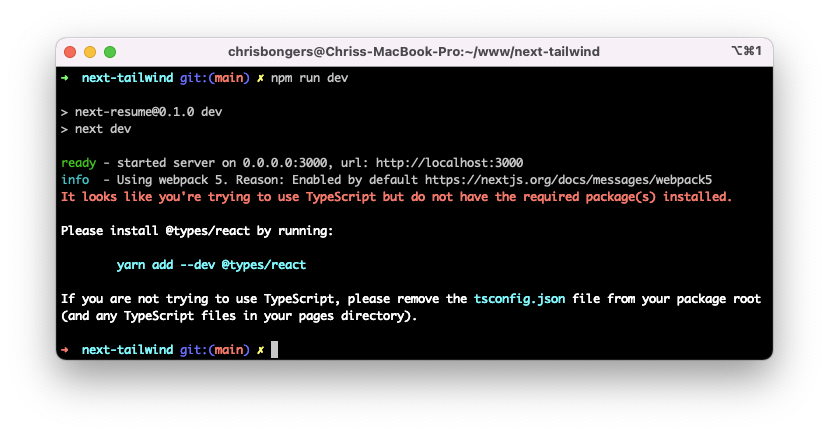
Note: It could show different packages here. Follow whatever the CLI tells you.
Once installed, and when you re-run the command, it should state it will create the tsconfig.json for you.
This file will now be populated with the correct contents.
There is one task left to do: converting our files from .js to .tsx to leverage TypeScript files.
Note this only affects your files, do not change the config files at the root of your project.
And there you go, you can now safely use TypeScript in your Next.js application.
Next.JS Types
A super cool part is that Next.js comes with some ready-made types we can leverage.
Let's start with the custom app, which can be found at pages/_app.tsx. We can set the type AppProps and import those types.
Before:
function MyApp({ Component, pageProps }) {
  return <Component {...pageProps} />
}
After:
import {AppProps} from "next/app";

function MyApp({ Component, pageProps }:AppProps) {
  return <Component {...pageProps} />
}
If you are using SSG or SSR there are also types provided for getStaticProps, getStaticPaths, and getServerSideProps.
import { GetStaticProps, GetStaticPaths, GetServerSideProps } from 'next'

export const getStaticProps: GetStaticProps = async (context) => {
  // ...
}

export const getStaticPaths: GetStaticPaths = async () => {
  // ...
}

export const getServerSideProps: GetServerSideProps = async (context) => {
  // ...
}
Another thing you might be using is the API routes from Next.js.
By default they look something like this:
export default function handler(req, res) {
  res.status(200).json({ name: 'John Doe' })
}
We can typecast the req and res to be types like this:
import {NextApiRequest, NextApiResponse} from "next";

export default function handler(req: NextApiRequest, res: NextApiResponse) {
  res.status(200).json({ name: 'John Doe' })
}
And that's it. You can type all the other things in your application that you might be using already.
I found it easy to get TypeScript going in a Next.JS application and defiantly urge you to try it out yourself.
I've uploaded it to this branch in GitHub.
Thank you for reading, and let's connect!
Thank you for reading my blog. Feel free to subscribe to my email newsletter and connect on Facebook or Twitter
About the author
I'm a full-stack developer from South Africa 🇿🇦. I love writing about JavaScript, HTML and CSS.
Comments
Join the discussionNo comments yet. Be the first to comment.



