
Managing migrations in Prisma (Add/Rename columns)

Migrations are a super powerful way to do database schema migrations. This will allow you to keep your database in sync with changes you make to your schema while maintaining existing data.
We already created our first migration, which was the initialization of the database.
Let's go from there and make changes to the schema to see what will happen.
If you plan to follow along, you can find the GitHub repo here.
Open the prisma/prisma.schema file and make the following changes to the existing schema.
// before
model Hobby {
  id      Int     @id @default(autoincrement())
  title   String  @db.VarChar(255)
  user    User    @relation(fields: [userId], references: [id])
  userId  Int
}
// after
model Hobby {
  id      Int     @id @default(autoincrement())
  name    String  @db.VarChar(255)
  rank    Int
  user    User    @relation(fields: [userId], references: [id])
  userId  Int
}
As you can see, two things happened here.
- The
titlecolumn changed toname - We added a
rankcolumn
Then we can create a new migration by running the following command.
npx prisma migrate dev --name change_hobby_table
However, we'll be quickly prompted with a message this is not possible.
And that is caused because Prisma does not handle renames. This makes sense as they can't identify whether we renamed a column or removed it and added a new one.
We can run the migration with a -create-only flag to solve this use case.
npx prisma migrate dev --name change_hobby_table --create-only
This will create a new migration file you can find at: prisma/migrations/{time}_change_hobby_table.
If you open this file, you can see the SQL that's generated.
-- AlterTable
ALTER TABLE "Hobby" DROP COLUMN "title",
ADD COLUMN     "name" VARCHAR(255) NOT NULL,
ADD COLUMN     "rank" INTEGER;
We can manually fix this SQL to fix our current need to rename the title column.
-- AlterTable
ALTER TABLE "Hobby" RENAME COLUMN "title" TO "name";
ALTER TABLE "Hobby" ADD COLUMN "rank" INTEGER;
We can execute the migration by running the following command.
npx prisma migrate dev
And once it's done, let's check out our database to see what happened.
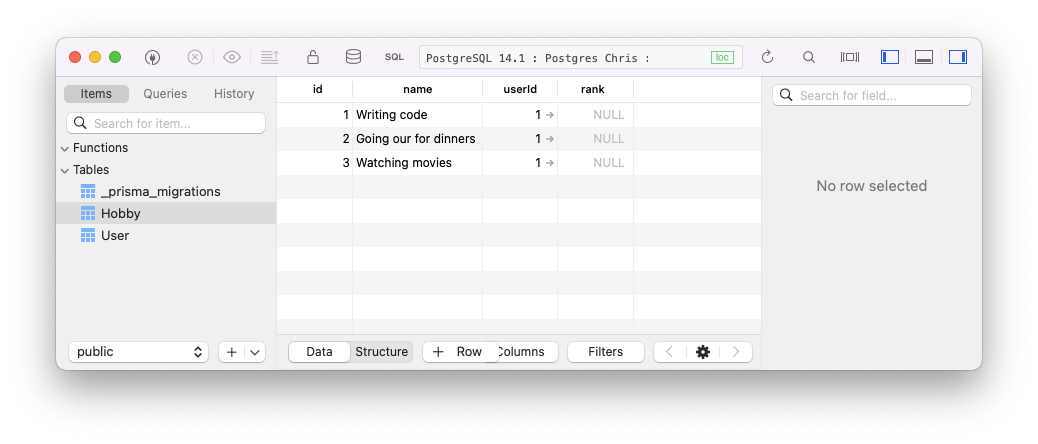
Perfect, our title column is now named name, but it still has all the data.
And we have a new column, rank.
Note: Prisma has a roadmap item to make this experience better. You can track it here: Improvement of Prisma Migrate
As for today's article, you can find the complete code samples on GitHub.
Thank you for reading, and let's connect!
Thank you for reading my blog. Feel free to subscribe to my email newsletter and connect on Facebook or Twitter
About the author
I'm a full-stack developer from South Africa 🇿🇦. I love writing about JavaScript, HTML and CSS.
Comments
Join the discussionNo comments yet. Be the first to comment.



