

Before diving into the main setup and nitty-gritty stuff, let's take some time to explore the components that makeup Kubernetes.
This will help us better understand what we are talking about and how it links together.
The main thing to note (at least for me) is that there are things that make up the Kubernetes core and admin side and things we define for our actual application.
Kubernetes overview
With this in mind, let's look at it in some more detail, starting with the Kubernetes provider high-level overview.
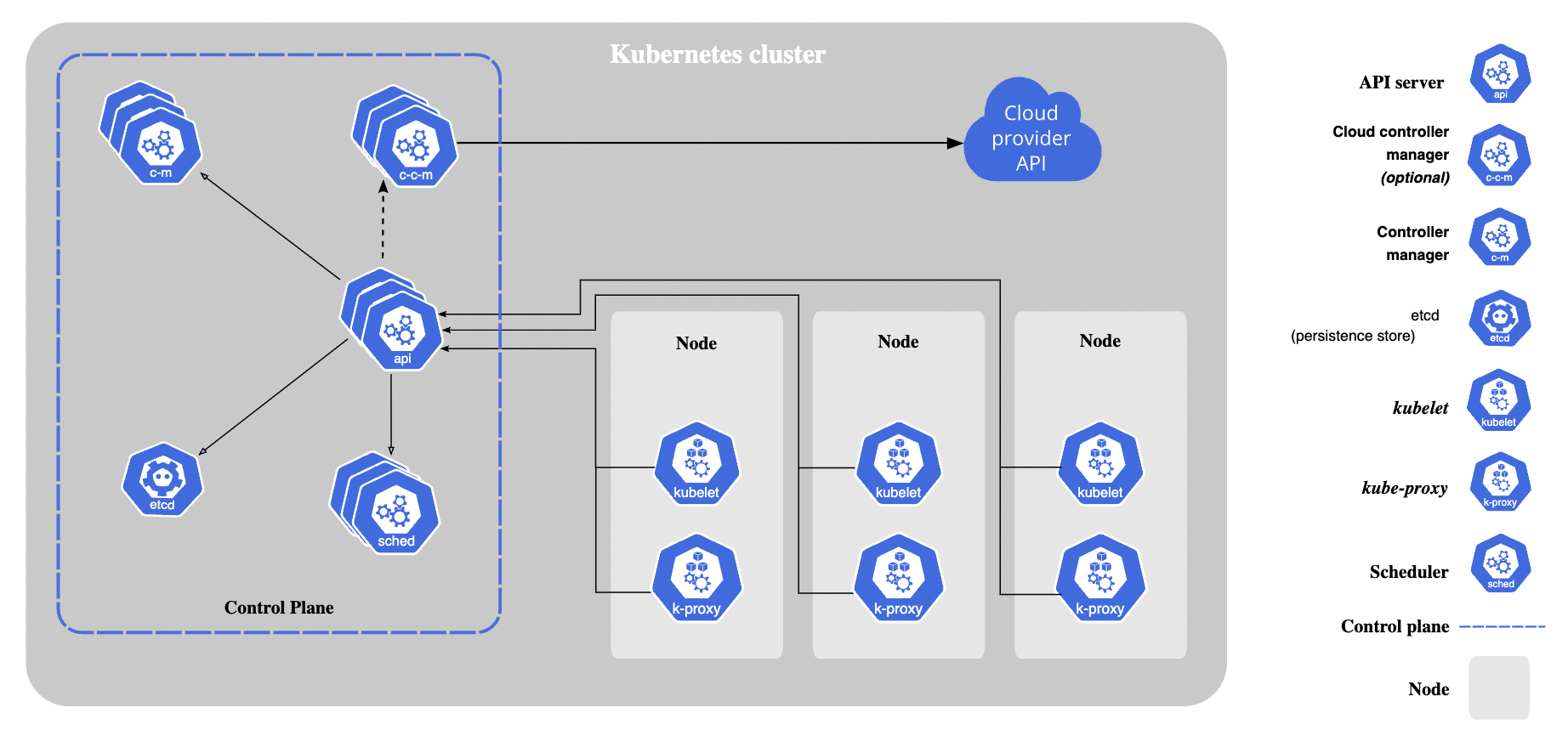
The above image demonstrates a Kubernetes cluster consisting of the following elements.
- Control Plane: The Kubernetes needed part
- Nodes: Basically, your worker machines that run containerized applications
These nodes, in return, host something called Pods, which are the components of the application workload. The Control Plane manages all of this and ensures everything works as expected.
It's tough to explain each part in one extensive article, so I'll be splitting it into more detailed ones.
- Control Plane
- Clusters in detail
- Containers
- Workloads
- Load balancing
- And so on... 👀
As you can tell many exciting things, we can go super broad or super niche. At the point of writing, I want to try and keep it high level so it will be easy for anyone with little to no experience to get to know Kubernetes.
Note: Keep in mind I'm also exploring while writing this, so do let me know if I got something misaligned.
Why the split matters
It's important to note there are certain things we want Kubernetes to manage. This is all included in the Control Plane. As mentioned in the previous article, we don't want to be responsible for ensuring enough pods are running at a given time. And the Kubernetes API handles this perfectly for us.
On the other hand, we want our application to be dynamic and not bound to specifics for a particular server. Hence it's essential to run the node independently.
Call for action
While this article is a bit short, we are in the early stages of explaining Kubernetes. I want to take the time to ask you for your input.
What are some concepts and things you want me to explore or think I should explain?
Let me know via Twitter/email or whichever way you find convenience. 🙏
Thank you for reading, and let's connect!
Thank you for reading my blog. Feel free to subscribe to my email newsletter and connect on Facebook or Twitter
About the author
I'm a full-stack developer from South Africa 🇿🇦. I love writing about JavaScript, HTML and CSS.
Comments
Join the discussionNo comments yet. Be the first to comment.



