
Jest partial snapshot matching

Now that we first looked at snapshot testing, you might already have come across some weird use-cases.
For instance, what if your data returns a date object? Or are your IDs dynamic and ever-changing?
This means only a part of our snapshot should match.
Jest partial snapshot matching
Let's take the following test, for instance.
test('snapshot testing', async () => {
  const randomFact = {
    id: Math.random().toString(36).slice(2),
    fact: 'Chris is writing about Jest',
    createdAt: new Date(),
  };

  expect(randomFact).toMatchSnapshot();
});
If we run this code, our snapshot will be generated nicely, and the test will succeed.
exports[`snapshot testing 1`] = `
Object {
  "createdAt": 2022-03-30T04:36:39.987Z,
  "fact": "Chris is writing about Jest",
  "id": "eq8b6a67yjb",
}
`;
However, what do you think will happen on the next run?
Correct, it will fail on both the createdAt and the id since those will be different.
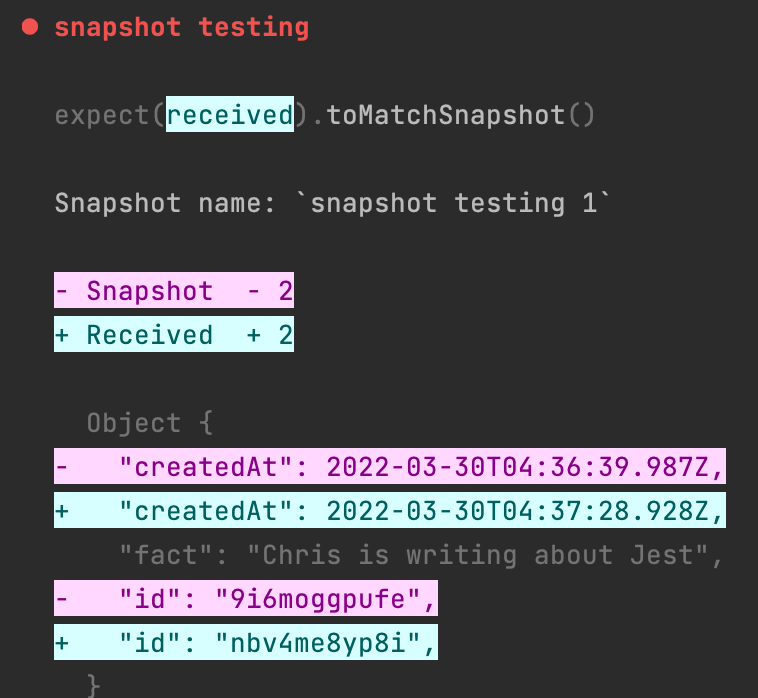
To fix this, we have to make sure Jest knows that the createdAt can be any date, and the ID can be any string type.
Luckily for us, it comes with this function, inside the toMatchSnapshot function you can define what objects should be made of like this:
test('snapshot testing', async () => {
  const randomFact = {
    id: Math.random().toString(36).slice(2),
    fact: 'Chris is writing about Jest',
    createdAt: new Date(),
  };

  expect(randomFact).toMatchSnapshot({
    id: expect.any(String),
    createdAt: expect.any(Date),
  });
});
Note how we didn't add the fact. This means this will still check uniquely for each snapshot.
Now make sure to run your next test while passing the update flag.
npm run test -u
And after the update, your snapshot should look like this:
exports[`snapshot testing 1`] = `
Object {
  "createdAt": Any<Date>,
  "fact": "Chris is writing about Jest",
  "id": Any<String>,
}
`;
Perfect!
We now have a unique date check on the createdAt field and a string check for the id.
Thank you for reading, and let's connect!
Thank you for reading my blog. Feel free to subscribe to my email newsletter and connect on Facebook or Twitter
About the author
I'm a full-stack developer from South Africa 🇿🇦. I love writing about JavaScript, HTML and CSS.
Comments
Join the discussionNo comments yet. Be the first to comment.



