
JavaScript paste text from the clipboard

I've made several articles on copying text to the clipboard in JavaScript with the Clipboard API, or execCommand.
But we never looked at how we could paste information from the clipboard with the click of a button.
Someone recently asked me how to do this on Twitter, so here you go, a dedicated article to pasting text in your clipboard.
JavaScript paste text from the clipboard
The main issue with this feature is that we need permission from the browser the read this data.
So on the very first try, the user will be prompted with a popup like this.
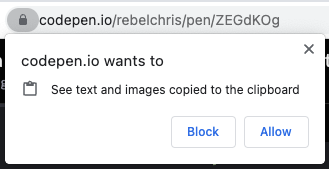
Let's take our existing clipboard demo and make the paste field interact.
In our demo, you should be able to click the top text area, which will copy the text to the clipboard.
Once the user clicks the bottom field, it should auto-paste it.
We'll first need to assign this field to a variable and attach a click handler.
const paste = document.getElementById('paste');
paste.addEventListener('click', () => {
  // Do our action
});
Our actual paste action is super simple and looks like this:
navigator.clipboard.readText().then((clipText) => (paste.innerText = clipText));
We use the clipboard API and invoke the readText function. It will give us the current value, which we can set on our paste field.
You can try this out on the following CodePen.
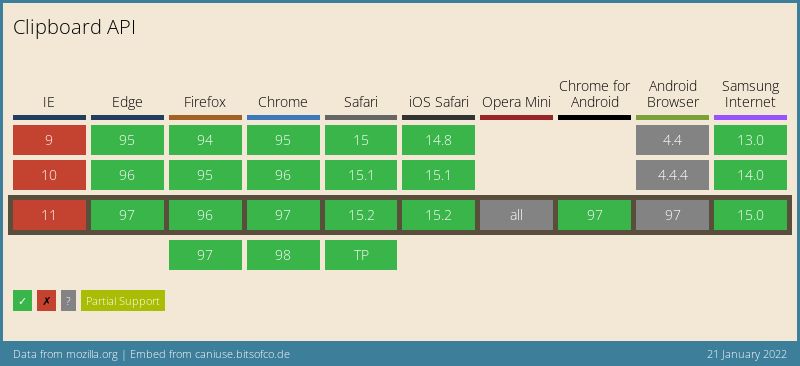
Browser support for Clipboard API
The support for the Clipboard API improved massively over the past couple of months, and all latest versions seem to support it fully.
Thank you for reading, and let's connect!
Thank you for reading my blog. Feel free to subscribe to my email newsletter and connect on Facebook or Twitter
About the author
I'm a full-stack developer from South Africa 🇿🇦. I love writing about JavaScript, HTML and CSS.
Comments
Join the discussionNo comments yet. Be the first to comment.



