
Javascript native barcode detector API

Today I'm looking at a super cool new API, the Barcode detector API. This is now shipped as a stable version since Chrome 83.
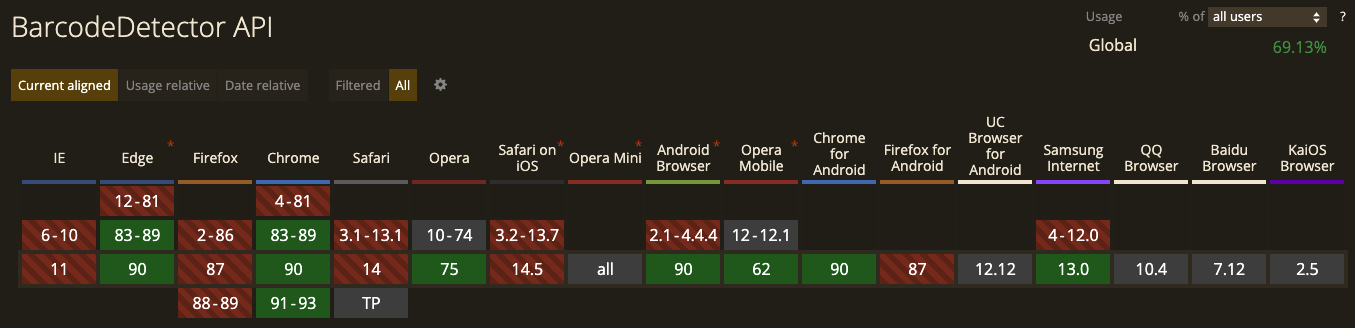
Be aware it's not a fully supported API by all browsers yet.
The Barcode detector API, as its name suggests can detect barcodes of several formats from an image or video source.
The end result for today will look like this:
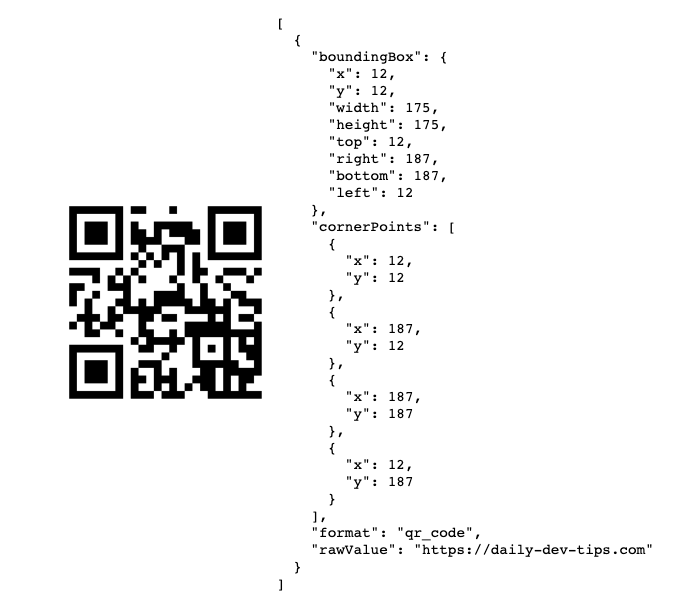
Note: You can find a full demo below
Using the Barcode Detector API
Using the barcode API is actually pretty simple. We can create a detector like this:
// Plain one:
const barcodeDetector = new BarcodeDetector();

// Specific format one:
const barcodeDetector = new BarcodeDetector({
  formats: [
    'aztec',
    'code_128',
    'code_39',
    'code_93',
    'codabar',
    'data_matrix',
    'ean_13',
    'ean_8',
    'itf',
    'pdf417',
    'qr_code',
    'upc_a',
    'upc_e'
  ]
});
As you can see we can pass an array of formats we want to be scanning for, this might come in handy if you are only looking for one type of barcode.
Then we can simply call the detect function and pass an image stream.
try {
  const barcodes = await barcodeDetector.detect(image);
  barcodes.forEach(barcode => doSomething(barcode));
} catch (e) {
  console.error('Barcode detection failed:', e);
}
In our case, we will be using a fixed image to detect the barcode.
<img
  src="https://cdn.hashnode.com/res/hashnode/image/upload/v1619338701344/-rJKsBrhI.png"
  crossorigin
  alt="QR Coden Daily Dev Tips"
/>
And now we can simply create a barcode detector that will use this image, and output all data in a newly created pre tag.
const barcodeDetector = new BarcodeDetector();
const image = document.querySelector('img');

barcodeDetector
  .detect(image)
  .then(barcodes => {
    let pre = document.createElement('pre');
    pre.innerHTML = JSON.stringify(barcodes, null, 2);
    image.after(pre);
  })
  .catch(console.error);
And it gives us the result of a bounding box, corner-points, and the actual value.
You can try this out on the following Codepen.
Browser support
As mentioned the API is still in progress being rolled out, as of Chrome 83 and Edge 82 we can use it. However, Firefox does not yet support it.
Thank you for reading, and let's connect!
Thank you for reading my blog. Feel free to subscribe to my email newsletter and connect on Facebook or Twitter
About the author
I'm a full-stack developer from South Africa 🇿🇦. I love writing about JavaScript, HTML and CSS.
Comments
Join the discussionNo comments yet. Be the first to comment.



