
JavaScript detecting key combinations

The other day we built this cool tool to detect which key was pressed. And as you may have seen, it could only register one key at a time.
Today I want to look at how we can capture some combination of keys.
This version will be based on only modifier keys and 1 specific key.
The modifiers keys we get:
metaKeyctrlKeyaltKeyshiftKey
Although we can't combine the regular letters, we can make a combination of these modifier keys.
For instance: metaKey + altKey + d
Detecting key combinations in JavaScript
As mentioned, we don't need to change much in our existing codebase from our normal key detection example.
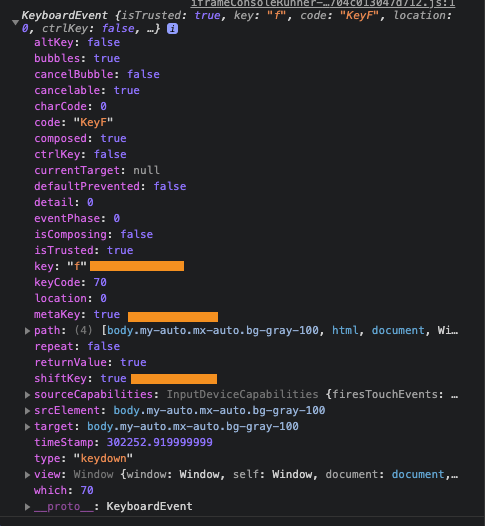
On the KeyBoardEvent, we get specific data, including the boolean status of the four modifiers keys.
Check out this example where I pressed Shift + Meta + f.
So let's first convert our HTML, so we have all the options available.
<body class="my-auto mx-auto bg-gray-100">
  <div class="max-w-md py-4 px-8 bg-white shadow-lg rounded-lg my-20">
    <div>
      <p class="text-gray-600" id="info">
        Press a key combi to see the magic 🪄
      </p>
      <div id="keys" class="hidden flex">
        <div id="meta" class="hidden mx-2 p-2 border-2">Meta</div>
        <div id="ctrl" class="hidden mx-2 p-2 border-2">Ctrl</div>
        <div id="shift" class="hidden mx-2 p-2 border-2">Shift</div>
        <div id="alt" class="hidden mx-2 p-2 border-2">Alt</div>
        <div id="key" class="mx-2 p-2 border-2">Key</div>
      </div>
    </div>
  </div>
</body>
As you can see, I decided to add all the options and the one key, but they are all hidden at first.
We then need to define all these variables in JavaScript.
const key = document.getElementById("key"),
  keys = document.getElementById("keys"),
  info = document.getElementById("info"),
  meta = document.getElementById("meta"),
  ctrl = document.getElementById("ctrl"),
  shift = document.getElementById("shift"),
  alt = document.getElementById("alt");
And as before, we want to listen to the keyDown event.
document.onkeydown = function (e) {
    // Function here
});
We want to check that it is a combination call, not just the first hit on one of the modifier keys.
if ((!e.altKey && !e.ctrlKey && !e.metaKey && !e.shiftKey) || e.key === "Meta" || e.key === "Shift" || e.key === "Control" || e.key === "alt") {
    return;
}
If that's the case, we simply return the function to stop it.
If not, we have a key combination and can show the appropriate keys.
e.altKey ? alt.classList.remove("hidden") : alt.classList.add("hidden");
e.shiftKey ? shift.classList.remove("hidden") : shift.classList.add("hidden");
e.metaKey ? meta.classList.remove("hidden") : meta.classList.add("hidden");
e.ctrlKey ? ctrl.classList.remove("hidden") : ctrl.classList.add("hidden");
info.classList.add("hidden");
keys.classList.remove("hidden");
key.innerHTML = e.keyCode;
The above section will show or hide the modifier keys, and eventually, we also add the specific key.
You might see in the demo below that it will show up as a weird character if you have certain combinations. The key code, however, will always be the same!
Thank you for reading, and let's connect!
Thank you for reading my blog. Feel free to subscribe to my email newsletter and connect on Facebook or Twitter
About the author
I'm a full-stack developer from South Africa 🇿🇦. I love writing about JavaScript, HTML and CSS.
Comments
Join the discussionNo comments yet. Be the first to comment.



