
HTML spellcheck attribute

Did you know HTML has a spellcheck attribute? It tells the browser if it should spellcheck an area or not.
It's as simple as adding the spellcheck attribute on an element.
It will look like this:
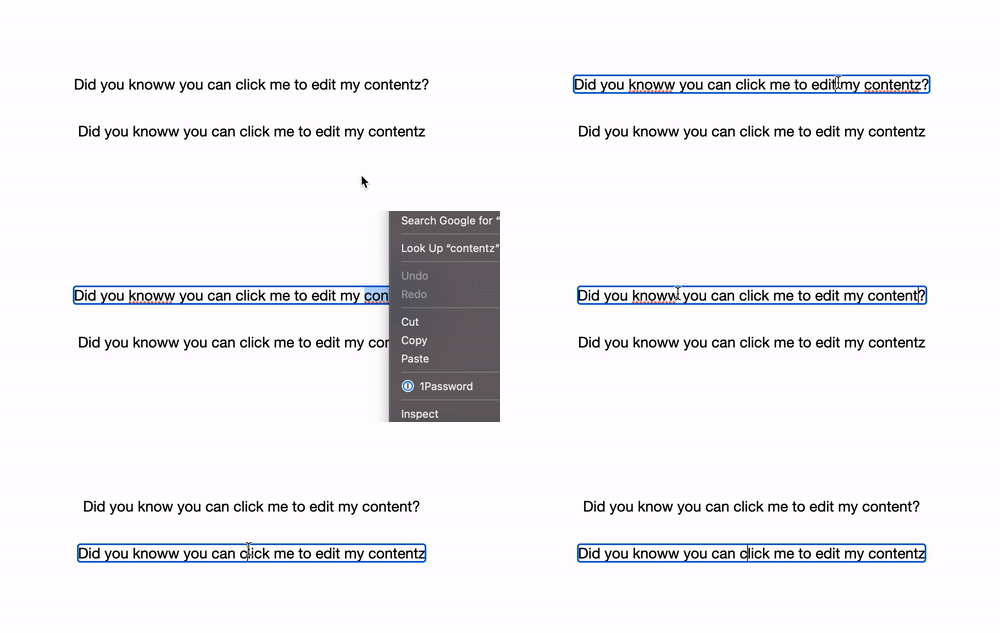
HTML Spellcheck attribute
For our example, we will use the contenteditable element, I'll make one with spellcheck and the other not.
<p contenteditable="true" spellcheck="true">
  Did you knoww you can click me to edit my contentz?
</p>
<p contenteditable="true" spellcheck="false">
  Did you knoww you can click me to edit my contentz
</p>
As you can see, both paragraphs have the contenteditable tag, but one has the spellcheck true and one not.
This now allows us to have the native spellchecker on the top one.
Note: Grammarly will still work on both!
You can have a play with the following Codepen to try it out.
Browser support
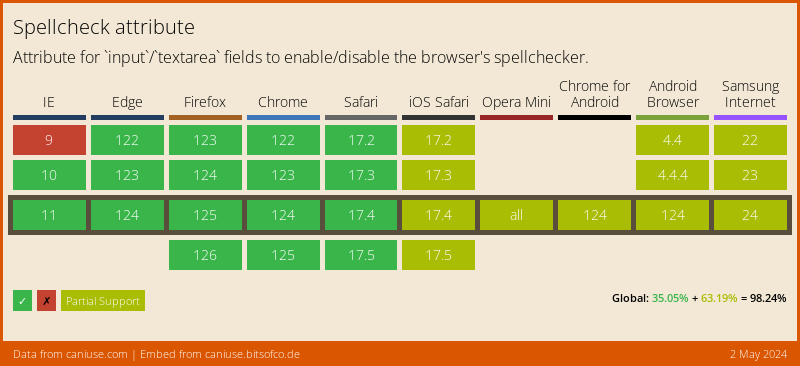
The spellcheck attribute has good support. You can see partial support in some browsers, mainly depending on which tag you use the spellcheck attribute.
Thank you for reading, and let's connect!
Thank you for reading my blog. Feel free to subscribe to my email newsletter and connect on Facebook or Twitter
About the author
I'm a full-stack developer from South Africa 🇿🇦. I love writing about JavaScript, HTML and CSS.
Comments
Join the discussionVery cool!
Yeah didn't know this one existed, cool to find new elements 👏



