
HTML mark tag a digital marker

Although Mark is also a name, it's not what this HTML attribute is used for.
Mark is used to describing a highlight of a text, to mark it, or highlight it.
How it works:
<p>This is some <mark>highlighted text</mark> using the Mark tag.</p>
And that will result in:

Custom styling the Mark tag
We can also add custom styling to our mark tag.
mark {
  background: purple;
  color: white;
}
This will give the following result:

Common use cases for the mark tag
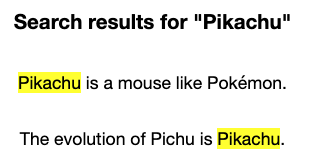
One place where you often find the mark tag being used is on search result pages.
You'll find the word you were looking for highlighted.
<h3>Search results for "Pikachu"</h3>
<p><mark>Pikachu</mark> is a mouse like Pokémon.</p>
<p>The evolution of Pichu is <mark>Pikachu</mark>.</p>
Demo
You can have a play with the following Codepen I set up to showcase the mark tag.
Browser support
The mark tag is really well supported and safe to use.

Thank you for reading, and let's connect!
Thank you for reading my blog. Feel free to subscribe to my email newsletter and connect on Facebook or Twitter
About the author
I'm a full-stack developer from South Africa 🇿🇦. I love writing about JavaScript, HTML and CSS.
Comments
Join the discussionIt looks super awesome; maybe I'll implement it to my Hashnode blog. 👀
Looking forward to seeing it on your blog 😎
Oh, this is nice. I absolutely love it!
Thanks, so glad you love it! I'm definitely going to use the mark element more often



