
HTML Input multiple attribute

Did you know there is a multiple attribute for HTML input fields?
If you ever worked with a file upload, you might know why you want this, but it even works on email fields!
Today I will show you how it works and why you can benefit from it.
Try out the multiple attribute in this Codepen.
The syntax for the multiple attribute is straightforward. It's enough to add the word to an input:
<input type="{file/email}" multiple />
Making an HTML file input accept multiple files
The most common use case for the multiple attribute is to use if on a <input type="file">, adding the multiple attributes to this will ensure that the user can select multiple files in one go.
The syntax will look like this:
<input type="file" name="files" multiple />
This will allow us actually to select multiple files in the file picker.
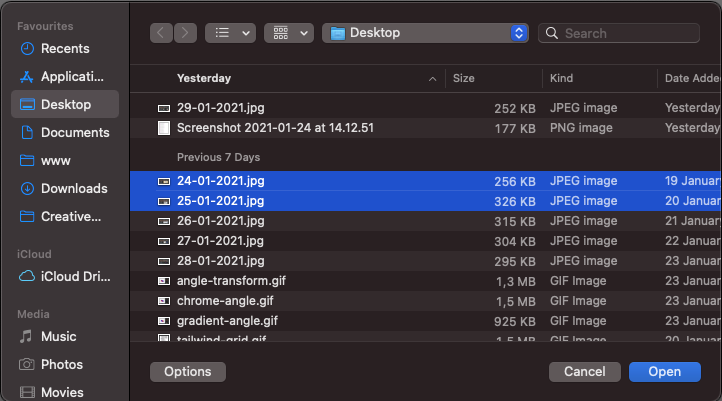
However, if you want to receive them on a backend you need also to adjust the name to reflect an array.
<input type="file" name="files[]" multiple />
This will ensure our backend will receive them in an array way instead of just the first selected file.
In PHP, for instance, we would get the following.
['files'] = [
 [
     "name" => [
         "24-01-2021.jpg",
         "25-01-2021.jpg"
     ],
     "type" => [
         "image/jpeg",
         "image/jpeg"
     ],
     "tmp_name" => [
         "/private/var/random_path",
         "/private/var/random_path",
     ]
     "size" => [
         255650,
         326338,
     ]
 ]
]
This will of course, differ for each backend language that you are using. At least you know it will arrive as an array of values.
Making an HTML email input accept multiple email addresses
Another great use-case for the multiple attribute is the email type.
By default, this type can check for emails on a form, but did you know we can enable it to accept multiple emails?
<input type="email" multiple />
The input expects email addresses with comma-separated values as:
// [email protected], [email protected]
I will be showing you how the default Chrome browser validation parses this.
First of all, let's try an input without this multiple attribute.
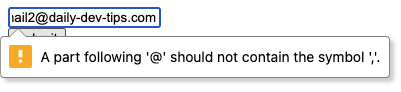
As you can see, the validation will state that the comma is not correct if we don't enable the multiple attribute.
Now let's try adding the multiple attribute, but type the email wrong.
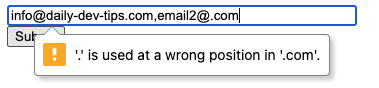
As you can see above, it now accepts the second email but states it's wrong.
We can even make a mistake in the first email, and it will pick up on that.

Note: Seeing this all works, we can of course, also leverage the JavaScript validation engine in the same way!
Browser Support
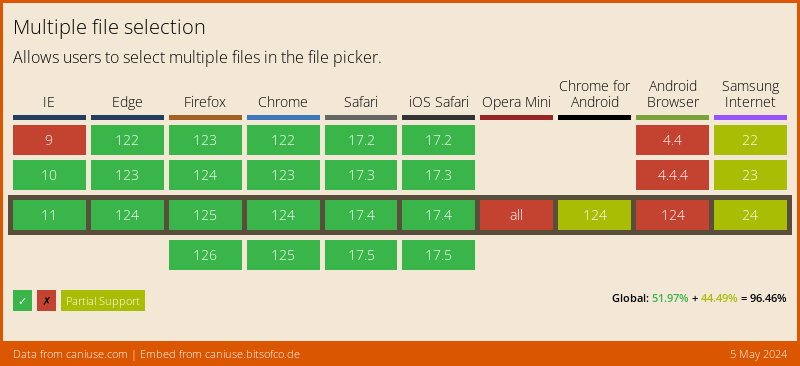
The HTML Multiple attribute has outstanding support. It won't work in some mobile browsers and IE9.
Thank you for reading, and let's connect!
Thank you for reading my blog. Feel free to subscribe to my email newsletter and connect on Facebook or Twitter
About the author
I'm a full-stack developer from South Africa 🇿🇦. I love writing about JavaScript, HTML and CSS.
Comments
Join the discussionNo comments yet. Be the first to comment.



