
How TypeScript can change your life

JavaScript is now one of the most used programming languages, and it's fantastic at what it does. But it's not always strict enough. It will give us a lot of freedom, which sometimes is exactly what we want. But for big applications not ideal, as we can break parts over time.
An example of this might be a variable you have in your database, it's intended as a number, but one day it returns a stringed version of a number like '123'.
This might not be the end of the world, but let's say you were doing calculations with this, and always expected a number, so you don't parse it in any way.
That's exactly where TypeScript would have warned you about the value not being correctly defined.
So, what is TypeScript?
TypesScript is a superset of JavaScript, giving us static typing, classes, and interfaces.
As a benefit from using those, our IDEs can give us a better developer experience because they will tell us what to expect from certain functions/variables.
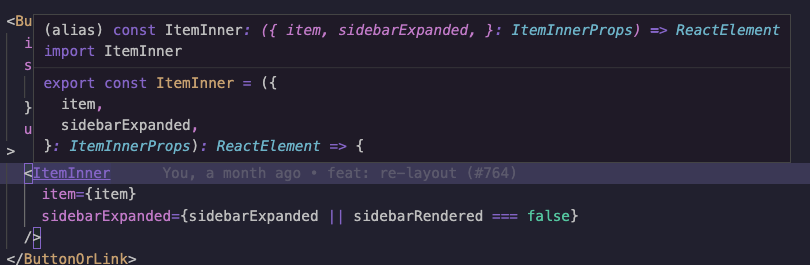
TypeScript runs before your code runs, making sure that the types of your code are correctly typed.
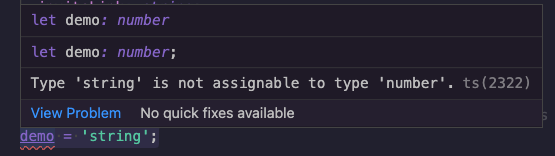
For instance, let's take this as an example:
let demo: number;
demo = 'string';
We create the let as a number type, so it's wrong to assign it as a string value, and TypeScript will let us know.
A good thing to keep in mind is that TypeScript won't change your output code.
Eventually, your output will be plain JavaScript, but we ensured the variables and types are exactly what we expected.
You can compare it to SASS/SCSS. It's a different way of writing CSS, but the result is just plain CSS.
How to get started
Before diving into TypeScript, I would suggest getting familiar with TypeScript. I'll be using the upcoming articles to go through it's basics.
But let's take an introductory look at what it takes to move from JavaScript to TypeScript.
We will need to convert our existing .js files to .ts files.
Then we will need a typescript compiler to convert these .ts into plain .js files again.
The TypeScript compiler is called tsc.
We can install it by installing the following package.
npm install -g typescript
Once done, we can run tsc file.ts to check that specific file.
This command will determine if our TypeScript is valid and output the same name but as a .js file.
Let's add the wrong typed code as we discussed before:
let myName: string;
myName = 123;
console.log(`Hello ${myName}`);
If we now try to compile this code, we get the following error.
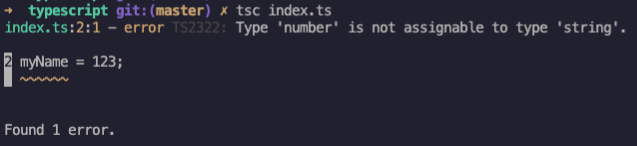
However, the index.js file is still being generated with the converted JavaScript version.
This is because, in the end, TypeScript is there to help us, but it will just assume we know what we are doing. It warned us about something, and it's up to us to do something with this.
However, you can tell it not to compile on an error by using the --noEmitOnError flag.
What's next
Now that we broadly know what TypeScript is and what it does, what can we do next?
In the next couple of articles, we'll be going through the basics of TypeScript.
- Types
- Interfaces
- Functions
- And more
Keep an eye out for the upcoming articles if you are interested in learning TypeScript with me 🙌.
Thank you for reading, and let's connect!
Thank you for reading my blog. Feel free to subscribe to my email newsletter and connect on Facebook or Twitter
About the author
I'm a full-stack developer from South Africa 🇿🇦. I love writing about JavaScript, HTML and CSS.
Comments
Join the discussionNo comments yet. Be the first to comment.



