

There are some files you don't want to commit to Git, simply because they would be too big and don't have any use.
Some examples of these files:
node_modules: Super big and changes every install.envoften contains secrets and keys. Make sure to ignore this file- Operating system files like:
Thumbs.db,.DS_Store .logfiles- Any cache directory
Luckily there is a simple way always to ignore these from your git repo.
Introducing the .gitignore file
As the name suggests, the .gitignore file will ignore specific files you marked inside it.
To use one, create a file called .gitignore at the root of your project.
Let's already add our operating files like so:
# Ignore platform files
Thumbs.db
.DS_Store
But let's put it to the actual test and initialize npm in our testing repo.
npm init -y
Now let's add a random package. I choose fastify for testing purposes.
npm i fastify
If we then look at our Git-changed files, we'll see a massive list of files.
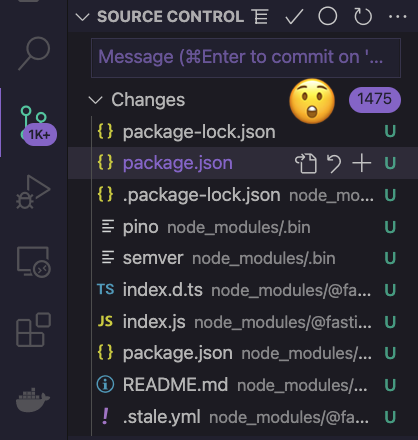
That's not really what we want as this contains all the node_modules files.
Let's modify our .gitignore file to ignore these like so:
# Ignore platform files
Thumbs.db
.DS_Store

# Packages
node_modules
If we take another look, we'll see there are only three files ready to be committed.
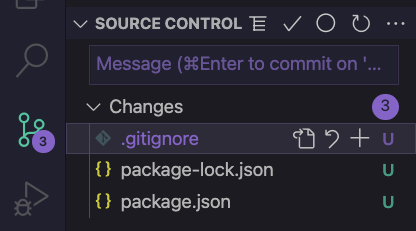
Way better!
And there you go, you can add any files you want to this .gitignore file but be aware of what you'll don't want to be committed.
I've pushed this to GitHub in case you want to have a look.
Thank you for reading, and let's connect!
Thank you for reading my blog. Feel free to subscribe to my email newsletter and connect on Facebook or Twitter
About the author
I'm a full-stack developer from South Africa 🇿🇦. I love writing about JavaScript, HTML and CSS.
Comments
Join the discussionNo comments yet. Be the first to comment.
Git basics
In this series we'll cover some basic, but very important topics in Git, GitHub and Open source



