
Getting notified in JavaScript when a Media Query changes

Media queries are awesome and well used in modern web development. But how can one notify JavaScript if a certain media query is met.
There is a window listener called: matchMedia, and it does exactly this!
This is what we will be making today:

JavaScript Media Query Changes
To use matchMedia we call the following:
var mediaQuery = window.matchMedia('(max-width: 500px)');
To use it we can add listeners to it:
mediaQuery.addListener(console.log);
Now if we size our screen with the console open it will fire a console log each this this media queries matches.
The return will have a MediaQueryListEvent, which contains a value called matches to say true or false.
Console logs are cool, but it doesn't really do much for us, so we can also attach a function:
mediaQuery.addListener(alertMe);

function alertMe(e) {
  if (e.matches) {
    document.body.style.backgroundColor = 'green';
  } else {
    document.body.style.backgroundColor = 'red';
  }
}
Now, if we resize and hit the media query, our screen will turn green or red depending on yes or no.
See this Codepen for a demo.
More on MediaQueryList here MDN Web Docs
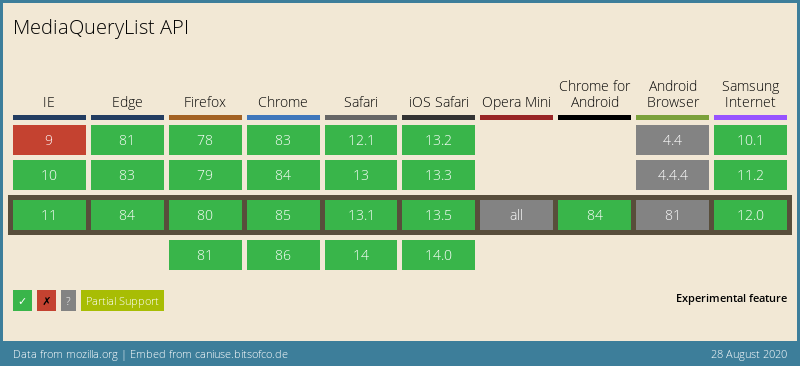
Browser Support
This function has really good support! For a novice function, definitely, one to use in projects.
Thank you for reading, and let's connect!
Thank you for reading my blog. Feel free to subscribe to my email newsletter and connect on Facebook or Twitter
About the author
I'm a full-stack developer from South Africa 🇿🇦. I love writing about JavaScript, HTML and CSS.
Comments
Join the discussionNo comments yet. Be the first to comment.



