
Detecting faces from the webcam in JavaScript

As we looked at the face detection API yesterday, let's see how we can make it like the barcode from the webcam example.
We will be doing this one a little bit differently, due to the high drawing rate, we will draw everything on the canvas, which makes it easier to draw the detection.
The end goal for today is cool face detection from a webcam input.

Writing video input to the canvas
For the first part, let's look at how we can capture the video input, and write it to a canvas.
For our HTML we can use the following:
<canvas></canvas>
Now let's introduce the basic onload to call an asynchronous function again.
window.onload = () => {
  detect();
};
Inside our detect function, we can have a play with getting the canvas and writing the video stream to it. But first, let's define all our variables.
async function detect() {
  const canvas = document.querySelector('canvas');
  const context = canvas.getContext('2d');
  const faceDetector = new FaceDetector({fastMode: true});
  const mediaStream = await navigator.mediaDevices.getUserMedia({
    video: {facingMode: 'environment'}
  });

  const video = document.createElement('video');
  video.srcObject = mediaStream;
  video.autoplay = true;
  video.onloadedmetadata = () => {
    canvas.width = video.videoWidth;
    canvas.height = video.videoHeight;
  };
}
However this will not write the actual video yet, this will need to be based on the loop to write every change.
So let's add the loop already.
(function renderLoop() {
  requestAnimationFrame(renderLoop);
  context.clearRect(0, 0, canvas.width, canvas.height);
  context.drawImage(video, 0, 0, video.videoWidth, video.videoHeight);
})();
That will give us the webcam output on the screen.

Detecting faces from the webcam input in JavaScript
So now that we have the webcam on the canvas, let's look at how we can implement our face detection.
We will change our loop to call the render function.
(function renderLoop() {
  requestAnimationFrame(renderLoop);
  render();
})();
This render function in return will call the face detector API.
function render() {
  faceDetector
    .detect(video)
    .then(faces => {
      context.clearRect(0, 0, canvas.width, canvas.height);
      context.drawImage(video, 0, 0, video.videoWidth, video.videoHeight);
    })
    .catch(console.error);
}
Now let's draw an outline for each face we find.
context.strokeStyle = '#FFFF00';
context.lineWidth = 5;
faces.forEach(face => {
  const {top, left, width, height} = face.boundingBox;
  context.beginPath();
  context.rect(left, top, width, height);
  context.stroke();
});
And it should give us a result like this.
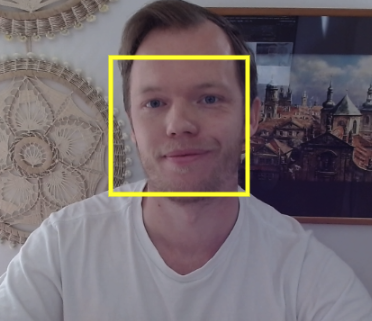
If you have the flag enabled in Chrome.
Open Chrome, and type the following address: chrome://flags, in there enable the #enable-experimental-web-platform-features.
You should be able to try out this Codepen as well.
Browser support
This API is unfortunately not publicly available, so browser support can't be provided at this stage. However, is a very cool one to look out for!
Thank you for reading, and let's connect!
Thank you for reading my blog. Feel free to subscribe to my email newsletter and connect on Facebook or Twitter
About the author
I'm a full-stack developer from South Africa 🇿🇦. I love writing about JavaScript, HTML and CSS.
Comments
Join the discussionNo comments yet. Be the first to comment.



