
CSS Writing Mode

The other day I came across the CSS writing-mode property and must admit I've never used it, so I decided to see what we can do with it.
It's an awesome property that tells us how text should flow, horizontal, or vertical.
HTML Structure
We are testing the three values we can use and a default benchmark text:
<p>This text is your basic pharagraph and flows naturally</p>
<p class="vertical-rl">This text goes Vertical from Right to Left</p>
<p class="vertical-lr">This text goes Vertical from Left to Right</p>
<p class="horizontal-tb">This text goes Horizontal from Top to Bottom</p>
CSS Writing Mode
As mentioned, CSS writing-mode can be used to define how a text should flow.
It comes with three possible options:
vertical-rl: Goes Vertical from Right to Leftvertical-lr: Goes Vertical from Left to Righthorizontal-tb: Goes Horizontal from Top to Bottom (Default)
The horizontal is the default, and what the normal value is.
.vertical-rl {
  writing-mode: vertical-rl;
}
.vertical-lr {
  writing-mode: vertical-lr;
}
.horizontal-tb {
  writing-mode: horizontal-tb;
}
This results in the following Codepen.
Browser Support
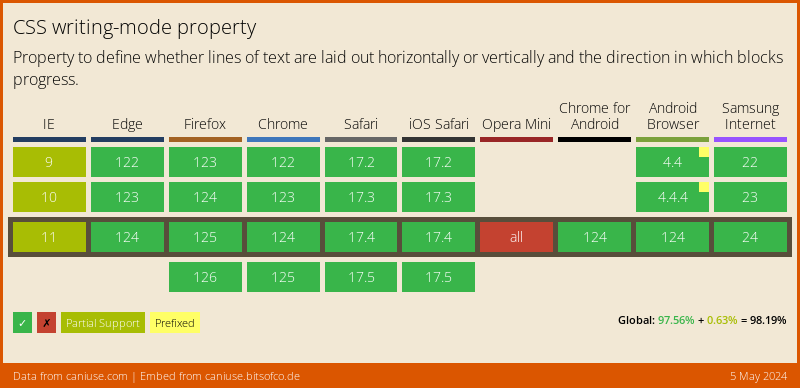
Writing mode comes with relative good support, it's missing some IE features and Opera Mini (as many cool features).
Thank you for reading, and let's connect!
Thank you for reading my blog. Feel free to subscribe to my email newsletter and connect on Facebook or Twitter
About the author
I'm a full-stack developer from South Africa 🇿🇦. I love writing about JavaScript, HTML and CSS.
Comments
Join the discussionNo comments yet. Be the first to comment.



