
CSS Modern multi-line ellipsis

A while ago I wrote an article on truncating text with ellipsis, and we used a fail-safe version for the multi-line ellipsis.
Today I'm looking into a more modern and simple approach to solve this truncate problem.
The end result:
HTML Structure
The HTML for this assignment is super basic, we just need one big paragraph.
<p>
  Morbi rutrum lectus turpis, sit amet sollicitudin eros condimentum vitae. Integer
  consequat eros vel tortor tempor, et vulputate turpis pretium. Suspendisse vel metus
  sem. Aenean sollicitudin luctus est ac gravida. Curabitur eros tellus, scelerisque sit
  amet suscipit consequat, laoreet at quam. Nullam massa ante, tincidunt quis metus ut,
  consequat facilisis risus. Orci varius natoque penatibus et magnis dis parturient
  montes, nascetur ridiculus mus.
</p>
As you can imagine this is way bigger than just three lines right. Let's see how we can solve this in the modern-day and age.
CSS Truncate text on 3 lines
To get right to it, we'll be using line-clamp to solve this.
Line-clamp will allow us to state how many lines it should cut the text.
p {
  width: 200px;
  display: -webkit-box;
  -webkit-line-clamp: 3;
  -webkit-box-orient: vertical;
  overflow: hidden;
}
As you may have spotted, for now, this only works if the display method is webkit-box.
So far this is by far the easiest way to achieve this, but has some odds and ends, like having to use the display format.
Browser support
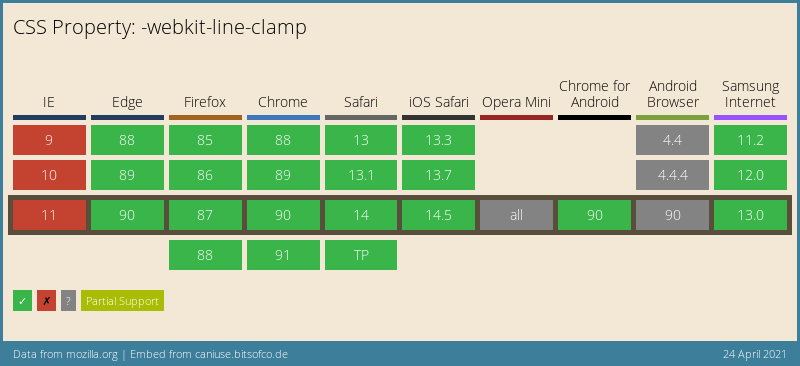
I actually was surprised the browser support for this is quite good. Most modern browsers support it out of the box.
Thank you for reading, and let's connect!
Thank you for reading my blog. Feel free to subscribe to my email newsletter and connect on Facebook or Twitter
About the author
I'm a full-stack developer from South Africa 🇿🇦. I love writing about JavaScript, HTML and CSS.
Comments
Join the discussionThanks a million. I have been looking for an implement of this. Had to use JavaScript to clip. This works too!
Awesome Marvin, Glad it was helpfull!
Very interesting. Thanks for share with us.
You're welcome Douglas, glad you enjoyed it



