
CSS Font-display and how to use it

I'm a full-stack developer from South Africa 🇿🇦. I love writing about JavaScript, HTML and CSS.
Yesterday we included a custom Google Font on our website and briefly mentioned the font-display option.
Let's dive deeper into what it is and how it works.
As we saw yesterday, custom fonts tend to load slowly and block the browser from defining when your website is ready. This, in turn, makes Google think your website is slow, and nobody wants that.
So in modern browsers, we can use the font-display function.
Font Display options
auto: This is the default value, and leaves the decision up to the browser, in most cases, it will beblockblock: This tells the browser to hide the text until the font has fully loaded. This is the flash you see when it swaps on some sites.swap: Swap, as the name suggests, will start with the fallback font and swap once the font is loaded.fallback: This is a compromise betweenautoandswap. It will start with hiding the font for a brief period and then go into theswaproutine.optional: This is much like thefallbackmethod. It tells the browser to start with a hide and then transition into the fallback font. The nice option here is that it allows the browser to see if the custom font is even used at all. If, for instance, a slow connection appears, they are less likely even to see the custom font.
How to use font-display
As seen in the previous example, we can use it as such:
h1 {
  font-size: 40px;
  font-family: 'Amatic SC', cursive;
  font-display: swap;
}
What is a fallback font?
So we talked about fallback fonts quite a bit, but what are those even?
h1 {
  font-family: 'Amatic SC', 'Times New Roman', Times, serif;
}
So in the above example, the custom font is Amatic SC the system font is Times New Roman or Times, so in the case of using swap, we will first see Times New Roman and when the custom font has loaded it will show Amatic SC.
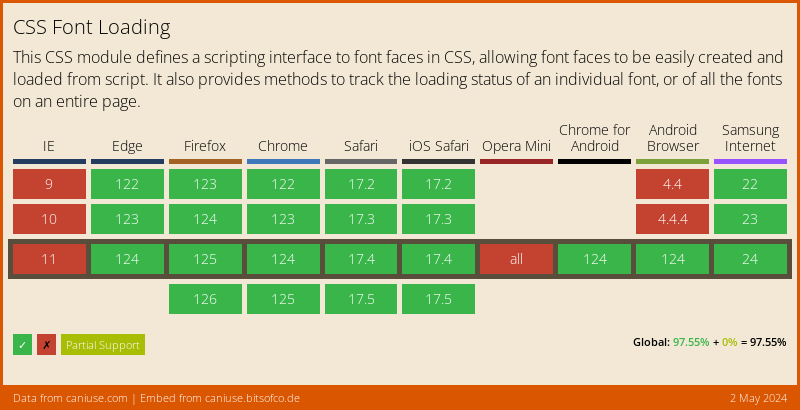
Browser Support
Not all browsers support this, but I encourage you to use font-display. The browsers that don't support it will decide for you.
Thank you for reading, and let's connect!
Thank you for reading my blog, feel free to subscribe to my email newsletter and connect on Facebook or Twitter



