
Converting a regular Angular application into Angular Universal

Here we are. We created this fantastic Angular application. It serves as a dynamic website, and it rocks!
However, by doing a quick SEO check, tears start rolling down your eyes quickly 😭.
You start doing some research, and titles, meta descriptions, OG-tags all seem out of reach.
At this point, you might even be thinking, heck, should we just start over in another framework? There's no way we can fix all of these issues now.
And then there is Angular Universal! It's a way to render an Angular application on the server.
Your normal Angular application will render in the browser, making it a SPA, quick, but no way to do actual SEO.
With Universal, we get the best of both worlds.
Benefits of Angular Universal
- We can add SEO elements, like Titles and Meta descriptions
- We have better ways to improve the speed of our application
- We can show the user a skeleton first while Angular is loading
- We keep the real-time experience once the first load is done
Note: Google Bot is actually capable of indexing JavaScript websites like Angular. The other search engines, however, don't.
Adding Angular Universal to an Angular project
Let's start by having a basic Angular application.
In our case, we will be working with our first Angular app we created a while ago.
Download the Angular starter template from GitHub.
The basic structure looks like this:
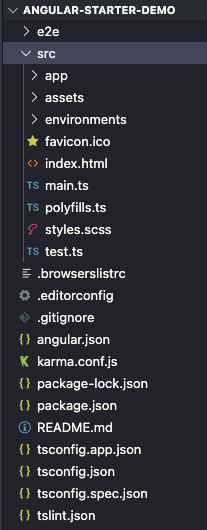
Then we can add Angular Universal by opening our favorite terminal and executing the following command.
ng add @nguniversal/express-engine
This will add Angular Universal and give us the following structure.
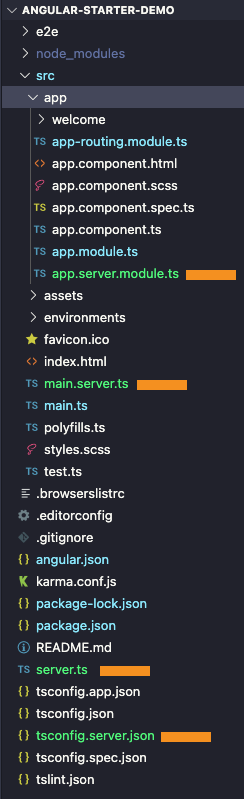
All the orange lines are new files
Running Angular Universal
Cool, so we usually would run Angular by executing ng serve for Angular Universal. We must execute the following command to run it locally.
npm run dev:ssr
This might take a little bit longer than you are used to from regular Angular.
You can see in the dist folder it now created two extra folders, including a browser and a server.
Other than that we can open http://localhost:4200 and visit our Angular application.
We can still click around and refresh on different pages, so everything stays the same so far.
Building Angular Universal for production
Once you are ready for production, the following command will create a final build:
npm run build:ssr
That will create a production build of our Angular application.
You can find today's code on GitHub.
What's next:
- Help my browser API's stopped working in Angular Universal
- Adding the titleService and MetaService
- Hosting Angular Universal on a server
Keep an eye out or subscribe to my newsletter to receive daily updates on the new articles.
Thank you for reading, and let's connect!
Thank you for reading my blog. Feel free to subscribe to my email newsletter and connect on Facebook or Twitter
About the author
I'm a full-stack developer from South Africa 🇿🇦. I love writing about JavaScript, HTML and CSS.
Comments
Join the discussionVery good article, but can you finish it and show the steps for deployment? Does this extra files created after installing the universal package need some config whenever we make more changes and finally, the app will work as a server side app now?! So we need to deploy it as a server side application right?
Hi Safwen,
I wrote another article in regards to the hosting part. You can find it here:
https://daily-dev-tips.com/posts/hosting-angular-universal-on-a-server/



