
Changing the text selection color with CSS

Did you know there is a CSS property that can change the user selection behavior?
It got some quite good support lately and is one of these cool gimmicks to have. It doesn't break anything for the browser that doesn't support it.
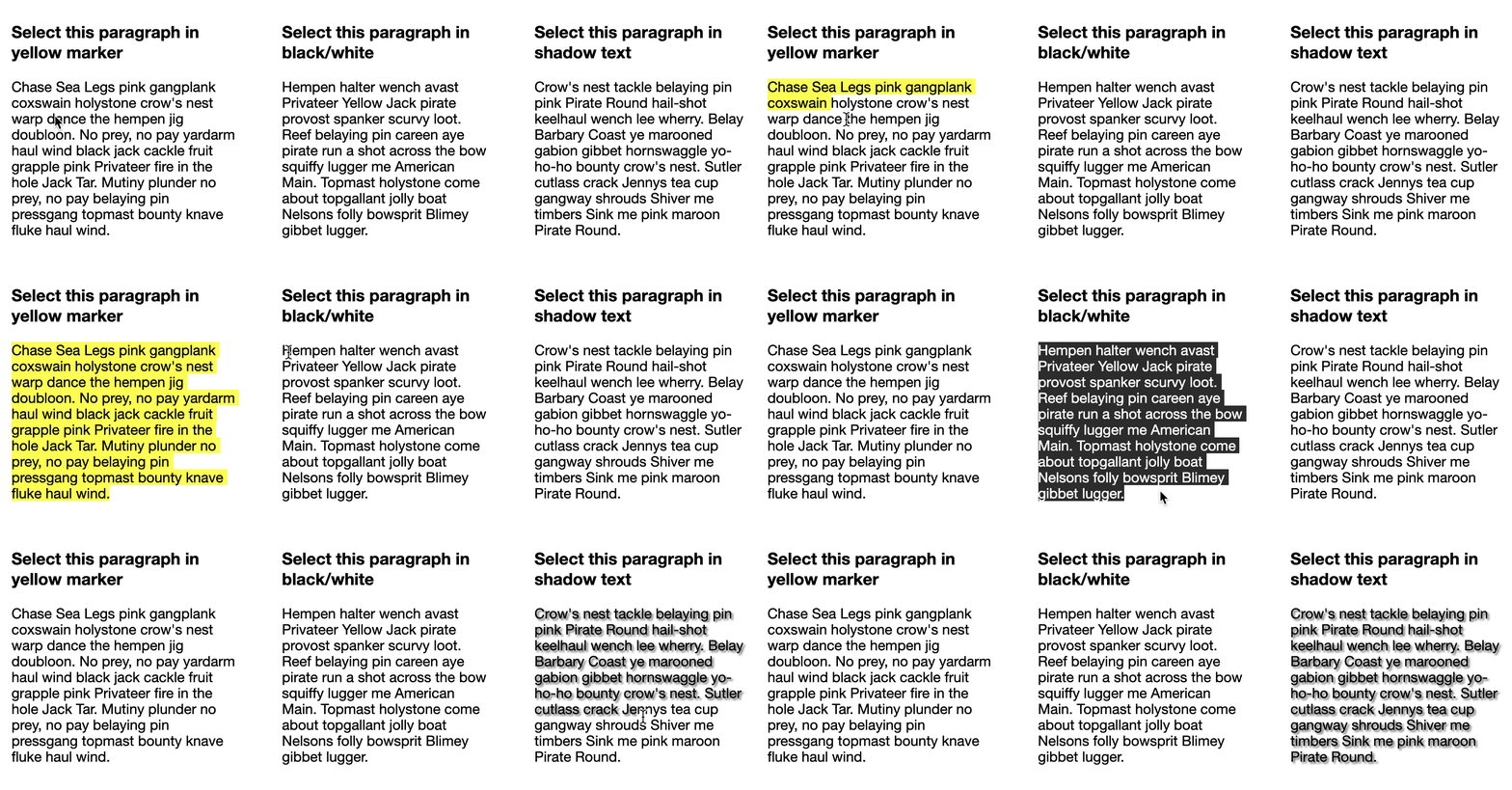
The end result will look like this.
HTML Structure
For our demo, we will have multiple paragraphs that will each do something different.
<div>
  <h3>Select this paragraph in yellow marker</h3>
  <p class="yellow">Content here</p>
</div>

<div>
  <h3>Select this paragraph in black/white</h3>
  <p class="black">Content here</p>
</div>

<div>
  <h3>Select this paragraph in shadow text</h3>
  <p class="shadow">Content here</p>
</div>
CSS Selection selector
Now we are going to use the selection attribute selector.
The default selector is written like this:
::selection {
  color: red;
}
Then we can add a Mozilla specific one:
::-moz-selection {
  color: red;
}
For our instance let's start with the yellow marker one:
p.yellow::selection {
  background: #FFFF00;
}
p.yellow::-moz-selection {
  background: #FFFF00;
}
This will make the background of the selection a yellow color.
Now if we move on to our black and white selector:
p.black::selection {
  background: #000;
  color: #fff;
}
p.black::-moz-selection {
  background: #000;
  color: #fff;
}
This will make the background black and the text color white.
Lastly I wanted to show you can do more then basic color selection and even add a text-shadow!
p.shadow::selection {
  text-shadow: 2px 2px 2px rgba(0, 0, 0, 0.5);
}
p.shadow::-moz-selection {
  text-shadow: 2px 2px 2px rgba(0, 0, 0, 0.5);
}
Have a play around on this Codepen.
Browser Support
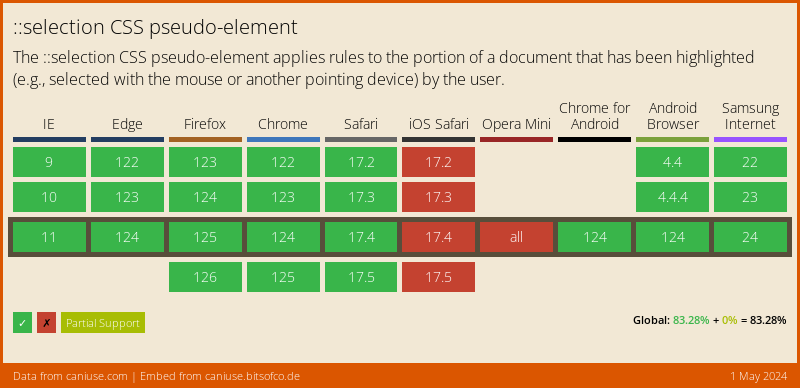
The browser support for the ::selection has really improved lately, and it can be used safely.
Thank you for reading, and let's connect!
Thank you for reading my blog. Feel free to subscribe to my email newsletter and connect on Facebook or Twitter
About the author
I'm a full-stack developer from South Africa 🇿🇦. I love writing about JavaScript, HTML and CSS.
Comments
Join the discussionOne of those little things that are nice to see. Thanks
Thanks Rahul!
Hopefully we'll see this more implemented soon 🤟
it's super cool 👌
Thanks Yogesh!
And you'll actually rarely see it in the wild 🤷♂️
This is a great feature, and can be extra fun when you randomly change the highlight color!
https://blog.braydoncoyer.dev/change-text-highlight-color-with-css
That's amazing haha! Nice to see your switching colors in that one.



