
Angular authenticating users from an API

As we have been doing quite some Angular work lately. Let's spend today on adding a user service and login to our application.
We will end up having a login service, which will call an API (fake) and return a token.
The end result will look like this.
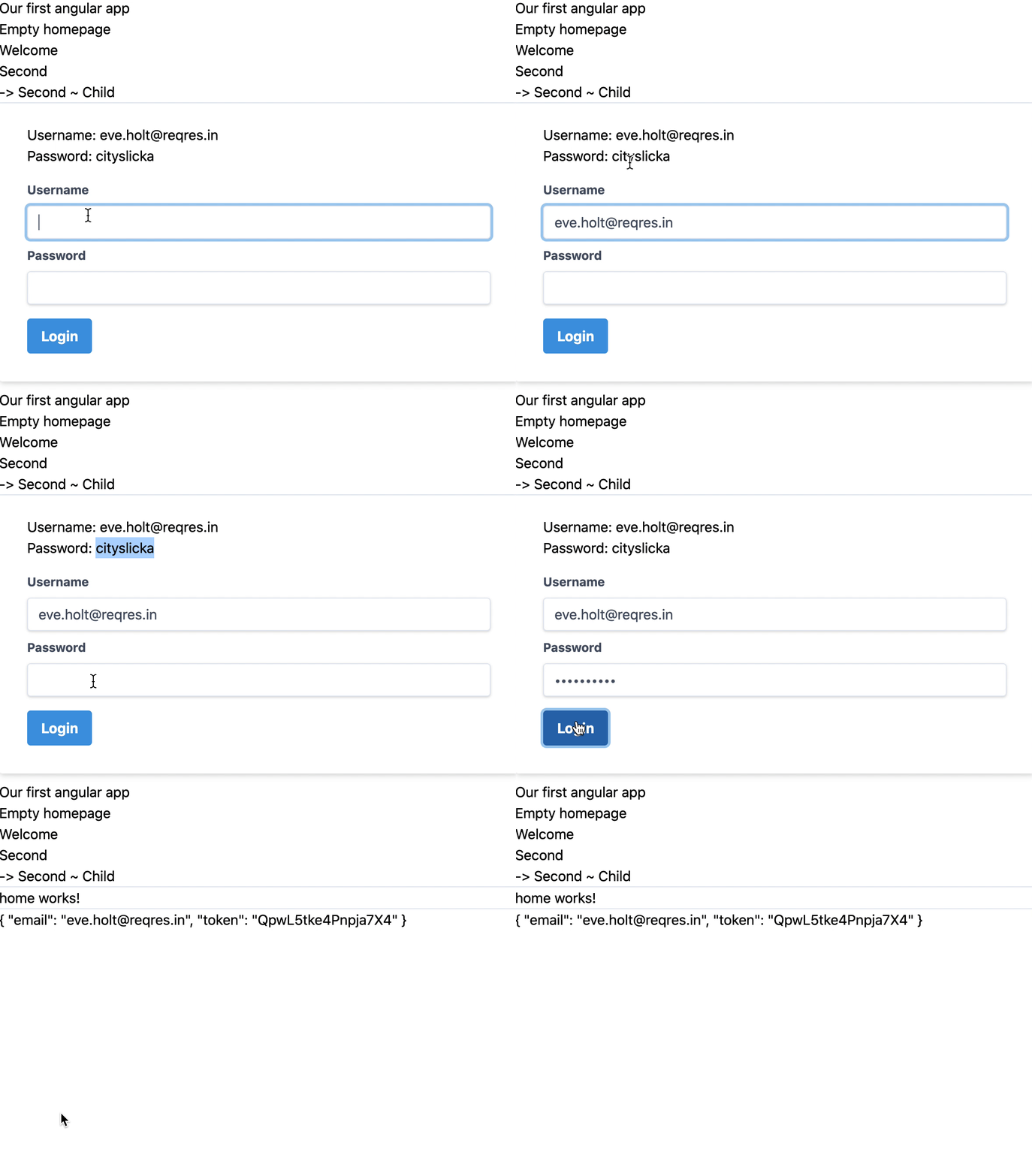
Creating a user model
Let's start off by defining a user model. In our case, we are only storing an email and a token in it.
Open your favorite terminal and run the following command.
ng generate class models/User --type=model
This will generate a user.model.ts file in the models folder.
Let's change this file to reflect our model.
export class User {
    email: string;
    token?: string;
}
You can enhance this model to reflect an actual user. Since we are using a fake endpoint, we only get the email and token back.
Modifying our environment
One cool element of Angular is that it comes with environment files. We can keep track of environment-specific variables.
Our API endpoint is going to be one of those.
We usually we will have different endpoints for our local, test, and production server.
Open your environment/environment.ts file and make it look like this.
export const environment = {
  production: false,
  apiUrl: 'https://reqres.in/'
};
Creating the auth service
Ok, if we have our model, let's go on to the service. The service will be handling the login, user state, and logout functions.
First, we'll generate this service in the terminal.
ng generate service services/Auth
This will create an auth.service.ts file in the services folder.
Let's start by defining our variables.
private userSubject: BehaviorSubject<User>;
public user: Observable<User>;
We are using Subjects and observables to store our user object in. This way, we can easily notify other components of changes in this variable.
Next, we need to define our construct
constructor(private http: HttpClient, private router: Router) {
    this.userSubject = new BehaviorSubject<User>(
      JSON.parse(localStorage.getItem('currentUser'))
    );
    this.user = this.userSubject.asObservable();
}
We are loading the Angular HttpClient and Router and subscribe to our userSubject to load whatever user object we have in our local storage.
Then we return the current user as an observable so it will be notified on every change.
Next, we'll also introduce a custom getter that will make it easy for other components to quickly get the value of the current logged in user without having to subscribe to our observable.
public get userValue(): User {
    return this.userSubject.value;
}
Note: You can see this as a once of data return.
Now let's make our login function.
login(username: string, password: string) {
return this.http
  .post<any>(`${environment.apiUrl}/api/login`, { username, password })
  .pipe(
    map(({token}) => {
      let user: User = {
        email: username,
        token: token,
      };
      localStorage.setItem('currentUser', JSON.stringify(user));
      this.userSubject.next(user);
      return user;
    })
  );
}
We pass the username and password to this function as strings, then we make a POST call to our defined apiUrl and call the api/login endpoint.
Here we pass the username and password variables.
Next, we make use of the pipe and map method to return the data.
The API returns only a token, so let's create a new user object with the username and token.
We then set the local storage to contain this token.
Next, we tell the userSubject we received a new value for the user observable.
And return the user object in this function.
Now onto our logout function
logout() {
    localStorage.removeItem('currentUser');
    this.userSubject.next(null);
}
The logout is as simple as removing the currentUser local storage object and sending a null object to our userSubject subject.
The full file will look like this:
import { Injectable } from '@angular/core';
import { HttpClient } from '@angular/common/http';
import { map } from 'rxjs/operators';
import { BehaviorSubject, Observable } from 'rxjs';
import { Router } from '@angular/router';
import { User } from '../models/user.model';
import { environment } from '../../environments/environment';

@Injectable({
  providedIn: 'root',
})
export class AuthService {
  private userSubject: BehaviorSubject<User>;
  public user: Observable<User>;

  constructor(private http: HttpClient, private router: Router) {
    this.userSubject = new BehaviorSubject<User>(
      JSON.parse(localStorage.getItem('currentUser'))
    );
    this.user = this.userSubject.asObservable();
  }

  public get userValue(): User {
    return this.userSubject.value;
  }

  login(username: string, password: string) {
    return this.http
      .post<any>(`${environment.apiUrl}/api/login`, { username, password })
      .pipe(
        map(({token}) => {
          let user: User = {
            email: username,
            token: token,
          };
          localStorage.setItem('currentUser', JSON.stringify(user));
          this.userSubject.next(user);
          return user;
        })
      );
  }

  logout() {
    localStorage.removeItem('currentUser');
    this.userSubject.next(null);
  }
}
So, technically, we can log in users and store the user object in local storage, but we have no way to call this function?
Let's also add the HttpModule to our app.module.ts.
@NgModule({
  declarations: [
    // All declarations
  ],
  imports: [
    // Other imports
    HttpClientModule
  ],
  providers: [],
  bootstrap: [AppComponent]
})
Adding a login page
Let's add a login page, which will redirect us to another page where we can see our user object.
Start by generating the login page.
ng generate component Login
The content will look like this.
import { Component, OnInit } from '@angular/core';
import { Router, ActivatedRoute } from '@angular/router';
import { FormBuilder, FormGroup, Validators } from '@angular/forms';
import { first } from 'rxjs/operators';
import { AuthService } from '../services/auth.service';

@Component({
  selector: 'app-login',
  templateUrl: './login.component.html',
  styleUrls: ['./login.component.scss'],
})
export class LoginComponent implements OnInit {
  loginForm: FormGroup;
  error = '';

  constructor(
    private formBuilder: FormBuilder,
    private router: Router,
    private authenticationService: AuthService
  ) {}

  ngOnInit() {
    this.loginForm = this.formBuilder.group({
      username: ['', Validators.required],
      password: ['', Validators.required],
    });
  }

  get f() {
    return this.loginForm.controls;
  }

  onSubmit() {
    if (this.loginForm.invalid) {
      return;
    }

    this.authenticationService
      .login(this.f.username.value, this.f.password.value)
      .pipe(first())
      .subscribe({
        next: () => {
          this.router.navigate(['/home']);
        },
        error: (error) => {
          this.error = error;
        },
      });
  }
}
We are using the form like we learned in the article about Angular Reactive forms.
Then we call our authenticationService once we call the onSubmit function.
This will send the forms username and password.
If we then get something back we navigate to the home url. If not we will display whatever the error was.
The HTML for this, based on Tailwind CSS.
<form
  [formGroup]="loginForm"
  (ngSubmit)="onSubmit()"
  class="px-8 pt-6 pb-8 mb-4 bg-white rounded shadow-md"
>
  <div class="mb-4">
    Username: [email protected]<br />
    Password: cityslicka
  </div>
  <div class="form-group">
    <label class="block mb-2 text-sm font-bold text-gray-700" for="username"
      >Username</label
    >
    <input
      type="text"
      formControlName="username"
      class="w-full px-3 py-2 leading-tight text-gray-700 border rounded shadow appearance-none focus:outline-none focus:shadow-outline"
    />
  </div>
  <div class="form-group">
    <label
      class="block mt-2 mb-2 text-sm font-bold text-gray-700"
      for="password"
      >Password</label
    >
    <input
      type="password"
      formControlName="password"
      class="w-full px-3 py-2 leading-tight text-gray-700 border rounded shadow appearance-none focus:outline-none focus:shadow-outline"
    />
  </div>
  <button
    [disabled]="!loginForm.valid"
    class="px-4 py-2 mt-4 font-bold text-white bg-blue-500 rounded hover:bg-blue-700 focus:outline-none focus:shadow-outline"
  >
    Login
  </button>
  <div class="mt-2" *ngIf="error">* Error: {{ error.message }}</div>
</form>
Let's add this route to our app-routing.module.ts file.
const routes: Routes = [
  { path: 'welcome', component: WelcomeComponent, children: [
    { path: 'about', component: AboutComponent }
  ] },
  { path: 'second', children: [
    { path: '', component: SecondComponent, },
    { path: 'child', component: ChildComponent }
  ] },
  { path: 'login', component: LoginComponent },
  { path: '',   redirectTo: '/welcome', pathMatch: 'full' },
  { path: '**', component: NotFoundComponent }
];
Creating the home route
As mentioned, we now want to redirect people to our home route and show our logged-in user's details.
Let's generate the home component.
ng generate component Home
The file will look like this.
import { Component } from '@angular/core';
import { User } from '../models/user.model';
import { AuthService } from '../services/auth.service';

@Component({
  selector: 'app-home',
  templateUrl: './home.component.html',
  styleUrls: ['./home.component.scss']
})
export class HomeComponent {
  currentUser: User;

  constructor(private authenticationService: AuthService
) {
  this.authenticationService.user.subscribe(user => this.currentUser = user);
 }

}
As you can see we are loading our authService and subscribe to the user object.
So once the user object changes, this function will update the currentUser object in this component.
Then in our HTML we simply return the user object.
<p>home works!</p>
<hr />
{{ currentUser | json }}
Now let's also add this route the the routing file.
const routes: Routes = [
  { path: 'welcome', component: WelcomeComponent, children: [
    { path: 'about', component: AboutComponent }
  ] },
  { path: 'second', children: [
    { path: '', component: SecondComponent, },
    { path: 'child', component: ChildComponent }
  ] },
  { path: 'login', component: LoginComponent },
  { path: 'home', component: HomeComponent },
  { path: '',   redirectTo: '/welcome', pathMatch: 'full' },
  { path: '**', component: NotFoundComponent }
];
Awesome, we can now login as a user, have it stored in local storage, and see who is logged in on our homepage!
You can find the full project code on GitHub.
Thank you for reading, and let's connect!
Thank you for reading my blog. Feel free to subscribe to my email newsletter and connect on Facebook or Twitter
About the author
I'm a full-stack developer from South Africa 🇿🇦. I love writing about JavaScript, HTML and CSS.
Comments
Join the discussionNo comments yet. Be the first to comment.



