
Adding Jest tests to a project

Now that we are talking about testing, let's try out Jest, a pretty well-used testing framework for JavaScript.
I've been using Jest for the past couple of months, finding it really powerful so far.
There are some other really great frameworks out there, and choosing one comes down to flavor and needs.
For this article, I'll use a simple JavaScript project as our basis. It will have a determination script to determine if certain statements are true or false.
You can download the starting point from GitHub.
Validating our function
You can see the determine.js function in the main folder.
This is basically our app. It's used to determine if a variable is a number.
In the most basic case, it should perform the following tests:
isNumber(123);
// Should be true

isNumber('abc');
// Should be false
We first have to add Jest to our project to make this testable.
npm install -D jest
The code above will install the jest package in our dev dependencies.
Now we should modify our package.json to include a testing command.
"scripts": {
    "test": "jest"
}
The cool thing about Jest is that it can fire automatically on any files it deems testable.
By default, it can run on the following files:
.jsfiles inside__tests__folders.test.jsfiles inside your project.spec.jsfiles inside your project
For now, let's add a determine.test.js file. This makes sense as we have our determine.js file as our basis.
To start the file, we have to import our function first.
const { isNumber } = require('./determine');
Then we can define tests. Each test is an isolated scope that can pass or fail.
Let's start by adding a test made to expect the right answer.
test('Validate a number', () => {
  expect(isNumber(1)).toBeTruthy();
});
We start by defining the test, which holds a string (the name of the test) and executes a function. The actual test states:
Expect -> function (variables) -> to be true
I really love how Jest made these super human-readable and understandable.
We ask for the function isNumber to be true when we pass the number one to it.
We can now run the test by invoking the following command:
npm run test
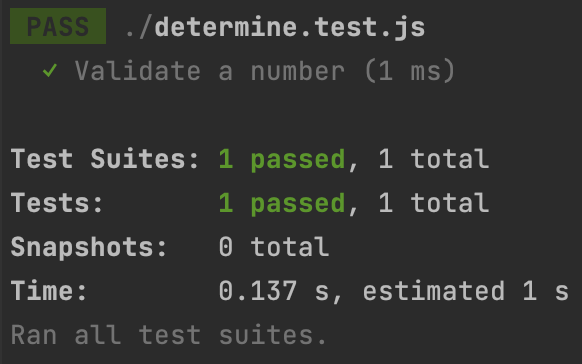
And as you can see, our test is succeeding.
Let's step up our test and add a failing test, but leave the same evaluation.
test('Invalidate a string', () => {
  expect(isNumber('ABC')).toBeTruthy();
});
We use the same test but pass a wrong number, so the test should fail.
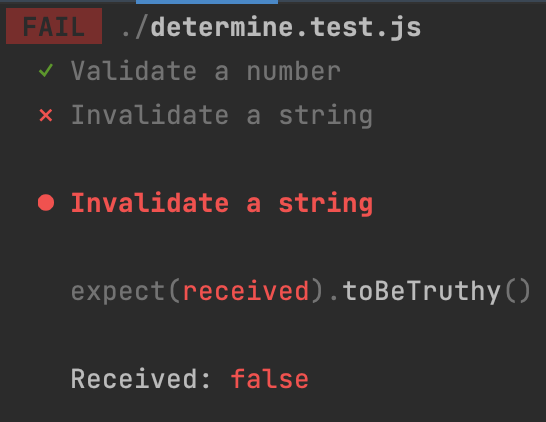
And it does fail, which is expected! So let's modify the test case to evaluate a false value.
test('Invalidate a string', () => {
  expect(isNumber('ABC')).toBeFalsy();
});
Our test will succeed, but we still check for a failed value!
The completed test can be found here on GitHub.
Conclusion
Although this is a very straightforward test, it can be super important. Let's say we modify something in this isNumber function. Our test will now quickly show something went wrong.
I'll be writing a bit more about writing some particular test cases and showing you how you can use and leverage Jest.
Thank you for reading, and let's connect!
Thank you for reading my blog. Feel free to subscribe to my email newsletter and connect on Facebook or Twitter
About the author
I'm a full-stack developer from South Africa 🇿🇦. I love writing about JavaScript, HTML and CSS.
Comments
Join the discussionGood introduction Jest and testing is not that scary when you get used to the concept.
Exactly, once you are in the mindset of writing them they become very easy to write and maintain.
This blog came at a perfect time. I am starting to look into on how to do test with jest. This summarizes nicely. I think I can learn with their documentation smoothly. 😀
Nice, glad you like it! Got a couple articles coming out now 💖



