
Accepting all invites on LinkedIn

Suppose you're anything like me and get many invites after posting your LinkedIn handle on Twitter. In that case, you might be wondering if there's not a simple way to accept all of them at once.
LinkedIn used to have the option itself, but for whatever reason, it no longer does.
Luckily we as developers can leverage the power of JavaScript!
TL;DR:
// Open invite page on LinkedIn and paste this in your debug console
const buttons = document.querySelectorAll('button.artdeco-button--secondary');
buttons.forEach(button => button.click());
How to accept all invites on LinkedIn at once
First, we need to go to the LinkedIn website and see there are multiple open invites.
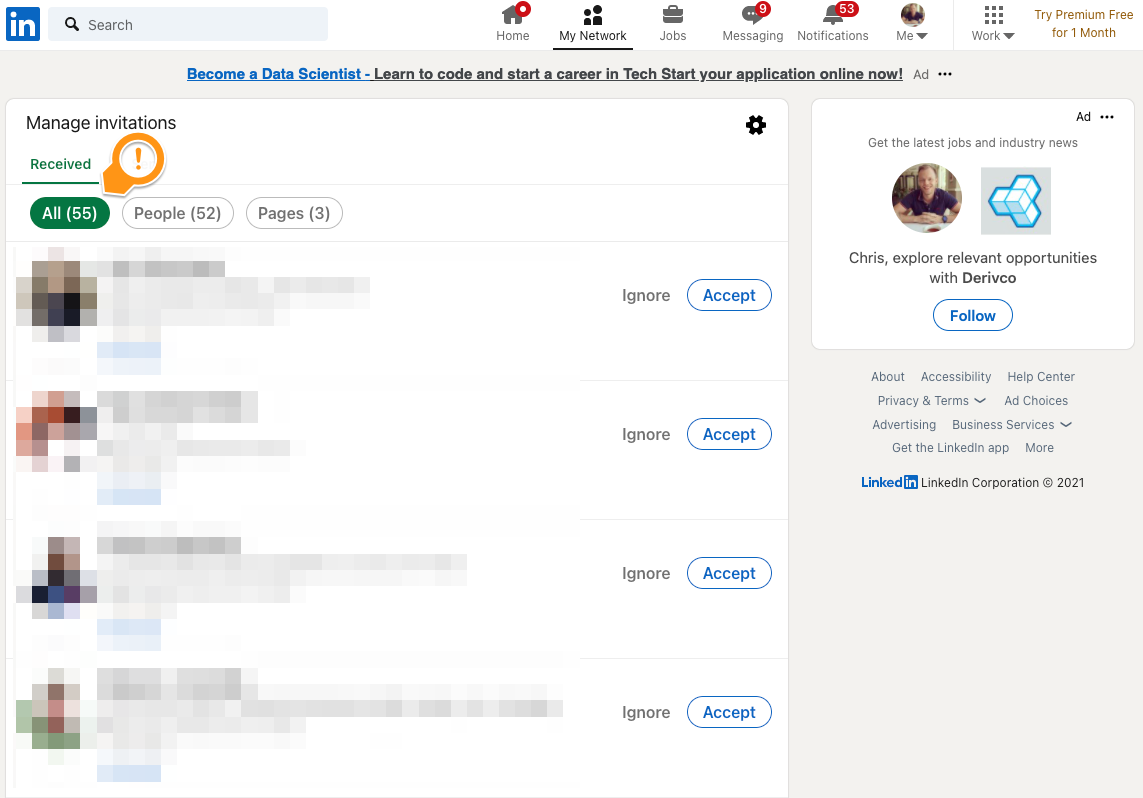
The next step is to find out what makes an invite button unique, so we will be using the inspector to find this out.
- Mac:
Cmd+Shift+C - Windows:
Ctrl+Shift+C
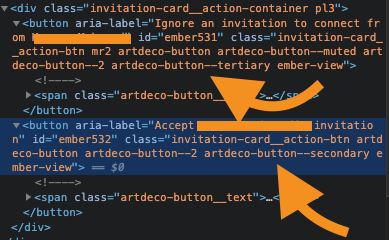
Here you can see both buttons, the top one being the button to decline an invitation and the bottom one to accept.
The top one has a unique class of button.artdeco-button--tertiary.
The bottom one button.artdeco-button--secondary.
With those two selectors, we can either accept or decline all invites at once!
Let's write a selector to get all the accept buttons.
const buttons = document.querySelectorAll('button.artdeco-button--secondary');
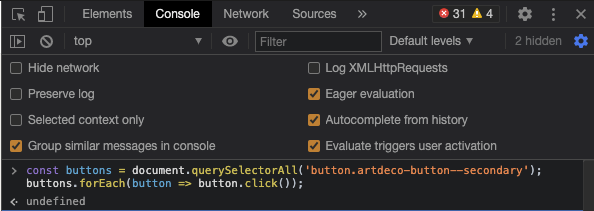
Then we can simply loop over the results and click them. Making the full function we need to execute in our console tab:
const buttons = document.querySelectorAll('button.artdeco-button--secondary');
buttons.forEach(button => button.click());
And that's it, a super simple way to accept all invites on LinkedIn at once!
Feel free to add me on LinkedIn as well.
Thank you for reading, and let's connect!
Thank you for reading my blog. Feel free to subscribe to my email newsletter and connect on Facebook or Twitter
About the author
I'm a full-stack developer from South Africa 🇿🇦. I love writing about JavaScript, HTML and CSS.
Comments
Join the discussionJust used it! Feels like WOW!!!
Awesome! Nice to see people using it!
wow😍. That's nice but please add a call to setTimeout with 300+ milliseconds before clicking the button otherwise LinkedIn will think you're running an automated tool and will block your account.
const buttons = document.querySelectorAll('button.artdeco-button--secondary');
buttons.forEach((button) => setTimeout(() => button.click(), 1000));
Ah good point! Haven't run into that yet, but can imagine they do so!



