# Using the shy soft hyphen in HTML
The other day I created a cool example using the [`` HTML tag](https://daily-dev-tips.com/posts/what-is-the-wbr-html-tag-and-why-do-i-need-it/). And although its a very cool tag on it's own.
There might be a better solution.
We can use `` this is a soft hyphen in HTML.
It means that it will add a `-` if the word is too long, else it will just render the word as is.
I'll be using my `` demo to now also add the shy as an option.
## How the works
You can basically place the in a word, in places where you want it to enter a soft hyphen when the word is too long for its container.
```html
superlongwordthatneedstobreakbetter
```
As you can see, the implementation is the same as we saw with `` however, this not an HTML element but an entity.
## Demo
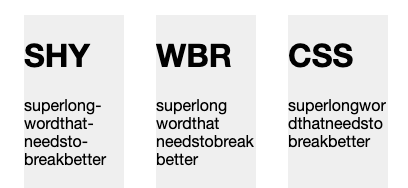
In the following demo, I've demonstrated three methods:
- `shy`: using the `` in the word
- `wbr`: using the `` in the word
- `css`: using word-break in css.
%[https://codepen.io/rebelchris/pen/OJRbrWz]
### Thank you for reading, and let's connect!
Thank you for reading my blog. Feel free to subscribe to my email newsletter and connect on [Facebook](https://www.facebook.com/DailyDevTipsBlog) or [Twitter](https://twitter.com/DailyDevTips1)