
TypeScript utility types: Pick and Omit

In the previous article, we first looked at TypeScript utility types: Partial and Required.
We'll dive into Pick and Omit in this article.
These are both used to create a new type with only a set of options from the original type.
However, they both work slightly differently. Let's take a look at the high-level difference.
Pickonly take the items you define you wantOmitwill pick every item you don't define to omit
So the result of both is very similar, it depends on your needs which one you might like.
The TypeScript Pick utility type
I'll be sticking to the same example we used before: a user interface.
interface User {
  id?: number;
  firstname: string;
  lastname?: string;
  age: number;
  telephone?: number;
  twitter?: string;
}
Now let's say we want to have a separate type that can pass around only the full name, so it doesn't need any other fields?
We can define a new type in which we can define the fields we would like to use.
type UserFullname = Pick<User, 'firstname' | 'lastname'>;

const userName: UserFullname = {
  firstname: 'Chris',
  lastname: 'Bongers',
};
Our username variable is now used to ensure only those two fields are set.
You might have spotted the delimiter |. It's used as a separator, and it will select both fields.
You'll often need this kind of type manipulation when using different return types, where you might want to exclude specific fields. But you can also think about child components that only take specific fields from a bigger object.
The TypeScript Omit utility type
Like the Pick type, the Omit can be used to modify an existing interface or type.
However, this one works the other way around.
It will remove the fields you defined.
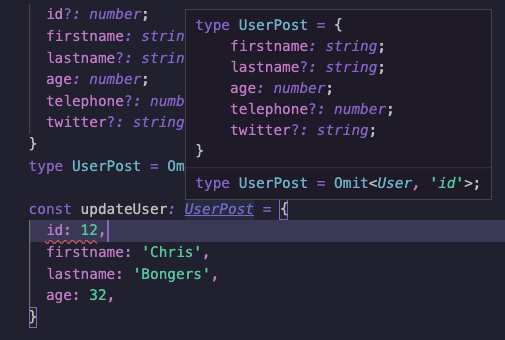
We want to remove the id field from our user object when we want to create a user.
type UserPost = Omit<User, 'id'>;

const updateUser: UserPost = {
  firstname: 'Chris',
  lastname: 'Bongers',
  age: 32,
};
Even though our id was already a conditional field, it's now fully removed from the type, so we can't even pass it along!
And there you have it, the use cases for Pick and Omit in the following article. We'll go more in detail on how powerful they are when combined.
Thank you for reading, and let's connect!
Thank you for reading my blog. Feel free to subscribe to my email newsletter and connect on Facebook or Twitter
About the author
I'm a full-stack developer from South Africa 🇿🇦. I love writing about JavaScript, HTML and CSS.
Comments
Join the discussionI like your daily dev tips, useful and great!
Thanks .
Super happy to hear you are loving them Hossein 💖



