
The Record Utility Type in TypeScript

I won't lie. There is a reason I skipped this one for a bit, it was a bit unclear on when to use this one, but it's starting to make sense.
The record utility type constructs an object type having keys and some other type.
This means you can narrow down your records by only excepting specific keys or types of keys.
Let's dive into those different scenario's
The TypeScript Record type
Let's say we have a single user interface, as we have seen before like this:
interface User {
  id: number;
  firstname: string;
  lastname: string;
  age?: number;
}
Now, what happens if we want to make an array of all users?
This is exactly a cool use-case for the record type, and let's say we want to map them by a number, it could look something like this:
const users: Record<number, User> = {
  0: {id: 1, firstname: 'Chris', lastname: 'Bongers'},
  1: {id: 2, firstname: 'Yaatree', lastname: 'Bongers', age: 2},
};
As you can see, this will create a map of users identified by a number.
The main Syntax for the record type looks like this:
Record<Keys, Type>
So we can also say in the above example we want the identifier to be a string.
const users: Record<string, User> = {
  123: {id: 1, firstname: 'Chris', lastname: 'Bongers'},
  456: {id: 2, firstname: 'Yaatree', lastname: 'Bongers', age: 2},
};
Making sure keys match
Since the first option accepts keys, we can use one more little trick: to pass a union type to the record.
By doing this, we ensure that only valid keys can be passed.
Let's say we have a type of admin user (a weird example, but let's go with it).
type Admins = 'chris' | 'nicole';
And we want to make sure we can only assign these keys to our list of admin users.
const adminUsers: Record<Admins, User> = {
  chris: {id: 1, firstname: 'Chris', lastname: 'Bongers'},
  nicole: {id: 2, firstname: 'Nicole', lastname: 'Bongers'},
};
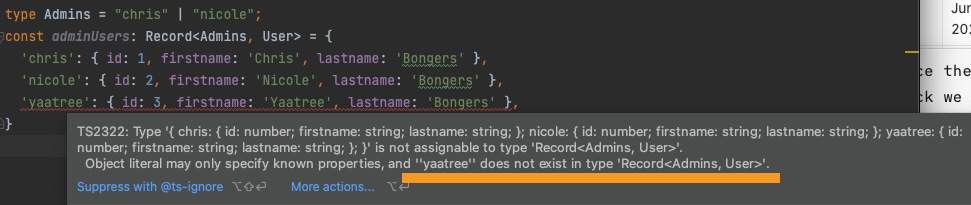
If we now try to pass anything else, we'll be hit by an error.
const adminUsers: Record<Admins, User> = {
  chris: {id: 1, firstname: 'Chris', lastname: 'Bongers'},
  nicole: {id: 2, firstname: 'Nicole', lastname: 'Bongers'},
  yaatree: {id: 3, firstname: 'Yaatree', lastname: 'Bongers'},
};
This will throw the following error, stating Yaatree is not a valid key.
Some other examples
In the union type article, we saw a Status type, which was used to identify unique status objects.
type Status = 'not_started' | 'progress' | 'completed' | 'failed';
Now we want to assign certain variables to this type, a color, and an icon.
This is another perfect example where a record can make sure only to accept the types we defined.
const statusTypes: Record<Status, {icon: string, color: string}> = {
  not_started: {icon: 'icon-not-started', color: 'gray'},
  progress: {icon: 'icon-progress', color: 'orange'},
  completed: {icon: 'icon-completed', color: 'green'},
  failed: {icon: 'icon-failed', color: 'red'},
};
And that's it. A super powerful and strict utility type called the Record type.
Thank you for reading, and let's connect!
Thank you for reading my blog. Feel free to subscribe to my email newsletter and connect on Facebook or Twitter
About the author
I'm a full-stack developer from South Africa 🇿🇦. I love writing about JavaScript, HTML and CSS.
Comments
Join the discussionThanks Anish, glad to see you are liking them



