# Static playlist website with Next.js and Prisma
By now, we had a good play with Prisma and created an [application that can load a person's Spotify playlists](https://daily-dev-tips.com/posts/nextjs-posting-data-to-postgres-through-prisma/).
On click, the person can add this playlist to our [Postgres database](https://daily-dev-tips.com/posts/setting-up-a-free-postgresql-database-on-heroku/).
Today, we'll be looking at creating static pages from this data for a blazing fast website.
For those willing to work alongside us. Take the following [GitHub branch](https://github.com/rebelchris/next-spotify-login/tree/upsert-data) as your starting point.
## Creating the list of playlists
Once you have filled your database with some playlists, go ahead and open up the existing `pages/index.js` file and change it to show the database playlists.
To get started, I renamed the existing `index.js` file to `new.js` because we want to use this as a separate page.
Then create the new `index.js` page and follow the following boilerplate.
```js
export async function getStaticProps() {
}
const Index = ({ playlists }) => (
);
export default Index;
```
The first thing we need to do is import the Next.js link and the Prisma client.
```js
import Link from 'next/link';
import { PrismaClient } from '@prisma/client';
```
Then in our `getStaticProps` we can leverage this Prisma client and retrieve all playlists.
```js
export async function getStaticProps() {
const prisma = new PrismaClient();
const playlists = await prisma.playlist.findMany();
return {
props: {
playlists,
},
};
}
```
This will query our database and return all the playlists as props to our page.
In the meantime, I've [added Tailwind to this Next.js project](https://daily-dev-tips.com/posts/setting-up-nextjs-with-tailwind-css/) to make it look a bit fancier.
Inside our template, we render a grid of playlists, each link to its individual page.
```js
const Index = ({ playlists }) => (
);
```
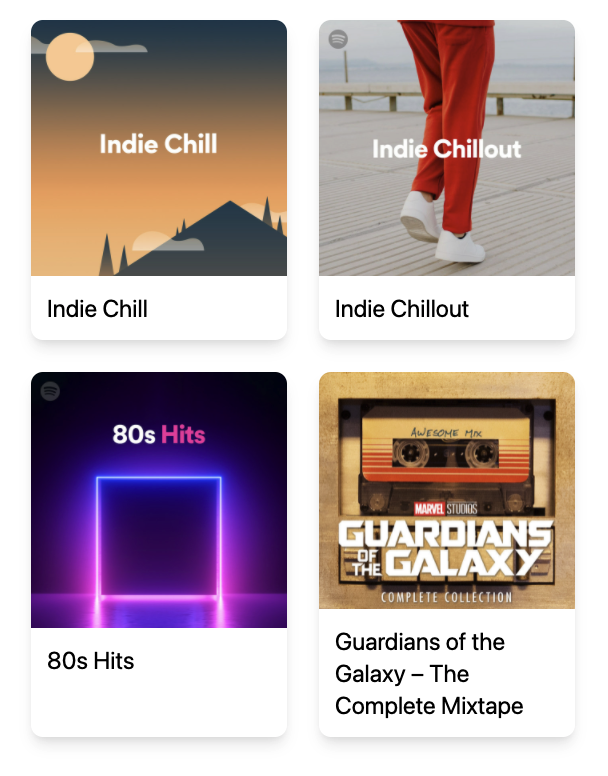
## Creating the individual playlist pages
Once we have our index file setup, we can go ahead and move to the individual pages.
We created links to these pages as `playlist/[id]`, so that's what we'll have to make.
Create a new file `pages/playlist/[id].js`.
For this file, we will use the following boilerplate.
```js
export async function getStaticProps({ params }) {
}
export async function getStaticPaths() {
}
const Playlist = ({ playlist }) => (
);
export default Playlist;
```
The main difference here is that we need both `getStaticProps` and `getStaticPaths`.
The `getStaticPaths` function will create single pages for a whole collection, as where the `getStaticProps` will find the details for one of these items.
In this file, we also need our Prisma client.
```js
import { PrismaClient } from '@prisma/client';
```
Then let's first work on the `getStaticPaths` function to build all the individual pages.
```js
export async function getStaticPaths() {
const prisma = new PrismaClient();
const playlists = await prisma.playlist.findMany();
return {
paths: playlists.map((playlist) => ({
params: {
id: playlist.id.toString(),
},
})),
fallback: false,
};
}
```
Here we use the same query to retrieve all our data and pass this on as unique paths based on the ID.
We can then use this ID in our `getStaticProps` function to get a single record.
```js
export async function getStaticProps({ params }) {
const prisma = new PrismaClient();
const playlist = await prisma.playlist.findUnique({
where: {
id: Number(params.id),
},
});
return {
props: {
playlist,
},
};
}
```
This will return a single playlist to the page.
In which we will render a simple UI with a button to Spotify.
```js
const Playlist = ({ playlist }) => (
);
```

And that's it. We now have a static generated Next.js website based on data from our Postgres database.
You can find the complete code on [GitHub](https://github.com/rebelchris/next-spotify-login/tree/static-website).
### Thank you for reading, and let's connect!
Thank you for reading my blog. Feel free to subscribe to my email newsletter and connect on [Facebook](https://www.facebook.com/DailyDevTipsBlog) or [Twitter](https://twitter.com/DailyDevTips1)