

I'm sure this happens to everyone sometimes. You accidentally pushed a file with secrets or a password that shouldn't have gotten into the Git history.
In the following example, I "accidentally" pushed my .env file to Git simply because I forgot to add it to me .gitignore file.

Note: If you accidentally pushed secret keys to a repo, you should always revoke them and generate fresh keys!
Removing the file right away
The best thing to do now is to remove the file right away and add it to your .gitignore file.
In my case, I added the following to the .gitignore.
# Secret file
.env
Let's try and push that to see what happens.

Yep, the .gitignore file doesn't untracked already committed changes. So how can we fix this now?
Removing a file from Git only
You can remove a file from Git by running the following command.
git rm -r --cached .env
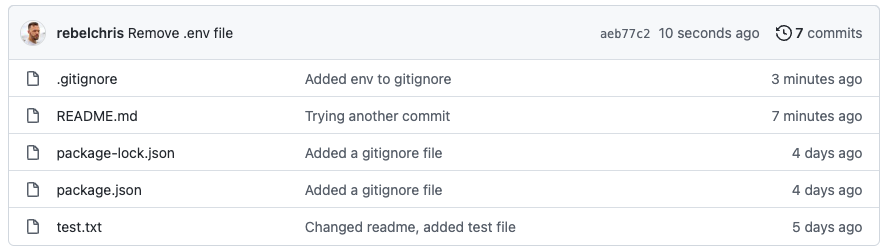
If we then push this change, you will see that the file is gone in GitHub.
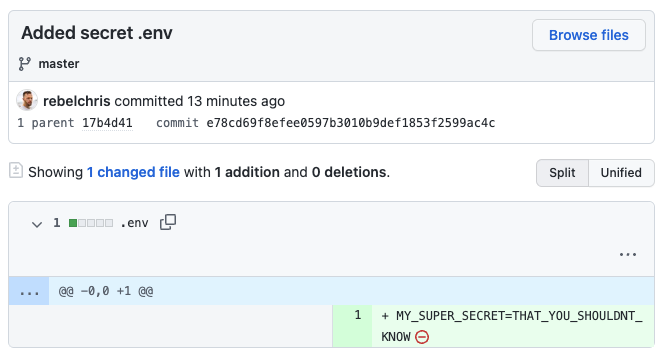
However, this didn't completely solve our issue. If we look at our Git history, we can still find the file and expose the secrets!
Completely remove a file from Git history
To remove the file altogether, we can use the following command.
git filter-branch --index-filter "git rm -rf --cached --ignore-unmatch .env" HEAD
You will get some warnings about this messing up your history as this goes through your whole history and 100% removes its occurrence.
To push this, you have to run the following command.
git push --force
If we look at our history, we can still see the commits that include this .env file, but the content is empty.
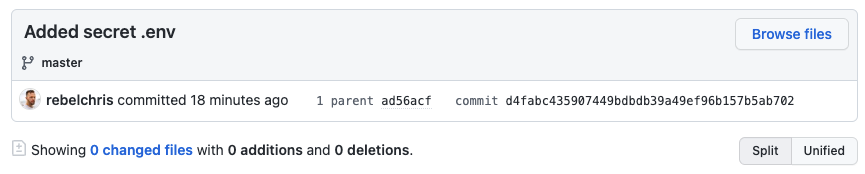
Few, thanks for having our back Git!
You can find the repo it tried this in on GitHub.
Thank you for reading, and let's connect!
Thank you for reading my blog. Feel free to subscribe to my email newsletter and connect on Facebook or Twitter
About the author
I'm a full-stack developer from South Africa 🇿🇦. I love writing about JavaScript, HTML and CSS.
Comments
Join the discussionWhat's the point in doing this? Regardless of what's in git, the credentials need revoked and git-ignored to prevent in the future. Removing from git history is some extra steps that doesn't really do anything.
Hey Jimmie,
I just like clean repo's. And like I said the env is more a demonstration of a common example.
It might have been another file you wish to remove from the history all together.
Thanks for sharing this. Will be handy someday 😀
Haha, I hope you never have to use it. But that day you do, it's here for you 👋
I've made the mistake once, while I was writing an article and pushing the code to GitHub, I revoked the Key but didn't know about this solution.
This will come in handy when someone else asked me or a colleague makes the mistake.
It's just so nice to know this things exist on your blog 😂
I had to do this a couple of days back. Thank you for this
Happens to everyone.
I've added a small subnote: If you accidentally pushed real-world secrets to a repo, you should always revoke and regenerate them.
Thanks for that, I will definitely keep that in mind.
This is gold, thanks for sharing.
Glad you like it Vishwajeet! 🎉
Git basics
In this series we'll cover some basic, but very important topics in Git, GitHub and Open source



