# NextAuth the easiest authentication for Next.js
Adding authentication to any application can be a bit of a mission.
However, with NextAuth, it's a breeze for Next.js applications.
In this article, we'll explore a social login, using Twitter as our authentication layer.
We'll build this whole app from scratch so you can follow along.
## Adding NextAuth to our application
Before adding it, let's quickly scaffold a new Next.js app.
```bash
npx create-next-app
```
Give the project a cool name on the prompt, and that's it. We have a basic Next.js app now.
To run your app enter the folder and execute the following command:
```bash
npm run dev
```
To add NextAuth to our project, we need to install the following package:
```bash
npm i next-auth@beta
```
## Adding the server-side layer
The first step is to add the server-side layer. This comes with the callback for the providers and more.
To add this, we need to create an `auth` folder inside our `pages/api` folder.
Inside this `auth` folder create a file called `[...nextauth].js`.
Inside of it, place the following code.
```jsx
import NextAuth from 'next-auth'
export default NextAuth({
providers: [
// We'll come back here
]
})
```
## Adding the session to our app
The next part we need is a session provider. This is already given to us by NextAuth. We just need to enable it in our `pages/_app.js` file.
```jsx
import { SessionProvider } from 'next-auth/react';
function MyApp({ Component, pageProps: { session, ...pageProps } }) {
return (
);
}
export default MyApp;
```
This will make sure our complete app is wrapped in a session provider to access the session throughout our app.
## Adding the Twitter provider to NextAuth
So far, we don't have any providers set up yet, so our app can't authenticate with anything.
To change this, we must first register a new app in the [Twitter Developer console](https://developer.twitter.com/).
Create a new app here.
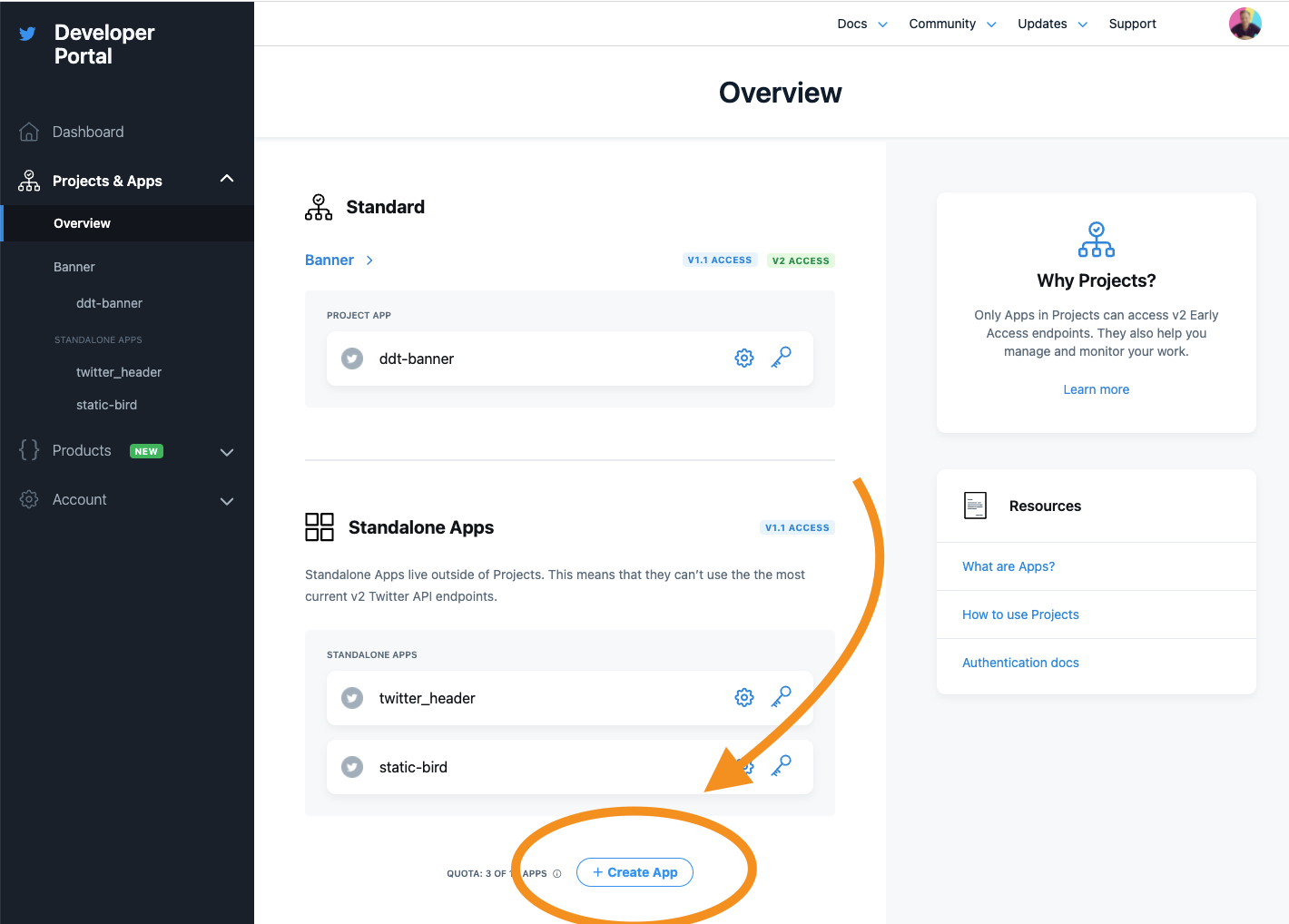
Add this point go back to your application, and create a `.env` file in the root of your project.
Inside this file, add the following two details from your Twitter app.
```text
TWITTER_CLIENT_ID=xxx
TWITTER_CLIENT_SECRET=xxx
```
Then click the authentication settings.
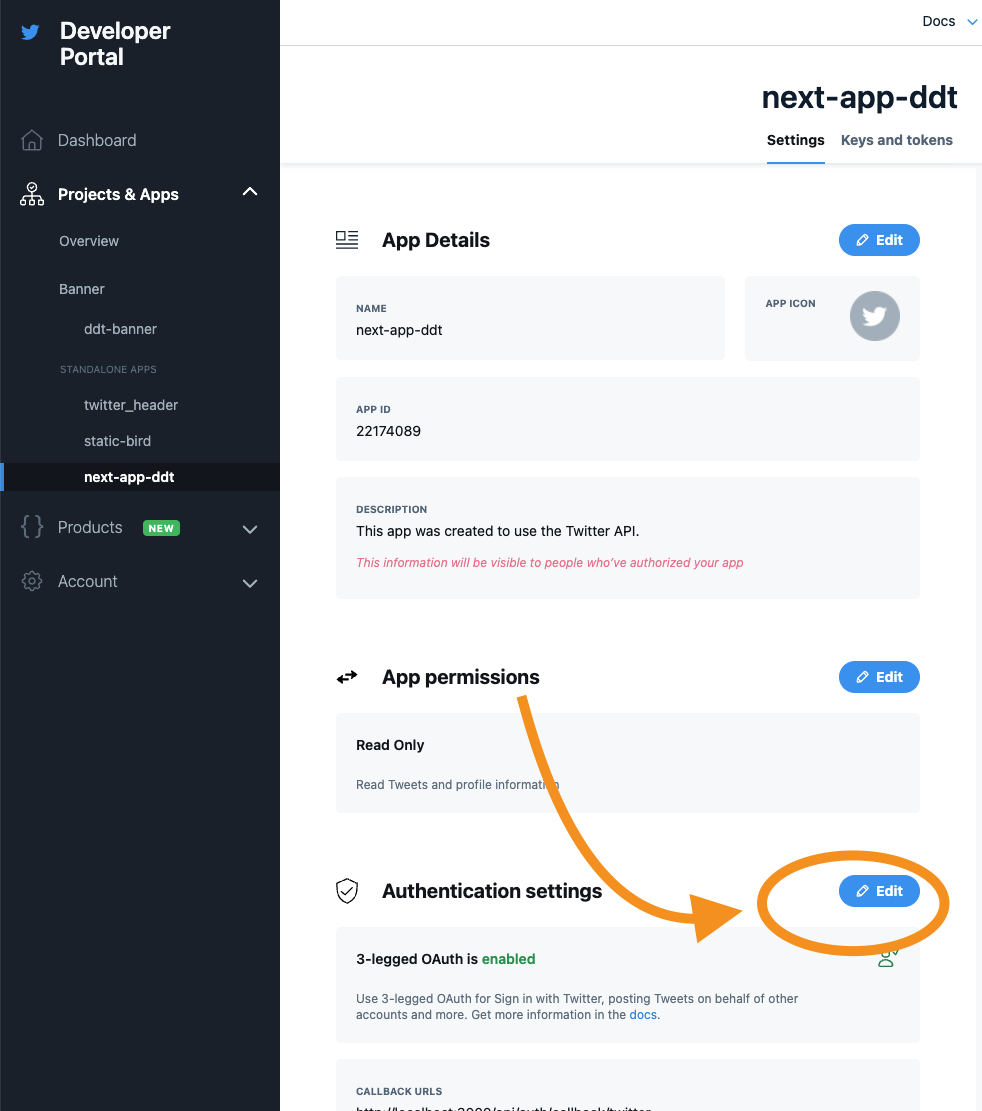
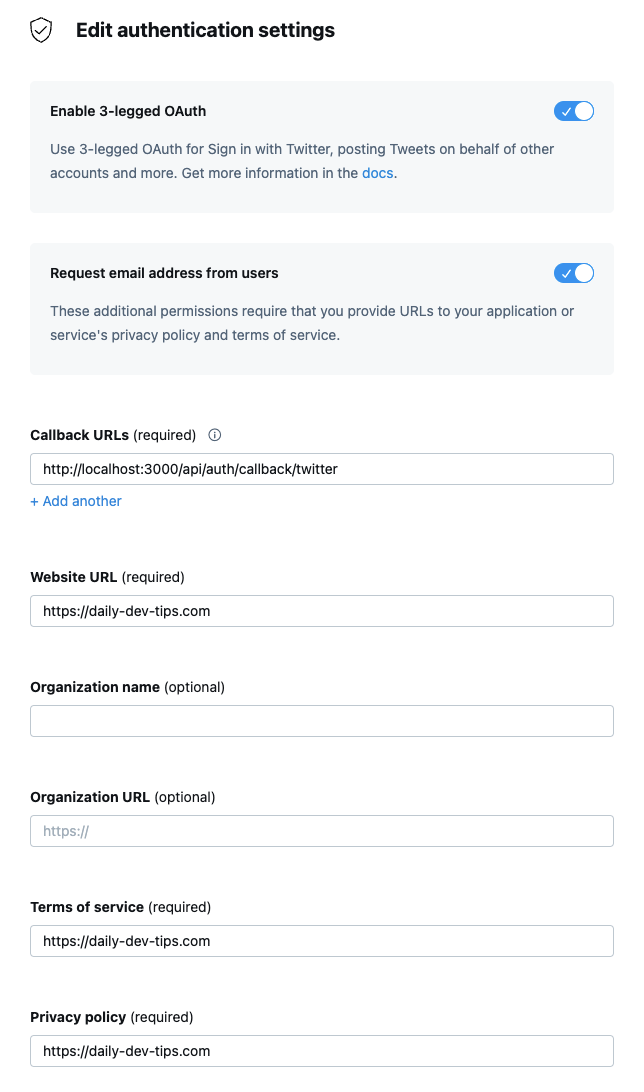
On this screen, fill out the following options:
- Enable 3-legged Oauth (ON)
- Request email addresses from users (ON)
- Callback URLs (http://localhost:3000/api/auth/callback/twitter)
- Website URL (your website)
- Terms of service (your website)
- Privacy policy (your website)
The last thing we need to do is edit our `pages/api/auth/[...nextauth].js` file and include the Provider:
```js
import NextAuth from 'next-auth';
import TwitterProvider from 'next-auth/providers/twitter';
export default NextAuth({
providers: [
TwitterProvider({
clientId: process.env.TWITTER_CLIENT_ID,
clientSecret: process.env.TWITTER_CLIENT_SECRET,
}),
],
});
```
## Adding the frontend authentication steps
Now that we have everything in place, let's add the login button to our app and test everything out.
Change your `index.js` file to look like this:
```jsx
import { useSession, signIn, signOut } from 'next-auth/react';
export default function Component() {
const { data: session } = useSession();
if (session) {
return (
<>
Signed in as {session.user.email}
);
}
return (
<>
Not signed in
);
}
```
And if we now run our app, the flow looks like this:

You can also find the complete code on [GitHub](https://github.com/rebelchris/next-auth).
### Thank you for reading, and let's connect!
Thank you for reading my blog. Feel free to subscribe to my email newsletter and connect on [Facebook](https://www.facebook.com/DailyDevTipsBlog) or [Twitter](https://twitter.com/DailyDevTips1)