
Next 13 - Loading file impact

With a first look at the special files, I wanted to dive a bit deeper into the impact of those files.
In particular, we'll look at the loading and error file. Unfurtionally the error is tough to demo out, so let's stick with the loading to show you the impact it can have.
As mentioned, the loading file can display some loading state to the user. The good thing about this file is that it can work on the component level.
Let's take the example we have made so far. If we sketch it out, it looks like this.
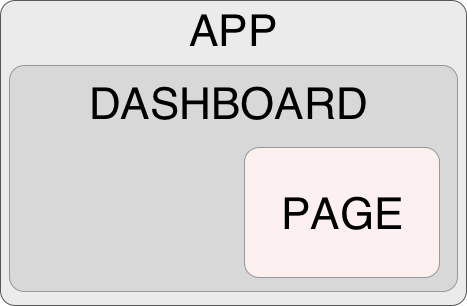
As you can see above, we got our app component which holds the main layout and HTML structure. Inside we get the dashboard layout, which could hold its styling. And deep down, we get the individual pages (settings/accounts, for instance).
Note: If you want to follow along, use the following GitHub branch.
Analysing the default
So what happens when our account page has to load for a long time?
Let's find out by adding a slow load on this page.
Open up the app/dashboard/account/page.tsx file, and you'll see I already added a demo API call to it.
I delayed this call so we could mimic a slow connection.
async function getData() {
  const res = await fetch('https://jsonplaceholder.typicode.com/todos');

  return new Promise((resolve) => {
    setTimeout(() => {
      resolve(res.json());
    }, 2000);
  });
}

export default async function AccountPage() {
  const table = await getData();

  return (
    <ul>
      {table.map((todo: Todo) => (
        <li key={todo.id}>{todo.title}</li>
      ))}
    </ul>
  );
}
I also added links to my dashboard layout to switch between the account and settings pages.
import Link from 'next/link';

export default function DashboardLayout({
  children,
}: {
  children: React.ReactNode,
}) {
  return (
    <>
      <aside className='w-64 bg-cyan-100 rounded-xl m-4'>
        <nav>
          <ul className='gap-4 flex flex-col p-4'>
            <li>
              <Link href='/dashboard/account'>Account</Link>
            </li>
            <li>
              <Link href='/dashboard/settings'>Settings</Link>
            </li>
          </ul>
        </nav>
      </aside>
      <main className='p-4'>{children}</main>
    </>
  );
}
Note: Temporary remove the
loading.tsxfile from the account page
If we now run this app and visit the settings page first, then navigate to accounts, your whole app will be frozen for 2 seconds until it loads the API data.
As you can see in the below example video.
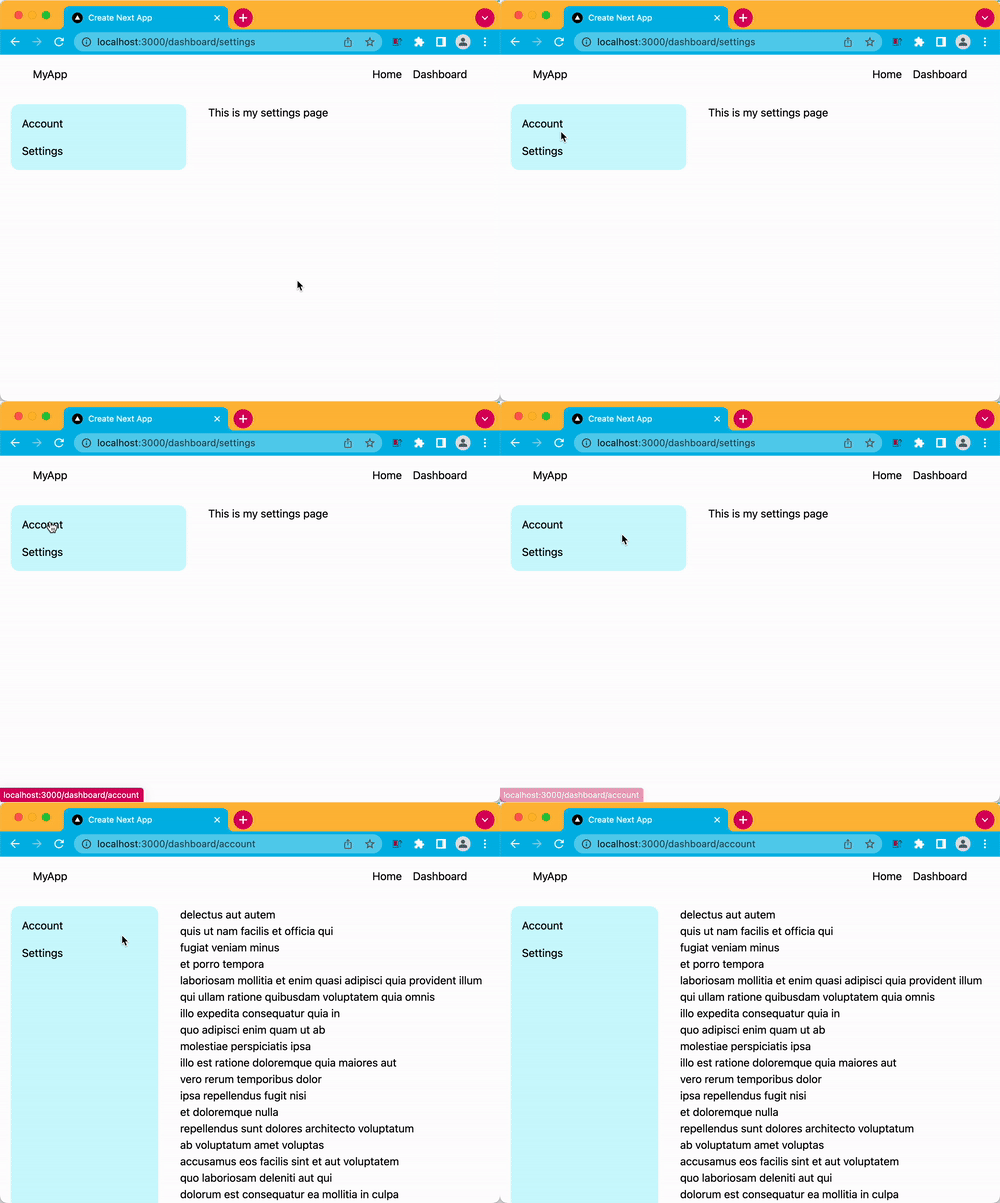
This is not ideal, as the user can't see what's happening and might think something is wrong.
Introducing the loading component
Now, if we place back our loading component in the dashboard folder with the following contents:
export default function Loading() {
  return <p>Loading account details</p>;
}
And yes, that's all to make it work! You can style this component to look more like your app with some skeleton loaders.
But this will do the trick. So let's try it and see what happens now when we visit the settings page and click on accounts.
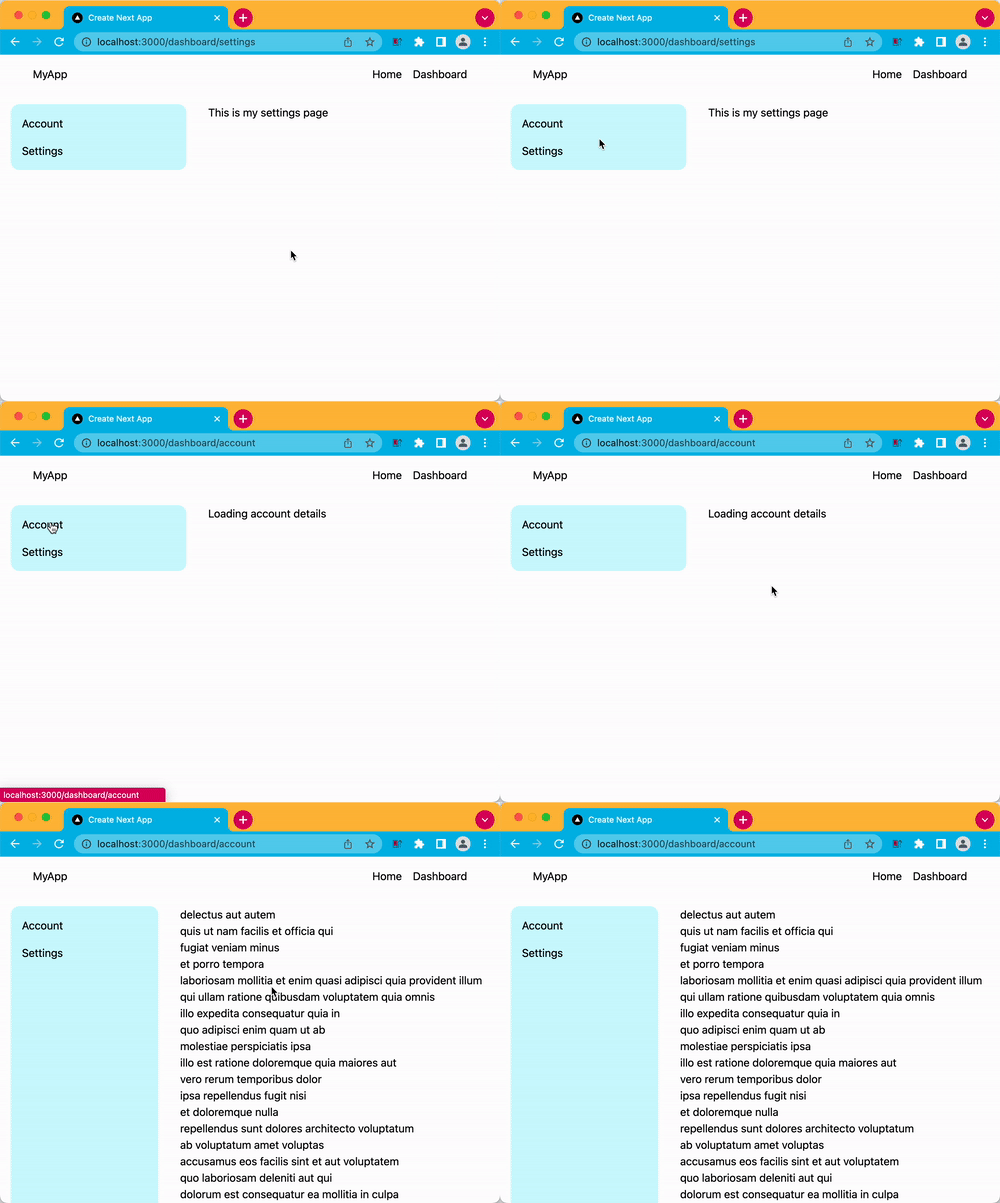
As you can see, this makes a huge difference, and it's great for the user to get instant feedback.
Of course, mimicking a 2-second delay is not ideal, but you get the idea that even the most minor delay can impact your user's experience.
As for the error state, it works similarly by showing the user that a particular component had an error. (You can try corrupting the URL). Next will even give the user an option to retry the component.
The code for today's article is on GitHub.
Thank you for reading, and let's connect!
Thank you for reading my blog. Feel free to subscribe to my email newsletter and connect on Facebook or Twitter
About the author
I'm a full-stack developer from South Africa 🇿🇦. I love writing about JavaScript, HTML and CSS.
Comments
Join the discussionNo comments yet. Be the first to comment.



