# Light and dark mode image in HTML
Did you know you can change images bases on the user preferred Color-scheme?
This nifty piece of code could already be used in [`CSS`](https://daily-dev-tips.com/posts/theme-switching-favicon-%F0%9F%99%8A/), but did you know it works directly in `HTML`?
We can detect if the user prefers a dark or light color schema and show a different image to them based on that!
It will look like this:

## HTML Structure
```html
```
That's is it!
By default, it will show the light image, but it will show the dark image if the person prefers the dark scheme.
Feel free to have a play with this on Codepen.
%[https://codepen.io/rebelchris/pen/bGewmom]
## Browser Support
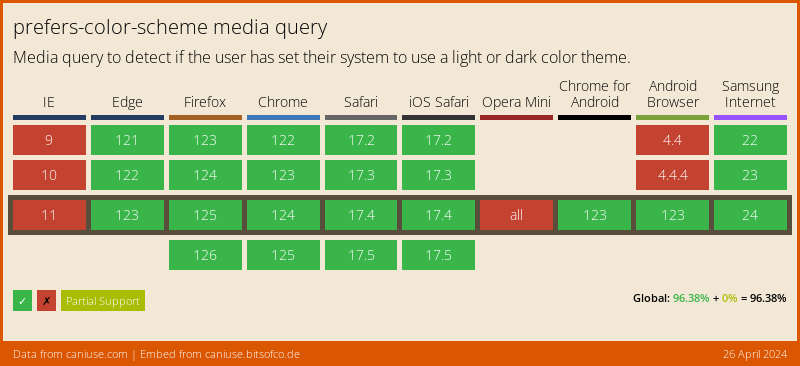
The support for prefers-color-scheme is getting better, but still not a reliable option to choose.
### Thank you for reading, and let's connect!
Thank you for reading my blog. Feel free to subscribe to my email newsletter and connect on [Facebook](https://www.facebook.com/DailyDevTipsBlog) or [Twitter](https://twitter.com/DailyDevTips1)
